Why Your ASP.NET Application Needs a Dynamic Weather Module
Developers building data-driven ASP.NET web applications often face the challenge of integrating real-time, location-aware data without bloating their codebase. Whether you are creating a travel portal, a corporate dashboard, or a local event site, displaying accurate weather information based on a user’s specific location can dramatically enhance user engagement and perceived utility. The ASP.NET Weather Module is a specialized .NET class library designed to solve this exact problem. It provides a clean, configurable bridge between your application and multiple weather APIs, handling everything from GeoIP location detection to XML output rendering via XSLT and CSS. This module is not just about fetching temperature data; it is about giving you full control over how that data looks and behaves, ensuring seamless integration into any existing ASP.NET project. For developers who value clean architecture, rapid implementation, and complete customization, this module offers a robust foundation that saves hours of manual API coding and debugging.
Key Features
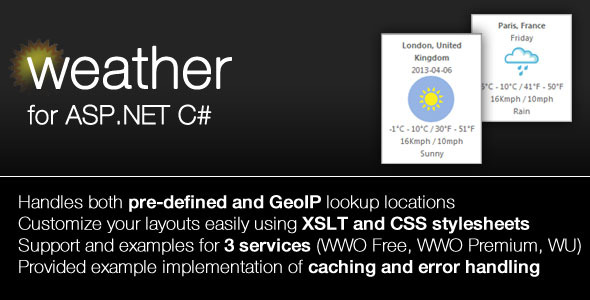
- Multi-Provider Support: The module natively supports connections to World Weather Online (WWO)—both Free and Premium tiers—as well as Weather Underground (WU). You are not locked into a single service, allowing you to choose based on budget, data accuracy requirements, or API rate limits.
- Client-Side GeoIP Integration: Instead of forcing users to manually type a city name, the module can automatically detect the client’s location using IP geolocation. This creates a personalized experience out of the box, which is critical for global audiences.
- Configurable Class Library: All core parameters—such as the number of forecast days, target city, units, and API keys—are exposed as configurable class properties. This means you can change behavior without editing core logic, simply by altering settings in your web.config or programmatically.
- XSLT and CSS Rendering Control: Weather data is returned as raw XML. The module ships with a pre-built XSLT stylesheet that transforms this XML into clean HTML. Furthermore, a provided CSS stylesheet lets you tweak fonts, colors, and layouts without touching the backend code. This separation of concerns is a hallmark of professional .NET development.
- Built-in Error Handling & Caching Demo: The package includes a complete C# demo project that demonstrates file system caching and proper error handling. This is not just a library; it is a working reference implementation that shows you best practices for production deployments.
- Source Code Included: You receive the full .NET Class Library assembly as well as the complete source code. This transparency allows you to debug, extend, or modify the module’s behavior to fit highly specific requirements.
Who Is This For? Use Cases
ASP.NET Developers Building Location-Aware Portals
If you are constructing a travel booking site or a local business directory, showing the current weather for a user’s city is a standard expectation. The ASP.NET Weather Module handles the heavy lifting of API calls and location detection, freeing you to focus on your application’s core features. Its configurable nature means you can quickly swap between providers if one changes its pricing model.
Corporate Intranet and Dashboard Creators
Enterprise dashboards often require live data feeds for logistics, field service management, or internal communications. This module’s support for multiple forecast days and its caching demo make it ideal for internal tools where reliability and speed are paramount. The included demo project can serve as a template for integrating weather into larger reporting systems.
Agencies Needing White-Label Weather Solutions
Digital agencies that build custom websites for clients often need reusable components with a consistent look and feel. The XSLT and CSS capabilities allow you to brand the weather output perfectly. Because the library is a .NET class, you can wrap it in a custom control and reuse it across dozens of client projects, drastically reducing development time.
Technical Details & Compatibility
This module is built as a standard .NET Class Library, making it compatible with ASP.NET Web Forms, ASP.NET MVC, and ASP.NET Core (via .NET Standard or framework targeting). The current version (v1.1) includes minor fixes for XSLT inconsistencies with the WWO Premium service and improved spacing in wind speed values. The package ships with a demo project written in C#, which provides a clear example of implementation. It relies on external APIs from World Weather Online and Weather Underground, meaning you will need a free or premium API key from those services. The module’s handling of GeoIP is self-contained, so you do not need an additional third-party geolocation service. The output is pure XML, which can be consumed by any client-side framework (React, Angular, Vue) if you prefer not to use the provided XSLT.
Pros and Cons
Pros
- Time-Saving Multi-Provider Architecture: You get immediate support for two major weather APIs without writing adapter code for each.
- Full Source Code Transparency: Having access to the source code ensures you are never stuck with a black box. You can customize every aspect of the logic.
- Professional Rendering Separation: The use of XSLT and CSS means your developers and designers can work independently on presentation and data logic.
- Client Geolocation Built-In: No need to implement a separate IP-to-location service; it is handled directly within the module.
- Production-Ready Demo: The included demo project with file caching and error handling serves as a solid starting point for any real-world implementation.
Cons
- Requires External API Keys: The module itself does not provide weather data; you must sign up for and manage API keys from WWO or WU.
- Legacy XSLT Approach: Modern front-end developers might prefer JSON and client-side templating over server-side XSLT transformations. While the module outputs XML, you may need an additional transformation step for pure JSON consumption.
- Targeted at .NET Ecosystem: This solution is not suitable for PHP, Python, or Node.js environments. It is specifically designed for the ASP.NET stack.
Frequently Asked Questions
Is the ASP.NET Weather Module compatible with ASP.NET Core?
Yes, with the correct targeting. The module is built as a .NET Class Library. If you are using ASP.NET Core (which runs on .NET 6, 7, 8, or later), you will need to ensure the library is compiled against a compatible .NET Standard version (e.g., .NET Standard 2.0). The included source code allows you to recompile for your specific target framework, and the demo project provides a C# reference that can be adapted for Core’s dependency injection patterns.
Does this module support caching to reduce API calls?
Absolutely. The shipped demo project includes a complete implementation of file system caching. This is a critical feature for production environments where you want to avoid hitting API rate limits and improve page load times. The caching logic is clearly demonstrated in the source code, and you can easily adapt it to use in-memory caching (MemoryCache) or a distributed cache (Redis) depending on your architecture.
Can I use my own CSS to style the weather output?
Yes, and this is one of the module’s strongest features. The package includes a default CSS stylesheet, but you are encouraged to override it. Because the XSLT transforms the raw XML into HTML elements with predictable class names and structure, you can write custom CSS to match your brand’s design system. This allows for a fully customized visual presentation without altering the backend logic.
Final Verdict
The ASP.NET Weather Module delivers exactly what it promises: a clean, configurable, and well-documented .NET library for integrating live weather data into your web applications. Its support for two major providers, built-in GeoIP, and the inclusion of full source code make it a reliable choice for professional developers who value control and transparency. The provided demo project with caching and error handling is not an afterthought—it is a genuine time-saver that can be dropped into a new or existing project. While the XSLT approach may feel a bit old-school compared to modern JSON endpoints, the flexibility it offers for server-side rendering is still highly relevant for many enterprise scenarios. If you are an ASP.NET developer looking to add location-based weather functionality without reinventing the wheel, this module is a solid investment. Click the purchase button, download the package, and have a working weather feature integrated within your next development sprint.