FlatFolio is a WordPress portfolio plugin that builds grid, carousel, slider and mosaic layouts from projects, posts and galleries. It is aimed at freelancers and small studios that want flexible, filterable showcase pages without hand-coding templates. The plugin is sold on ThemeForest for $27 and has 846 sales, which puts it in the established-but-not-blockbuster tier of the Galleries category.
Anyone evaluating FlatFolio Galleries should understand one thing up front: this is a layout engine, not a full theme. It handles how items appear and how visitors move between them, and it assumes the surrounding site already exists.
What FlatFolio Galleries Actually Do
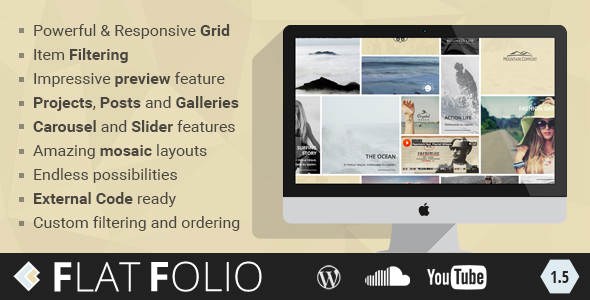
The core of the plugin is a responsive grid system. Items are pulled from three WordPress sources — projects, posts and galleries — and arranged into a grid whose column count adapts to the viewport. Because the same engine feeds carousels and sliders as well, a site owner can present the same body of work in several different ways without rebuilding the content each time.
Filtering is the feature most buyers will use first. Visitors can narrow a grid by category, skill or custom criteria, and the vendor supports controlling both the filter set and the ordering. For a design studio with a mixed portfolio, that turns a flat wall of thumbnails into something a prospective client can navigate by discipline or project type.
The preview feature is the second pillar. Clicking an item opens an expanded panel or lightbox rather than sending the visitor to a new page, which keeps browsing momentum intact. FlatFolio Galleries support custom URLs for individual gallery images, so a preview can still link somewhere specific when that is what the project needs.
Layout variety is broad. There are four item shapes and what the vendor describes as unlimited item formats, plus mosaic arrangements that mix sizes within a single grid. Overlay treatments include captions, coloured layers, additional info, titles and subtitles, hover shadows, curtain shadows and logo overlays. In practice this means the visual tone of a portfolio can be changed substantially through settings rather than custom CSS.
Two smaller capabilities are worth noting because they are easy to miss. The first is media support for YouTube and SoundCloud layouts, which suits photographers, musicians and video producers who need embedded players inside the grid. The second is external code readiness and localisation support, meaning the plugin plays reasonably well with third-party scripts and can be translated.
Where FlatFolio Galleries Fit and Where They Do Not
The strongest fit is a creative professional or small agency running a WordPress site that already has a theme in place. Photographers, illustrators, motion designers, architects and music producers all work with the same basic need: a browsable body of work that filters cleanly and previews quickly.
It also suits multi-purpose sites where portfolio content sits alongside a blog. Because posts can feed the same grid as projects, a writer or consultant can present articles and case studies through one consistent visual system instead of two unrelated templates.
Freelancers building client sites will find the layout controls useful for matching a portfolio to an existing brand, since overlay colours, shadows and item shapes are adjustable. That is cheaper than commissioning custom templates for every project.
Where it is the wrong choice: anyone who needs a complete website out of the box. FlatFolio is a plugin, so typography, header, footer, navigation and page structure come from elsewhere. A buyer with no theme and no design direction will spend more time assembling a site than expected. It is also a poor fit for e-commerce portfolios that need cart integration or complex product data, and for sites that require a page builder the plugin does not integrate with.
Setting Up FlatFolio Galleries in Practice
Installation follows the standard WordPress path: upload the plugin file, activate it, and enter any licence details the vendor requires. The vendor provides an online documentation version, which is the sensible first stop.
The real work starts with content. Projects, posts and galleries need to exist and be tagged or categorised before the grids have anything meaningful to filter. On a site with existing content this is quick; on a new build it is the bulk of the effort, because filter quality depends entirely on how consistently items are labelled.
From there, layouts are configured through the plugin’s shortcode or builder interface — the vendor tags mention builder support, though the listing does not name specific page builders, so that detail should be confirmed before purchase if it matters. Typical configuration covers choosing a source, setting the grid or carousel mode, selecting item shape, defining the filter set, and styling overlays.
A realistic timeline for a competent WordPress user is roughly one to two hours to get a first grid live, and half a day to tune filters, overlays and responsive behaviour across a full portfolio. The vendor states the plugin was last updated in May 2020, so buyers should expect the interface to reflect the WordPress of that era rather than the current block editor conventions.
Strengths and Limitations
Strengths
- Three content sources — projects, posts and galleries — feed one consistent layout system, which reduces duplicate setup.
- Filtering, ordering and custom filter sets give visitors real navigation rather than a static wall of images.
- Genuine layout range: grid, carousel, slider and mosaic, with four item shapes and adjustable overlays.
- Preview panels keep browsing on-page, and gallery images can carry custom URLs when needed.
- YouTube and SoundCloud support extends the plugin beyond still imagery.
- Localisation ready and documented, which matters for non-English sites.
Limitations
- The vendor’s last recorded update is May 2020. Buyers on current WordPress versions should verify compatibility rather than assume it.
- It is a plugin, not a theme. Anyone expecting a finished site will need to supply their own design foundation.
- Filter usefulness depends on disciplined tagging. Sparse or inconsistent categories produce a filter bar that does not help visitors.
- The listing does not name which page builders are supported, so integration with a specific builder cannot be confirmed from the product data alone.
- At $27 it is inexpensive, but support and future updates are tied to a single author rather than a larger team.
How FlatFolio Galleries Compare to the Wider Category
Portfolio plugins generally split into two groups. The first is lightweight layout tools that plug into an existing theme and focus on presentation. The second is larger portfolio suites that bundle their own post types, templates and sometimes a full theme.
FlatFolio sits firmly in the first group. Against lightweight alternatives, its advantage is breadth: most competitors in that tier offer grids and lightboxes, while this one adds carousels, sliders, mosaic arrangements and audio or video embeds. Against the heavier suites, it gives up convenience — no bundled theme, no all-in-one setup — but gains flexibility, since it can be dropped into a site that already has an established design.
Against free gallery plugins, the case rests on layout control and overlay customisation rather than raw functionality. A free grid plugin will show images; the paid option here is about how those images are framed, filtered and previewed. For a portfolio where presentation is the product, that difference is the whole point.
The remaining consideration is maintenance. A plugin last updated in 2020 competes against actively maintained alternatives, and that is a legitimate factor in the decision regardless of feature lists.
Frequently Asked Questions
Is FlatFolio a WordPress theme or a plugin?
It is a plugin. FlatFolio adds portfolio grids, carousels, sliders and mosaic layouts to an existing WordPress site, but it does not supply a theme, header, footer or page structure. Buyers need a working theme already in place before installing it.
Can FlatFolio Galleries pull in regular blog posts?
Yes. The plugin builds layouts from projects, posts and galleries, so standard blog articles can appear in the same grid as portfolio items. That makes it useful for sites where writing and visual work sit side by side, though consistent categorisation is needed for filters to work well.
Does FlatFolio support video and audio content?
It supports YouTube and SoundCloud layouts, so embedded video and audio can sit inside portfolio grids alongside images. The vendor does not state support for other hosting platforms, so anyone relying on a different video service should confirm compatibility before buying.
Is FlatFolio still maintained?
The vendor’s last recorded update is May 2020. The plugin remains on sale and has 846 sales, but buyers should treat compatibility with current WordPress and PHP versions as something to verify rather than assume. For a new build, checking recent support activity is sensible.
Verdict
FlatFolio Galleries are worth buying for freelancers, photographers and small studios that already have a WordPress theme and want flexible, filterable portfolio layouts without custom development. The combination of grid, carousel, slider and mosaic modes, plus overlay styling and media embeds, covers more ground than most plugins at this price.
It is not the right purchase for anyone wanting a complete website, an actively developed plugin with recent releases, or deep integration with a specific page builder the vendor does not name. The 2020 update date is the single biggest caveat and should shape expectations.
Developed by unCommons, the plugin has a clear, narrow purpose and executes it well within its era. Buyers who match that purpose and can verify compatibility will get solid value at $27; those outside it should look at heavier portfolio suites instead.