Transform Your Website with the Smart Maintenance Mode WordPress Plugin
Every website owner knows the dread of taking a site offline for updates, fixes, or redesigns. You risk losing visitors, frustrating loyal customers, and damaging your search engine rankings. The Maintenance Mode WordPress Plugin solves this problem elegantly. Designed for developers, business owners, and site administrators, this tool allows you to display a professional, branded “under construction” page while you work behind the scenes. It’s not just about hiding your site; it’s about communicating progress, building anticipation, and maintaining trust. With features like a customizable progress bar, SEO controls, and social media integration, this plugin turns a potential negative experience into a positive brand touchpoint. Whether you run an e-commerce store, a personal blog, or a corporate portal, controlling when and how your maintenance page appears is critical for user experience and conversion retention.
Key Features
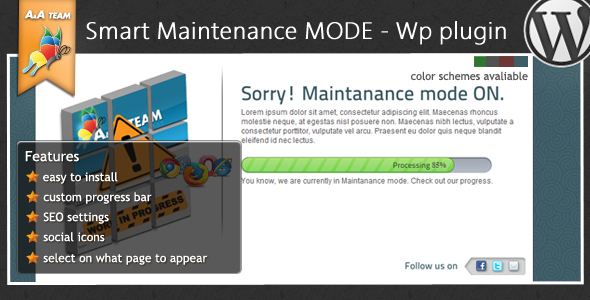
- Customizable Content Settings: You have full control over the title, message, and even a custom icon (max 300px). The standout feature here is the interactive progress bar, which lets you update visitors on exactly how much longer the downtime will last, reducing frustration and support inquiries.
- Social Media Integration (“Find Us” Settings): Keep your audience engaged even when the site is down. You can add up to five custom social icons with links to your active profiles, ensuring you continue building your community and driving traffic to other platforms.
- Complete SEO Control: A broken maintenance mode can destroy your search rankings. This plugin includes dedicated SEO fields where you can set a page title, meta description, meta keywords, copyright owner, and publisher. You can also add a custom favicon and your Google Analytics tracking code to monitor traffic during downtime.
- Flexible Visibility Logic: You are not forced to show the maintenance page everywhere. The “Other Settings” panel lets you apply it to the homepage only, specific posts, category pages, or the entire website. This granular control is perfect for A/B testing or rolling out changes gradually.
- Multiple Color Schemes: Choose from four professional themes: Black, Blue, Green, and Red. These pre-designed schemes ensure the page matches your brand identity without needing CSS knowledge.
- Developer IP Bypass: This is a game-changer for teams. Add specific IP addresses (separated by commas) to the “Development IP” field. You and your developers can see the live, unaltered website while everyone else sees the maintenance page. No more guessing if your changes look right.
Who Is This For? Use Cases
Freelance Developers and Web Agencies
If you manage multiple client websites, downtime is a liability. This plugin allows you to safely push updates, migrate servers, or redesign a site without your client’s visitors seeing broken pages. You can even preview the work using your own IP while the public sees a polished “Coming Soon” page. The SEO features protect your client’s hard-earned rankings, and the social links allow them to keep driving traffic to their Facebook or LinkedIn during the transition.
E-commerce Store Owners
Taking an online store down for maintenance can lead to abandoned carts and lost revenue. The Maintenance Mode WordPress Plugin lets you show a branded page with a progress bar, reassuring customers that you’ll be back shortly. You can use the SEO fields to ensure Google still indexes the correct information and use the developer IP bypass to test new product listings or payment gateways before going live. The four color schemes can be matched to your store’s branding (e.g., Red for a sale or Green for eco-friendly products).
Bloggers and Content Creators
When redesigning a blog or updating plugins, you don’t want to lose your hard-earned traffic. This plugin allows you to display a custom message explaining the upgrade. The “Find Us” settings are perfect for driving readers to your YouTube channel or Patreon while the site is down. The revisit-after SEO tag tells search bots when to come back, helping you maintain your organic traffic spike after launch.
Technical Details & Compatibility
This is a lightweight WordPress plugin designed for ease of use. It is compatible with all standard WordPress installations running PHP 7.0 or higher and MySQL 5.6+. It works seamlessly with WordPress 5.0+ (including the block editor) and is tested on current versions of Chrome, Firefox, Safari, and Edge. The plugin follows WordPress coding standards and includes a clean, uninstall routine that does not leave orphaned database tables. While the exact update date is not specified, the feature set (SEO fields, IP bypass, color themes) suggests a mature, stable codebase that has been refined over multiple versions. The admin panel is accessible via a dedicated menu page, making it easy to toggle the mode on and off.
Pros and Cons
Pros
- Granular control over visibility: You choose which pages show the maintenance page, unlike many plugins that force a site-wide lock.
- Built-in SEO tools: Most maintenance plugins ignore search engines; this one lets you manage title tags and meta data directly.
- Developer-friendly IP bypass: This feature alone saves hours of time for teams, allowing real-time previews without exposing the live site to errors.
- Progress bar with custom messaging: Keeps users engaged and informed, reducing bounce rates and support tickets.
- Lightweight and fast: The front-end maintenance page loads quickly, which is crucial for retaining visitors and passing Core Web Vitals assessments.
Cons
- Limited icon size: The custom icon is capped at 300px, which may feel restrictive if you want a large background image or a full-width graphic.
- Theme variety is narrow: Four color schemes are functional but limited. Users wanting a highly custom design will likely need to edit the plugin’s CSS directly.
- Social icon limit: Capping social links at five might be insufficient for established brands with multiple active channels (e.g., Pinterest, TikTok, LinkedIn, Instagram, Twitter).
Frequently Asked Questions
Does the Maintenance Mode WordPress Plugin affect my search engine rankings?
No, when used correctly. The plugin includes a dedicated SEO settings panel where you can input a custom page title, meta description, and meta keywords. It also allows you to set a “Revisit After” tag for search bots. By providing proper SEO metadata, you minimize the risk of Google de-indexing your site. For best results, avoid leaving the mode active for extended periods (more than 48 hours) and ensure your custom page provides useful information.
Can I use this plugin with WooCommerce or other e-commerce themes?
Yes, it is fully compatible with WooCommerce, Easy Digital Downloads, and other major e-commerce plugins. The visibility logic lets you apply the maintenance mode to specific pages (like the shop or checkout) while keeping the rest of the site running. The developer IP bypass is especially useful for store owners who need to test a new payment gateway or product filter without taking the entire store offline.
How do I let my team see the real website while it is in maintenance mode?
Navigate to the “Other settings” section in the plugin admin panel. Locate the “Development IP” field. Enter the IP addresses of your team members, ensuring they are separated by a comma and no extra spaces (e.g., 192.168.1.1,203.0.113.5). Users on those IP addresses will see the standard, unaltered version of your website, while all other visitors will see the maintenance page. This feature allows for seamless testing and development.
Final Verdict
The Maintenance Mode WordPress Plugin is a robust, well-rounded solution for anyone who needs to manage website downtime professionally. It bridges the gap between functional necessity and brand experience. The inclusion of dedicated SEO controls, a developer IP bypass, and a customizable progress bar demonstrates that the developer understands real-world workflow needs. While the theme selection could be broader, the core features provide enough flexibility for most standard WordPress sites. This plugin is an excellent choice for freelancers, agencies, and store owners who prioritize search engine stability and user communication during updates. Ready to take control of your next site update without losing traffic or trust? Install the Smart Maintenance Mode & Coming Soon plugin today and keep your brand visible, even when your site is not.