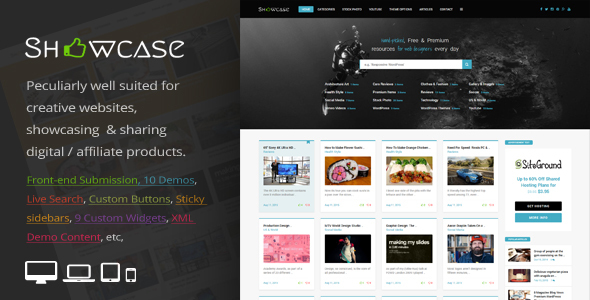
Showcase is a responsive WordPress grid and masonry blog theme built by An-Themes and sold on ThemeForest for $49. It arranges posts, products and media into a tight, image-led grid, and it ships with a front-end submission system that lets visitors publish content without touching the WordPress dashboard. It suits site owners who want a visual catalogue or magazine layout rather than a standard single-column blog.
The theme has been downloaded 281 times and holds a solid rating on the marketplace, which suggests a small but satisfied user base. It was last updated in December 2024 and is listed as compatible with WordPress 6.7 and above, so it is actively maintained rather than abandoned.
What the Showcase WordPress Grid and Masonry Theme Actually Does
The central idea is presentation. Posts render as cards inside a grid or a masonry wall, where each tile can carry a featured image, a title, tags and a link. Masonry means tiles of different heights pack together without gaps, which is useful when images vary in size. The theme ships with ten homepage layouts, so the arrangement of those tiles can be changed without rebuilding anything from scratch.
The feature that separates this product from a generic blog theme is front-end submission. Visitors can submit a post while logged out, or while logged in, directly from a form on the site. Each submission can include a title, description, category, tags, author name, author URL and a featured image. Logged-in users can attach more than one image or media item. Submissions land in the WordPress database with a pending status, and the administrator approves or rejects them from the dashboard. An email notification goes to the admin address every time a form is submitted successfully.
That submission form is configurable in ways that matter for real sites. Fields can be shown or hidden, required fields can be set, and the form can be assigned to a fixed category or left open for the submitter to choose. A mathematical captcha and Google reCAPTCHA are both available and can be switched on or off from the settings page. The form itself is HTML5 with streamlined CSS, and a shortcode places it anywhere on the site, so it does not have to live on a dedicated page.
Supporting features round out the package. There is a sticky header and sticky sidebars, live search that returns results with thumbnails while the query is still being typed, and an option to hide the featured image on individual posts. Colours are unlimited, a child theme is included, and the theme is translation ready with .po and .mo files plus a .POT file for creating a new translation. It is also WordPress Multisite ready and compatible with HTTPS/SSL.
Nine custom widgets come bundled: an advertisement block, most-used tags, posts by category, posts by tag, recent posts, popular posts ranked by likes, and two custom banner sizes. Default WordPress widgets are styled to match. The listing also notes Disqus comment support, Contact Form 7 compatibility, Font Awesome icons, drag-and-drop gallery images and header options, and custom CSS through the theme options panel. The vendor claims zero PHP notices and warnings, which, if accurate, is a meaningful quality signal for a theme at this price.
Where This Grid and Masonry Theme Fits, and Where It Does Not
The strongest fit is an affiliate or product showcase site. The vendor tags include affiliate products, app showcase, software showcase, movie showcase and product showcase, and the custom buttons for digital and affiliate products point in the same direction. Anyone building a curated directory of tools, apps or digital goods can use the grid to present items visually and the front-end form to let others suggest additions.
Creative portfolios are a natural second use. The masonry layout handles mixed image heights well, the gallery slider accepts unlimited images with drag-and-drop ordering, and meta boxes for YouTube and Vimeo videos mean video posts sit alongside photography without a plugin. A photographer or designer could run this as a portfolio and a journal at once.
Multi-author blogs and community magazines also benefit. Because submissions are queued as pending, an editor can review everything before it goes live, which keeps quality control in one place. The category and tag fields submitted from the front end feed straight into the theme’s archive structure.
Where it is the wrong choice: a business that needs a conventional corporate site with service pages, team profiles and a booking flow. This is a content theme, not a page-builder framework, and the layout logic is built around posts and tiles. Anyone who needs complex page-level design control, e-commerce checkout, or a membership system with tiered access will spend more time fighting the structure than using it. A site with very little imagery will also look thin, because the grid depends on visuals to work.
Setting Up the Showcase Theme in Practice
Installation follows the standard WordPress route: upload the theme zip through Appearance, activate it, then import a demo layout if one is wanted. The vendor provides documentation and a changelog, and the theme options are split into logical panels for general settings, home settings, header settings, CSS style settings, footer settings and backups. The backup panel is worth using before making large changes, since it lets a configuration be restored if an experiment goes wrong.
Prerequisites are modest. A WordPress 6.7 or newer installation, a host that supports HTTPS, and a contact form plugin if the built-in form integration is used. Google reCAPTCHA requires API keys from Google, which the site owner has to obtain separately. Disqus comments require a Disqus account. The vendor does not state whether a page builder plugin is required or supported, so anyone planning to use one should confirm before buying.
Realistic time to a working site is a few hours. Installing the theme and importing a demo takes minutes. Choosing one of the ten homepage layouts and adjusting colours, logo and header options is an afternoon’s work. Configuring the front-end submission form, including field selection, required fields, captcha and notification email, is the part that takes longest because it depends on editorial decisions about what submitters should provide. Translating the theme adds more time if a non-English site is planned.
Strengths and Limitations of the Showcase WordPress Theme
Strengths
- Front-end submission is genuinely complete, with pending status, email alerts, field control, captcha options and shortcode placement.
- Ten homepage layouts and a masonry grid give real variety without custom development.
- Nine purpose-built widgets, including popular posts by likes and advertisement blocks, reduce the need for extra plugins.
- Child theme, translation files and Multisite support are included at a $49 price point.
- Live search with thumbnails improves navigation on image-heavy sites where browsing beats typing.
- Actively maintained, with a December 2024 update and WordPress 6.7 compatibility.
Limitations
- There is no stated integration with major page builders, so layout changes rely on the theme’s own options rather than a visual editor.
- The front-end submission system is a theme feature, not a standalone plugin. Switching themes later would remove it, and existing submissions would need a migration plan.
- Captcha protection depends on Google reCAPTCHA keys or a basic mathematical challenge, so a site owner who wants neither has limited spam protection.
- The vendor does not publish performance benchmarks, and masonry grids with large image galleries can be heavy on shared hosting unless images are optimised.
- Sales volume is modest at 281, which means fewer third-party tutorials, forum threads and community answers than a top-selling theme would have.
- E-commerce, membership and booking functionality are outside the theme’s scope and would require separate plugins that the listing does not confirm compatibility with.
How It Compares With Other Grid and Magazine Themes
Most themes in the blog and magazine category compete on layout count and page-builder compatibility. Showcase competes on a narrower axis: it assumes the site is a visual catalogue and that content may arrive from outside the editorial team. That combination of masonry presentation and front-end submission is the differentiator, and it is the reason to choose this theme over a more general magazine option.
Against multipurpose themes, Showcase gives up flexibility. A multipurpose theme with a page builder can be shaped into almost anything, but it will not include a submission workflow out of the box, and it usually costs more. Against minimal free grid themes, Showcase adds the widget set, the ten layouts and the submission system, which is a reasonable case for the $49 spend if those features are actually used.
Against dedicated directory or classified themes, Showcase is lighter. It does not appear to offer paid listings, map fields, or structured custom post types for businesses. If the project is a true directory with monetisation, a purpose-built directory theme is the better fit. If it is a visual blog or showcase with occasional guest submissions, Showcase sits in a useful middle ground.
Frequently Asked Questions
Can visitors submit posts without creating an account?
Yes. The front-end submission form accepts posts from both logged-out and logged-in users. Logged-in users get additional options, such as attaching more than one image or media item to the post. All submissions arrive in the WordPress dashboard with a pending status so an administrator can review them before publication.
Does the Showcase theme work with WordPress 6.7?
Yes. The vendor lists the theme as WordPress 6.7+ ready, and the most recent update was released in December 2024. That version also includes updated documentation and a changelog. Running the latest WordPress release alongside the latest theme version is the safest combination for security and compatibility.
Is a page builder required to use this theme?
No page builder is required. The theme ships with its own options panels for general settings, home layout, header, footer, CSS styling and backups, plus ten prebuilt homepage layouts. The vendor does not state whether popular page builder plugins are supported, so anyone who depends on one should confirm compatibility before purchasing.
Can the theme be translated into another language?
Yes. Showcase is translation ready and includes .po and .mo files along with a .POT file, which is the template used to create a new translation. A site owner can translate the theme into any language using standard WordPress translation tools. The vendor does not state how many completed translations are already available.
Verdict on the Showcase Responsive WordPress Grid and Masonry Theme
Showcase is worth buying for anyone building an affiliate product showcase, a visual portfolio, or a community magazine where outside contributors submit content. The combination of a masonry grid, ten homepage layouts and a configurable front-end submission system is uncommon at $49, and the December 2024 update shows the developer is still maintaining it.
It is not the right purchase for a corporate site, an online store, or a project that depends on a page builder for layout control. Those needs sit outside what this theme was designed to do. Buyers should also weigh the modest sales count, which means less community support than a bestseller offers, and the fact that the submission system is tied to the theme rather than a separate plugin.
For the specific job of presenting many items visually while letting others propose new ones, Showcase does that job directly, without the plugin stack a general-purpose theme would require.