Quickshop is a Shopify storefront theme built by roartheme that combines a responsive Bootstrap layout with Shopify’s section-based drag-and-drop editor. It is aimed at small and mid-sized merchants who want a ready-made shop front for fashion, gadgets, furniture or general retail, and who prefer configuring sections over writing Liquid code. The theme sells on ThemeForest for $56 and has accumulated roughly 1,400 sales.
Because Quickshop Ecommerce sits in a crowded field of paid Shopify themes, the interesting question is not whether it looks acceptable — the demo is clean and modern — but whether its feature set and its maintenance history still make sense for a store launching now.
What Quickshop Ecommerce Actually Gives a Store Owner
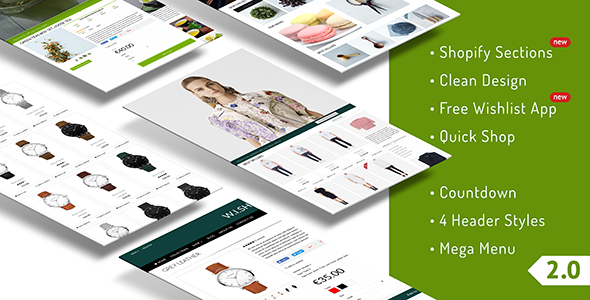
The headline capability is Shopify section support. Sections let a merchant rearrange, hide or duplicate blocks of the homepage — slider, featured products, latest news, sidebar widgets — from the theme editor without touching code. Quickshop shipped this in version 2.0, and it is the single feature that keeps the theme relevant to how Shopify stores are assembled today.
Around that core, the theme bundles a fairly long list of storefront tools:
- Merchandising controls. A countdown offer on the slider, a “limited offers” block, a single-product selling layout, and recently viewed and notification product widgets. These are the pieces that let a store run a promotion without installing a third-party app.
- Conversion extras. A “tweet to get a discount code” mechanic, a Mailchimp signup popup, a newsletter form, and a shipping calculator on the cart. Each one replaces a small paid app, which matters for merchants trying to keep monthly costs down.
- Product discovery. AJAX search that returns results without a page reload, AJAX add to cart, zoom and lightbox on product images, colour swatches, and a choice of 12, 24 or 48 products per collection page.
- Social and content integration. Instagram and Facebook widgets, Twitter embeds, Flickr images, and sharing buttons covering Facebook, Twitter, Pinterest, Google+, YouTube, Flickr, Instagram, Tumblr and RSS.
- Storefront polish. Custom-styled checkout, customer account area, blog, FAQ page and 404 page, plus a sticky header, drop-down and mega menu support, and three colour presets (green, red, violet).
- Technical foundations. HTML5 and CSS3 markup on Bootstrap, retina-ready assets, Google rich product snippets for search listings, a translation panel for common strings, and a wishlist that the vendor notes works without a third-party app.
The wishlist detail is worth pausing on. Most Shopify wishlists require a monthly app subscription, so a non-app implementation is a genuine differentiator for a store with tight margins.
Where Quickshop Fits and Where It Does Not
Quickshop Ecommerce suits a merchant who is comfortable inside the Shopify admin but not inside a code editor. A boutique clothing store that needs colour swatches, a promotional countdown and an Instagram feed on the homepage can assemble all of that from the theme settings. A furniture or electronics retailer with a broad catalogue benefits from the mega menu and the adjustable products-per-page setting, which keeps long category pages manageable.
Freelancers and small agencies building client stores on a fixed budget are another natural fit. At $56 for a single licence, the theme undercuts the cost of stacking five or six separate apps to cover wishlists, popups, countdowns and social feeds.
It is the wrong choice for a store that depends on heavy custom functionality. If the roadmap includes subscriptions, complex bundle logic, multi-currency checkout beyond what Shopify offers natively, or a headless storefront, a section theme from 2018 will fight that work rather than support it. Merchants who want Shopify’s Online Store 2.0 JSON templates with app blocks should also look carefully, because the vendor does not state whether the theme has been migrated to that format.
Setting Up a Quickshop Store in Practice
Installation follows the standard Shopify path: purchase the theme files, upload the zip through the admin’s theme library, and publish. No build tools, package managers or server access are required, and the theme installs as a complete package rather than a starter skeleton.
The real work is configuration. Expect to spend an afternoon on a first build. The sequence most merchants follow is to upload a logo, pick one of the three colour presets, then rebuild the homepage by adding and arranging sections. Product images need to be prepared at consistent dimensions because the theme supports custom width and height values for product items — inconsistent source images will show up as an uneven grid.
Third-party connections come next: a Mailchimp list for the signup popup and newsletter form, Instagram and Facebook accounts for the widgets, and the Shopify Product Reviews app if customer reviews are wanted. The translation panel handles the common storefront strings, but it is a convenience for a handful of labels rather than a full localisation system.
Support runs through the developer’s own ticket desk at roartheme.ticksy.com, with a stated response window of up to 24 hours. The vendor’s support scope is narrow by design: it covers errors in the product and advice on using its features, not general Shopify configuration or custom development.
Strengths and Limitations
Strengths
- Section-based homepage editing, so layout changes do not require code.
- An unusually broad built-in feature set for the price, including a non-app wishlist, countdown offers and AJAX search.
- Custom-styled checkout, account area, blog, FAQ and 404 pages, which keeps the whole storefront visually consistent.
- Rich product snippets and clean HTML5 markup give search engines structured data out of the box.
- Roughly 1,400 sales on ThemeForest indicate a reasonably tested codebase with a real user base.
Limitations
- The last update recorded by the vendor is version 2.1.2 in December 2019, with the previous release in March 2018. That is a long gap, and it raises fair questions about compatibility with Shopify features introduced since.
- No Online Store 2.0 support is stated. Merchants who want JSON templates and app blocks cannot confirm that capability from the listing.
- Multi-currency support was added in version 1.0.2, well before Shopify Markets existed, so its behaviour alongside modern multi-currency selling is unverified.
- Support is limited to product errors and feature guidance, so any customisation beyond the settings panel is the buyer’s problem.
- Only three colour presets are included, which is thin compared with themes offering full palette controls.
How Quickshop Compares With Other Shopify Themes
The paid Shopify theme market splits roughly into two groups. One group is actively maintained, built on Online Store 2.0, and priced between $100 and $400 with regular release notes. The other group is older, cheaper, and packed with features that were novel when they shipped. Quickshop Ecommerce sits in the second group.
On raw capability per dollar, it competes well. Few themes at this price include a shipping calculator, a tweet-for-discount mechanic, a Mailchimp popup and a non-app wishlist in one package. A merchant comparing total cost of ownership against a newer theme plus four or five apps may find Quickshop cheaper in year one.
On longevity, the comparison flips. A newer theme will receive updates as Shopify changes its platform, will support app blocks, and will have a support channel that is actively staffed. Buyers weighing the two should decide which risk matters more: paying more upfront, or owning a theme whose update history stopped in 2019.
Frequently Asked Questions
Is Quickshop compatible with the latest Shopify themes system?
The vendor does not state Online Store 2.0 compatibility. Quickshop supports Shopify sections with drag-and-drop editing, which was added in version 2.0, but that predates JSON templates and app blocks. Buyers who need the newest theme architecture should confirm directly with roartheme before purchasing, since the listing does not address it.
Does Quickshop require paid apps for its features?
Most features are built in. The wishlist is explicitly described as working without an app, and the countdown offers, social widgets, AJAX search and shipping calculator are all part of the theme. The Shopify Product Reviews app is integrated but optional, and Mailchimp is needed only if the newsletter and popup forms are used.
How much does Quickshop cost and what licence is included?
Quickshop sells for $56 on ThemeForest under the standard regular licence. That licence covers a single end product, which in practice means one Shopify store. Agencies building several client stores will need a separate licence for each one, and the vendor does not publish extended licence pricing in the listing.
Can Quickshop be customised without knowing how to code?
Yes, within limits. The theme editor handles layout, colours, sections, menus and the translation panel, and the three presets can be swapped in a click. Anything beyond those settings — new templates, altered Liquid logic, custom checkout behaviour — requires development work that falls outside the vendor’s stated support scope.
Verdict
Quickshop Ecommerce is a sensible purchase for a merchant launching a straightforward retail store on a tight budget, particularly one who wants wishlists, countdown promotions and social feeds without stacking monthly app subscriptions. The section editor makes it approachable for anyone comfortable in the Shopify admin, and the feature list is generous for $56.
It is not the right theme for stores with custom functionality on the roadmap, for merchants who need confirmed Online Store 2.0 support, or for anyone who expects a vendor to keep pace with platform changes. The gap between the 2019 release and today is the deciding factor: buyers are effectively purchasing a finished product rather than a maintained one, and should price that risk into the decision.