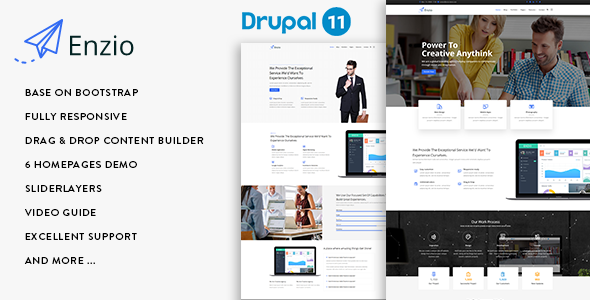
Enzio is a commercial Drupal theme from the developer gavias, sold on ThemeForest for $48, aimed at corporate, agency and portfolio sites. It ships six pre-built homepage layouts, a drag-and-drop content builder, a slider module and a set of custom content types, and it is kept current for Drupal 11. The Enzio business theme suits freelancers and small agencies that want a designed Drupal starting point without building page templates from scratch, and it is a poor fit for anyone who needs a lightweight, code-first theme with no bundled modules.
What the Enzio business theme actually gives a site builder
The headline capability is the page construction layer. Enzio bundles Gavias Content Builder, a module that lets a site builder assemble pages by dragging rows and elements into place rather than writing Twig templates. Rows and sections can be exported from one page and imported into another, which matters on multi-page corporate sites where a footer block, a call-to-action strip or a pricing table repeats. Without that import/export step, every repeated block would be rebuilt by hand.
Content is organised through custom entity types rather than generic articles. The theme registers Article, Portfolio, Gallery and Testimonial types, and the portfolio and gallery entries support image, gallery and video formats. In practice this means a design studio can publish project case studies with filtered grids and carousels without installing a separate portfolio plugin or configuring a field suite. Gavias View Format supplies the filtered portfolio grid and responsive carousel displays that render those entries.
Visual control sits in a theme panel rather than in stylesheets. Enzio ships 12 colour schemes with an unlimited custom skin, boxed and full-width layout modes, four header styles and white or black footer variants. Colours, backgrounds and typography are adjustable, and Google Fonts can be selected through a real-time customizer, so a site can be re-skinned to match a client brand without a child theme and a CSS rebuild.
The slider is handled by Gavias SliderLayer, a separate module with per-object transitions and animations configured through a drag-and-drop backend. For a business homepage that leads with a hero banner, this replaces the need to hand-code a carousel or license a third-party slider.
On the integration side, the theme is built for Bootstrap 3 with SASS, HTML5 and CSS3, and it declares compatibility with the Webform and Simplenews modules — the standard Drupal choices for contact forms and email newsletters. Demo content is included for both fresh installations and existing sites, and the vendor provides written documentation alongside HD video walkthroughs.
Where Enzio fits, and where it does not
The strongest fit is a small-to-medium corporate site on Drupal 11: a consultancy, a professional services firm, a startup landing page, or an agency portfolio. The six homepage variants cover the common shapes of those projects — a service-led layout, a portfolio-led layout, a landing page — and the testimonial and portfolio content types are already modelled, which removes a day or two of configuration on a typical build.
It also suits freelancers who inherit a Drupal site and need to add marketing pages quickly. The content builder is approachable for someone comfortable with Drupal’s administration interface but not with theme development, and the import/export of rows means a page pattern can be reused across a client’s site or even across projects.
Enzio is the wrong choice in a few clear cases. If the project is a blog, a news publication or a documentation site, the portfolio and gallery machinery is dead weight and a leaner theme would be easier to maintain. If the team writes its own Twig templates and wants full control of markup, a bundled page builder adds an abstraction layer that will fight the development workflow. And if the site must run on Drupal 9 or earlier, this theme is not the answer — the vendor’s changelog shows the codebase moving to Drupal 10 in 2023 and Drupal 11 in late 2024, so older core versions are not the target.
What setup involves in practice
Installation assumes a working Drupal 11 site, either fresh or existing, plus the ability to install contributed modules and run database updates. The theme depends on its companion modules — Gavias Builder Content, Gavias SliderLayer and Gavias View Format — so the setup is not a single theme upload; those modules need to be enabled and their configuration imported.
The vendor provides demo content for both fresh and existing installations, with a video guide for each path. On a fresh install, importing the demo content is the fastest route: it populates the homepages, menus and sample portfolio entries so the structure can be inspected and edited rather than built from zero. Expect roughly an hour to get a demo site running and a further half day to a day to strip the sample content, apply brand colours and fonts, and rebuild the homepage rows for a real client. Existing installations take longer, because demo import has to be done selectively to avoid overwriting live content.
Two prerequisites are worth flagging. First, the theme is built on Bootstrap 3, which is an older front-end framework; sites that already standardise on a newer Bootstrap version will need to reconcile the two or accept the theme’s markup as-is. Second, the support channel is email, listed in the listing as a Gmail address, so buyers should expect ticket-style response rather than a formal helpdesk with SLAs.
Strengths and limitations of the Enzio business theme
Strengths
- Six distinct homepage designs and 12 colour schemes give a real head start on a corporate build without custom design work.
- The drag-and-drop content builder with row import and export is genuinely useful on multi-page sites where blocks repeat.
- Portfolio, gallery and testimonial content types are pre-modelled, including video and gallery formats, which saves configuration time.
- Current for Drupal 11, with a changelog showing the vendor has tracked major core releases.
- Demo content for both fresh and existing installations, backed by written documentation and video walkthroughs.
- 258 sales on ThemeForest at $48 indicates a modest but established install base rather than an untested release.
Limitations
- Bootstrap 3 is the front-end foundation. That is an ageing framework, and teams on newer Bootstrap versions face integration work or a compromise.
- The page builder and slider are Gavias-proprietary modules. Content built with them is tied to those modules, so migrating away from the theme later means rebuilding pages rather than porting them.
- Support is by email only, with no stated response time or support policy detail beyond the contact address.
- The listing does not state accessibility conformance, performance benchmarks or a browser support matrix, so those need to be verified on a staging site before committing.
- No rating is displayed on the listing, so there is no public satisfaction signal to weigh alongside the sales count.
How Enzio compares with the wider Drupal theme market
Drupal themes broadly fall into three camps: base themes that provide markup and regions for developers, distribution-style themes that bundle a page builder and demo content, and niche themes for a single vertical. Enzio sits firmly in the second camp. Against base themes, it offers far more out of the box — homepages, content types, a slider, a builder — but less control and a heavier dependency footprint. Against niche vertical themes, it is more general: the six homepages cover several business shapes rather than one, which is an advantage for agencies with varied clients and a disadvantage for a single-purpose site that would benefit from deeper vertical features.
The closest comparison is with other multipurpose Drupal themes that ship a builder. The differentiator there is usually the builder’s maturity and the vendor’s update cadence. Enzio’s changelog shows updates tracking Drupal 10 and then Drupal 11, which is the signal that matters most in this category — a theme that lags a major core release becomes a liability. Buyers comparing options should weight that cadence heavily, and should check whether a competing theme’s builder supports the same row-level import and export, since that feature has an outsized effect on build time.
Frequently Asked Questions
Is Enzio compatible with Drupal 11?
Yes. The vendor’s changelog records an update to Drupal 11.x in November 2024, following an earlier move to Drupal 10.x in 2023. Sites on Drupal 9 or earlier are not the target, and buyers on older core versions should confirm compatibility with the developer before purchase.
Does the Enzio theme require coding to build a page?
No. Pages are assembled with Gavias Content Builder, a drag-and-drop interface for rows and elements, and colours and fonts are set through a theme panel and real-time customizer. Some CSS knowledge helps for fine-tuning, and the listing notes CSS development support, but a standard corporate page can be built without writing code.
What modules does the Enzio business theme depend on?
It relies on three Gavias modules: Builder Content for page assembly, SliderLayer for the hero slider, and View Format for portfolio filters, responsive grids and carousels. It also declares integration with the Webform and Simplenews contributed modules for forms and newsletters. All of these must be installed and enabled alongside the theme.
Can the Enzio theme be used on an existing Drupal site?
Yes. The vendor supplies demo content for both fresh installations and existing installations, each with a video guide. On a live site the import has to be applied selectively, since importing full demo content would overwrite existing pages, so allow extra time and take a backup first.
Verdict on the Enzio business theme
Enzio is a sensible buy for a freelancer or small agency that needs a designed Drupal 11 corporate site quickly and is happy to work inside a bundled page builder. The six homepages, pre-modelled portfolio and testimonial content, and row-level import and export justify the $48 for that audience. It is a weaker choice for development teams that write their own templates, for blog or documentation projects, and for anyone unwilling to accept Bootstrap 3 as the front-end base. Buyers should treat the proprietary builder as a long-term commitment, not a temporary convenience, and test performance and accessibility on staging before committing a client project to it.