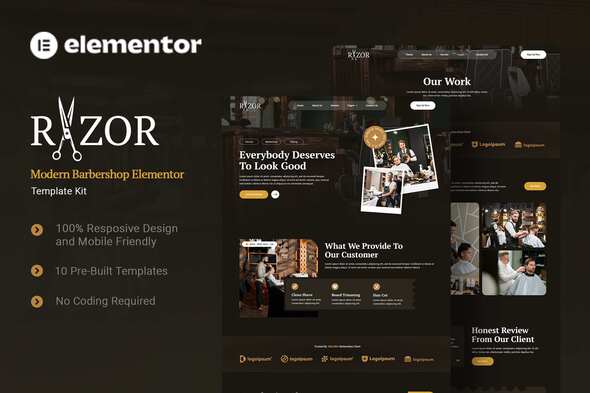
Razor is a specialized Elementor Template Kit designed specifically for barbershops and grooming businesses seeking a professional online presence. Built exclusively for the Elementor Page Builder plugin in WordPress, this collection provides pre-designed page templates and components—not a full theme—allowing rapid website deployment with cohesive styling. Optimized for use with the lightweight Hello Elementor theme, it maintains compatibility with most Elementor-supported themes.
Transform Your Barbershop Website With Pre-Built Templates
This kit includes 10 essential page layouts tailored to the grooming industry, enabling you to launch a functional site in hours rather than weeks. Each template features modern masculine aesthetics with clean lines, strategic spacing, and optional dark mode styling. Here’s how each page serves your business:
- Home – Dynamic landing page showcasing services, promotions, and booking calls-to-action
- About Us – Professional space to highlight your barbers’ expertise and shop history
- Service – Detailed presentation of haircuts, shaves, and grooming packages with pricing
- Team – Staff profiles with bios and specialty certifications to build client trust
- Testimonial – Social proof section featuring client reviews and transformation photos
- Our Work – Portfolio gallery highlighting haircut results and barbering artistry
- Blog – SEO-friendly content hub for grooming tips, trend updates, and local promotions
- FAQ’s – Preemptive answers to common queries about appointments, pricing, and aftercare
- Error 404 – Branded fallback page to retain visitors who encounter broken links
- Contact Us – Integrated form with map location and business hours for client inquiries
Design Elements That Elevate Your Brand
Razor employs a sophisticated typography system combining PT Serif for headings (conveying traditional craftsmanship) and Roboto for body text (ensuring modern readability). The layout balances bold imagery with ample white space, while the optional dark mode reduces eye strain and creates a premium lounge-like aesthetic that resonates with male audiences.
Essential Plugins For Full Functionality
To replicate the demo exactly, these plugins are required. All are free except where noted:
- Elementor Pro (Premium) – Core design functionality
- ElementsKit – Adds specialized widgets like team carousels
- Plus Addons – Extends Elementor’s content elements
- Metform – Powers appointment forms and contact submissions
- Elementor Header & Footer Builder – Manages global site sections
Step-by-Step Installation Guide
Since this isn’t a traditional theme, installation requires specific steps:
- Install and activate the Envato Elements plugin from WordPress repository
- Navigate to Envato Elements > Installed Kits in your WordPress dashboard
- Upload the Razor template kit .zip file
- Use Elementor’s Template Library importer (Templates > Saved Templates) for individual sections
For visual guidance, follow Envato’s comprehensive tutorial: Elementor Template Kits Installation Guide. For troubleshooting, access Elementor > Get Help in your WordPress menu.
Specialized Setup Instructions
Metform Integration: If using Elementor Pro, skip Metform installation. To import forms:
- Import Metform block templates via Elementor’s template importer
- Open the page containing your form in Elementor editor
- Right-click the form widget > Edit Form > Select Add Template (folder icon)
- Choose your imported template under My Templates and click Insert
- Customize form fields and update
Global Header/Footer Configuration: (For non-Elementor Pro users)
- Install “Header Footer & Blocks Builder” plugin
- Create new header/footer under Appearance > Header Footer
- Set display rules to “Entire Site”
- Edit with Elementor and import corresponding Razor templates
Image Licensing and Customization Notes
The demo uses premium images from Envato Elements’ Barber Collection. You must license these separately or replace them with your original photos. For authentic branding, we recommend:
- Shooting high-resolution photos of your actual barbershop interior and work
- Using tools like Remove.bg to create consistent transparent PNGs of grooming tools
- Maintaining color consistency by sampling your brand palette in Elementor’s style settings
Remember to update all SEO metadata, alt text for images, and contact information before launching. The kit’s modular design allows easy swapping of sections—try different testimonial layouts or service grids to match your unique business flow.