Displaying a Dribbble portfolio inside WordPress has always been a challenge, not because of a lack of plugins, but because of the limitations of the Dribbble API itself. Most solutions either hammer the API with too many requests, leading to rate-limit errors, or they send visitors away from your site to view the shots. WPShotsDojo solves both issues elegantly. This premium WordPress plugin, developed by Themes-Dojo on CodeCanyon, pulls in any user’s latest shots directly into your posts, pages, or custom post types. It uses intelligent local caching to respect API limits and keeps users engaged with a built-in lightbox. For designers, agencies, and creative professionals, WPShotsDojo transforms a simple portfolio display into a seamless, high-performance part of your website.
Key Features
WPShotsDojo is packed with features designed to give you complete control over how your Dribbble work is showcased. Here is a breakdown of the core functionality that makes this plugin stand out:
- Seamless Dribbble API Integration: The plugin connects directly to the Dribbble API to fetch the latest shots from any user. You are not limited to your own account; you can display work from any public Dribbble profile.
- High-Performance Local Caching: The most significant technical hurdle with Dribbble is the restrictive API rate limit. WPShotsDojo counters this by storing shot data locally on your server. This drastically reduces the number of API calls, preventing error messages and ensuring your pages load quickly even during traffic spikes.
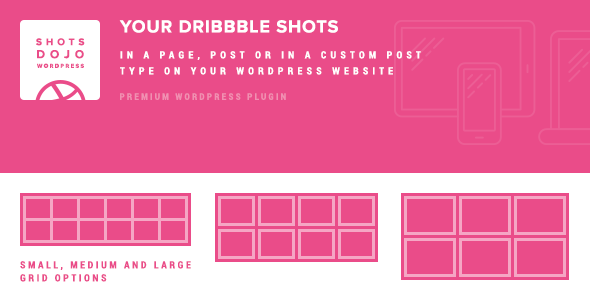
- Multiple Grid Styles: Choose from three distinct grid layouts—Small, Medium, and Large. Each style features custom animations, unique spacing, and optimized image source sizes to provide a distinct visual experience. All grids are fully responsive, adapting perfectly to mobile and desktop screens.
- Integrated Lightbox: Instead of redirecting visitors to Dribbble.com, clicking a shot opens a beautiful lightbox right on your site. This popup loads the shot’s description, likes, views, and comments, keeping the user in your ecosystem and increasing time-on-site metrics.
- Customizable CSS: You have full control over the styling. Whether you need to match your theme’s branding or make specific adjustments, the plugin allows you to override the CSS code directly, ensuring the portfolio blends flawlessly with your design.
- Automatic Updates: The plugin automatically checks for and updates the local shot cache hourly. This ensures your portfolio is always up-to-date without any manual intervention.
- Retina Ready: All grids utilize high-resolution Dribbble image sources, ensuring your work looks crisp and sharp on Retina displays and high-DPI screens.
Who Is This For? Use Cases
WPShotsDojo is built for anyone who wants to leverage their Dribbble presence without compromising their website’s design or performance. It bridges the gap between a third-party social platform and your own digital real estate.
Freelance Designers & Creative Agencies
Your Dribbble profile is often your most updated portfolio. Instead of manually uploading images to your WordPress site, WPShotsDojo automates the process. You can create a dedicated portfolio page that pulls your latest shots automatically. This not only saves time but also ensures that your website and Dribbble profile are always in sync. The “Medium” grid style is ideal for this, offering a professional look that highlights your best work without overwhelming the page layout.
Digital Art Directors & UI/UX Specialists
If you manage multiple projects or work under a brand account, you can use the plugin to curate inspiration boards or showcase team work. The ability to display *any* Dribbble user’s shots means you can create a “Team” page featuring shots from all your designers, even if they post from their personal accounts. The “Large” grid style with the lightbox feature is perfect for detailed case studies where viewers need to see the fine details and read the project descriptions.
Web Developers Building Client Portfolios
For developers who build websites for creatives, this plugin is a value-add that simplifies the portfolio creation process. It integrates into any WordPress theme, including those with custom post types, full-width layouts, or sidebars. You can install the plugin, input the client’s Dribbble username, and the portfolio is live instantly. The “Small” grid is great for footers or sidebars, while the larger grids work well as hero sections on landing pages.
Technical Details & Compatibility
To ensure a smooth experience, it is important to understand the technical requirements. This plugin is straightforward but relies on a few server configurations.
- WordPress Compatibility: The plugin has been tested and supports WordPress versions up to 4.4.2 and later, ensuring compatibility with modern installations.
- PHP CURL Requirement: A critical note is that the Dribbble API requires PHP CURL to be enabled on your server. This is a standard module on most hosting providers, but you should verify it before installation to avoid connectivity issues.
- Database Indexing: The plugin utilizes your database to cache shot data. The changelog mentions minor fixes to MySQL DB Engine indexes, ensuring that data retrieval is fast and does not slow down your database.
- Responsive Design: All grid styles are built to be responsive. They will scale fluidly across devices, from large desktop monitors to small smartphones, without breaking your layout.
- JavaScript Dependency: The plugin relies on its own JavaScript for animations and lightbox functionality. It includes these dependencies locally, reducing reliance on external CDNs.
It’s worth noting that the plugin’s core strength is its efficient use of the API. By caching results hourly, it practically eliminates the risk of hitting Dribbble’s rate limits, which is a common pain point with other Dribbble plugins.
Pros and Cons
Like any specialized tool, WPShotsDojo has its strengths and limitations. Here is an honest look at what you can expect.
Pros
- Performance-Centric: The local caching mechanism is a standout feature. It ensures your site remains fast and avoids API communication errors.
- User Retention: The lightbox feature is a game-changer. It stops users from bouncing off to Dribbble, keeping them on your site longer and improving engagement metrics.
- Design Flexibility: With three grid styles and full CSS control, you are not locked into a “one-size-fits-all” design. The plugin can be tailored to match any aesthetic.
- Retina Support: The high-quality image rendering ensures your portfolio looks professional on modern displays, reflecting positively on your work.
Cons
- Server Dependency: The requirement for PHP CURL might be a hurdle for users on very restrictive shared hosting environments, which often disable this extension for security reasons.
- Update Frequency: The hourly cache refresh is effective, but it means if you post a new shot on Dribbble, it might take up to 60 minutes to appear on your website. This is a minor delay for most users.
- Limited Widget Options: While you can place grids in content areas, the plugin does not explicitly mention native sidebar widgets, which might require additional code for some users.
Frequently Asked Questions
Is WPShotsDojo compatible with page builders like Elementor or WPBakery?
Yes, it is designed to work with standard WordPress content areas. The plugin outputs a shortcode or PHP function that you can place anywhere, including inside rows and columns created by page builders. Since you have full CSS control, you can style the output to align with the builder’s container widths and styling defaults.
Do I need a Dribbble API key to use WPShotsDojo?
Yes, you will need to register an application on Dribbble to get an access token and API key. The plugin uses this key to authenticate requests. The development team provides clear instructions on how to obtain this key within the plugin’s settings page, making the process straightforward even for non-developers.
Does this plugin replace my existing portfolio theme?
No. WPShotsDojo is not a theme; it is a functional plugin. It enhances your existing theme by adding Dribbble feed capabilities. It is specifically designed to “blend in” with your current design, working alongside your theme’s CSS and template files rather than replacing them. It will work with any standard WordPress theme that utilizes the_content() or similar functions.
Final Verdict
In a market saturated with portfolio plugins, WPShotsDojo earns its place through meticulous attention to performance and user experience. The developers, Themes-Dojo, have a reputation for creating reliable plugins, and this one is no exception. They have clearly listened to feedback, focusing on the pain points of API rate limits and visitor retention. The ability to curate multiple grids from different users on a single page is a powerful feature for creative teams, while the lightbox integration is essential for maintaining site traffic. The plugin’s focus on local caching and retina-ready images ensures that your work looks exceptional and your site remains fast, two critical factors for both SEO and user satisfaction.
If you are ready to stop sending your hard-earned traffic to Dribbble and start showcasing your work in a way that enhances your brand, WPShotsDojo is the professional solution you need. It is a polished, performance-optimized tool that integrates perfectly with your WordPress workflow. Stop relying on manual uploads and clunky embeds. Invest in a plugin that respects your visitors’ time and your server’s resources. Click the link to view the live demo and secure your copy of WPShotsDojo today—your portfolio deserves to be seen in the best possible light, right on your own domain.