Key Features
HardwareLib provides a comprehensive set of tools for retrieving detailed hardware information from Windows systems. The library is designed to be lightweight and easy to integrate into any .NET application. Its primary strength lies in its use of WMI (Windows Management Instrumentation) to query hardware components directly, ensuring accurate and up-to-date data without relying on external drivers or third-party APIs.
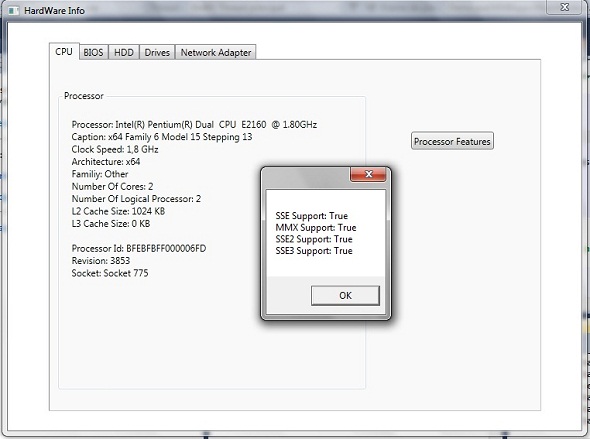
- CPU Information Retrieval: Access detailed data about the processor, including its name, manufacturer, architecture, and core count. The library includes a dedicated Cpu class that allows you to query specific CPUs from a system list.
- Motherboard and RAM Details: Obtain the manufacturer, model, and serial number of the motherboard. For RAM, you can retrieve module capacity, speed, and type (e.g., DDR3, DDR4) using WMI queries.
- Storage Device Access: The library features robust support for hard drives (HDD) and solid-state drives (SSD). You can get the caption, device ID, and model. For more granular partition information, a separate LogicalDisk class is provided to enumerate drives and their volumes.
- Graphics Card and Network Adapter Data: Pull manufacturer and model information for your GPU. Similarly, network adapter details such as adapter name, MAC address, and connection status are accessible through dedicated functions.
- Optical Drive Detection: Identify CD/DVD drives installed on the system, including their drive letter and media type.
- Processor Feature Detection: Beyond basic info, the library includes methods to check for specific CPU capabilities like MMX, 3DNow!, SSE, SSE2, and SSE3 support, making it useful for performance optimization and compatibility checks.
Who Is This For? Use Cases
HardwareLib is a versatile tool for .NET developers who need to interact with system hardware at a low level. Its simplicity and focus on WMI make it ideal for applications where reliability and ease of integration are priorities.
System Information Utilities
Build comprehensive system profilers or diagnostic tools that display hardware specifications to end-users. This is perfect for IT support staff who need to quickly assess a remote machine’s components. The library handles the heavy lifting of WMI queries, letting you focus on the user interface and reporting logic.
Software Licensing and Compliance
Developers creating license management systems can use HardwareLib to generate unique machine fingerprints based on motherboard or hard drive serial numbers. This helps enforce software licenses by tying them to specific hardware configurations without requiring complex encryption or hardware dongles.
Performance Optimization Tools
Applications that need to scale resource usage based on available hardware will benefit from real-time CPU feature detection and memory capacity checks. For example, a game launcher could query the GPU model to recommend optimal graphics settings, or a video rendering tool could adjust thread count based on detected CPU cores.
Inventory Management Systems
Large organizations can integrate HardwareLib into their asset management software to automatically collect hardware data from networked machines. The library’s ability to pull manufacturer, model, and serial numbers helps maintain accurate records for warranty tracking and upgrades.
Technical Details & Compatibility
HardwareLib is a .NET library designed for Windows environments that support WMI. It has been tested with .NET Framework 2.0 and later versions, making it compatible with legacy systems as well as modern .NET projects. The library does not require any additional external dependencies or administrative privileges for basic data retrieval, although some WMI queries (like disk serial numbers) may need elevated permissions. It supports x86 and x64 architectures, ensuring broad compatibility across Windows 7, 8, 10, and Windows Server editions. The library has received active updates, with version 1.2 introducing a GPU demo and bug fixes, signaling ongoing maintenance and developer support.
Pros and Cons
Pros
- Lightweight and dependency-free: No need to install additional SDKs or drivers—just reference the DLL in your project.
- Simple API: Straightforward classes like
Cpu,Hdd, andLogicalDiskmake integration intuitive even for developers new to WMI. - Detailed hardware data: Access manufacturer, model, and serial number for core components, which is rare in free or lightweight libraries.
- CPU feature detection: Unique ability to check for instruction set support (MMX, SSE, 3DNow!) without requiring complex assembly code.
- Regular updates: With version 1.2 releasing bug fixes and a GPU demo, the library shows active development and community engagement.
Cons
- Windows-only: Because it relies on WMI, the library cannot be used on macOS or Linux without emulation layers like Wine.
- Limited to basic information: While it covers major components, it does not provide sensor data (temperatures, fan speeds) or advanced disk health metrics like S.M.A.R.T. attributes.
- No asynchronous methods: The current API is synchronous, which might cause UI blocking in graphical applications if queries take time.
- WMI dependency issues: On some slimmed-down Windows installations or systems with disabled WMI, the library may fail to return data without clear error messages.
Frequently Asked Questions
Is HardwareLib compatible with .NET Core or .NET 5+?
Yes, HardwareLib is compatible with .NET Core, .NET 5, .NET 6, and later versions, as long as your application targets Windows. The library uses the System.Management namespace, which is available in .NET Core Windows-specific builds. You may need to add the System.Management NuGet package to your project references.
Can I use HardwareLib to get the hard drive serial number for software licensing?
Yes, the library allows you to retrieve the hard drive’s serial number and model. However, note that on modern Windows systems, this may require administrative privileges. For licensing purposes, it is common to combine the serial number with other identifiers (like motherboard serial or MAC address) using the library’s other classes for a more robust fingerprint.
Does HardwareLib include support or documentation for beginners?
The library comes with basic code examples in the description and includes a demo project with version 1.2. The API is intentionally minimal, so most developers can get started by examining the example code provided. While there is no formal paid support tier, the developer has a history of releasing updates and bug fixes, which suggests responsiveness to user feedback.
Final Verdict
HardwareLib delivers exactly what it promises: a straightforward, dependency-free .NET library for accessing core hardware information via WMI. Its simplicity is its greatest asset, allowing you to add system profiling to your application in minutes. The inclusion of CPU feature detection and detailed component serialization makes it particularly valuable for developers building licensing systems, performance tools, or inventory management software. While it is limited to Windows and lacks asynchronous support, the library’s low price point, active updates, and positive user reception from the CodeCanyon community make it a worthwhile investment for any Windows-focused .NET developer. If your project requires accurate, low-level hardware data without the overhead of enterprise-grade solutions, HardwareLib is a practical and cost-effective choice. Try it today to streamline your system information queries and enhance your application’s capabilities.