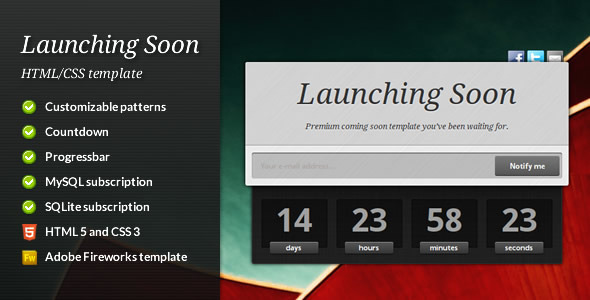
Launching Soon is a pre-launch “coming soon” page template sold on ThemeForest for $5. It gives a site owner a single ready-made HTML5 page with a countdown timer, a progress bar, an email signup form and space to describe an upcoming product, so visitors have something to look at before the real site goes live. It suits small projects on a tight budget — a personal site, a side project or a simple business launch — where the goal is to start collecting emails rather than to build a full marketing funnel. The template was built by Equiet and has sold 260 copies.
What the Launching Soon Site Templates package actually contains
The template is a single-page design rather than a multi-page theme. Everything a visitor sees fits on one screen or one short scroll, which is the right shape for a holding page. The vendor bundles four functional elements that matter in practice.
The countdown timer is the centrepiece. It runs on a jQuery plugin and counts down to a date set in the code, giving visitors a concrete reason to come back. The progress bar communicates how far along the project is in percentage terms; it is a visual device rather than something connected to real build data, so the value has to be updated by hand.
The subscription form is the part with actual utility. It submits over AJAX, meaning the page does not reload when someone signs up, and it stores addresses in either MySQL or SQLite. That choice of two database backends is unusual for a template at this price and means the page can run on cheap shared hosting without a separate mailing-list service. A note of caution: the vendor does not state that the form includes spam protection or double opt-in confirmation, and those are normally expected for any public email capture form.
On the presentation side, the template uses HTML5 and CSS3, with a background pattern system and swappable imagery. The vendor ships an Adobe Fireworks source file, which matters if the buyer wants to redesign the layout rather than just change text and colours. Documentation is included. The bundled assets — background photographs, Subtle Patterns Volume 1 textures, Classy Social Media Icons, the Droid Sans and Droid Serif fonts, the CountDown jQuery plugin and Fancybox — are third-party items with their own licences, and several of the credited images are Creative Commons photographs from Flickr. Anyone reusing those images commercially should check each licence rather than assume the ThemeForest purchase covers them.
Where these Launching Soon Site Templates fit, and where they do not
The strongest fit is a solo developer or small team with a domain registered and a launch date roughly set. A holding page with a countdown and an email field is enough to stop the domain looking abandoned and to build a list before day one. It also works for event pages, product pre-orders and portfolio sites that are being rebuilt.
A second good fit is a freelancer who needs to stand up several holding pages quickly for different clients. At $5 a licence, the cost per project is trivial, and the database-backed form means each client can own their subscriber list outright.
The template is a poor choice in three situations. First, if the launch needs a multi-step signup, referral tracking, A/B testing or integration with a CRM, a single static page with a basic form will not carry it. Second, if the site is being built on WordPress, Squarespace or another CMS, a standalone HTML template adds a separate deployment to maintain; a coming-soon plugin inside the existing CMS is simpler. Third, if the project needs to look current, the design vocabulary here — background patterns, Fancybox lightboxes, Droid fonts — reads as early-2010s web design, and the vendor has not updated the files since August 2011.
Setting up a coming soon page from this template
Setup assumes some comfort with editing HTML and CSS by hand. There is no admin panel and no installer. The practical sequence is: upload the template folder to the web root or a subdirectory, open the main HTML file, replace the placeholder copy and logo, set the countdown target date in the script configuration, adjust the progress bar value, and point the form at a database.
The database step is the one that trips people up. The buyer needs to create a MySQL database and user through their host’s control panel, or confirm that SQLite is available, then enter those credentials in the form’s server-side configuration file. The vendor’s documentation covers this, but it is a server-side task, not a drag-and-drop one. Testing the form end to end — submitting an address and confirming it lands in the table — should be part of the process before the page goes public.
For someone who already works with HTML, PHP and a database, the whole job is realistically an afternoon including testing. For someone who has only ever used a website builder, expect a day or more, or budget for a developer’s time. The Fireworks file is only useful if that software is installed; buyers without it can still change colours and images through the CSS.
Strengths and limitations of this coming soon template
Strengths
- Very low price for a page that includes a working email capture form, not just a static graphic.
- Choice of MySQL or SQLite storage means the subscriber list belongs to the site owner, with no third-party mailing service in the loop.
- The countdown and progress bar give visitors two different signals about timing, which is more than most budget holding pages offer.
- Fireworks source file and documented customisation give a designer room to restyle rather than rebuild.
- 260 sales is a modest but real track record for a template in this niche.
Limitations
- The last vendor update was August 2011. Browsers, PHP versions and hosting environments have moved on considerably since then, and the vendor does not state compatibility with current PHP releases.
- No spam protection or double opt-in is described, which is a genuine risk for any public email form.
- The design is dated: patterned backgrounds, lightbox scripts and Droid fonts place it firmly in its era.
- No WordPress version, no page builder support and no admin interface — every change is a code edit.
- Third-party images and icons carry separate licences that the buyer must verify independently.
- Single-page scope only; there is no supporting content structure if the launch needs more than a holding screen.
How it compares with the wider coming soon template category
Coming soon templates generally fall into three groups: static HTML pages like this one, CMS plugins that add a holding screen to an existing site, and hosted landing-page services with built-in email marketing. This product sits firmly in the first group, and that position defines both its appeal and its ceiling.
Against CMS plugins, the trade-off is control versus convenience. A plugin installs in minutes and inherits the site’s existing theme and user system, but it ties the holding page to that platform and often to a subscription. A standalone template deploys anywhere, including a bare hosting account with no CMS, and the buyer owns every file. Against hosted landing-page services, the template wins on cost and data ownership but loses on deliverability, automation and analytics, which those services bundle in.
Within the static template group, the differentiator here is the database-backed form. Many cheap coming soon templates are purely visual and leave the buyer to bolt on a Mailchimp embed or similar. Having storage built in removes a dependency, at the cost of some server configuration. Buyers who want a modern aesthetic, responsive layouts and ongoing updates will find better-fitting options elsewhere in the category; buyers who want a cheap, self-contained page they fully control will find this one does the job.
Frequently Asked Questions
Does Launching Soon work with WordPress?
No. It is a standalone HTML template, not a WordPress theme or plugin, so it cannot be installed through the WordPress dashboard. It runs as its own page on a hosting account, either at the domain root or in a subfolder while the main site is built elsewhere. Sites already on WordPress are usually better served by a coming-soon plugin.
Can the countdown timer be set to a specific date?
Yes. The countdown runs on a jQuery plugin and the target date is configured in the page’s script, so it can be set to any future date and time. The vendor does not document a visual date picker, so the value is edited directly in the code. The progress bar percentage is set the same way.
Where are the email addresses from the signup form stored?
They are stored in a database on the buyer’s own hosting, using either MySQL or SQLite depending on configuration. Nothing is sent to a third-party service by default. That means the site owner is responsible for exporting the list, backing it up and handling any privacy obligations that apply in their jurisdiction.
Is the template responsive on mobile phones?
The vendor does not state that it is responsive, and given the 2011 release date it should not be assumed. Buyers who need a layout that adapts cleanly to phones and tablets should test it on real devices before committing, or plan to add media queries to the CSS themselves. This is the single biggest practical caveat.
Verdict on Launching Soon
This template is worth buying for a developer or technically confident site owner who needs a cheap, self-hosted holding page with a working email capture form and does not mind editing code. The database-backed subscription form and the Fireworks source file are real, practical assets at $5. It is not the right purchase for anyone who needs a responsive, contemporary design out of the box, WordPress integration, or a form with spam protection and confirmation emails built in. The 2011 last-update date is the deciding factor: treat this as a starting point to be adapted, not a finished product to be deployed as-is. Buyers who accept that framing will get fair value; those expecting a modern, maintained template should keep looking.