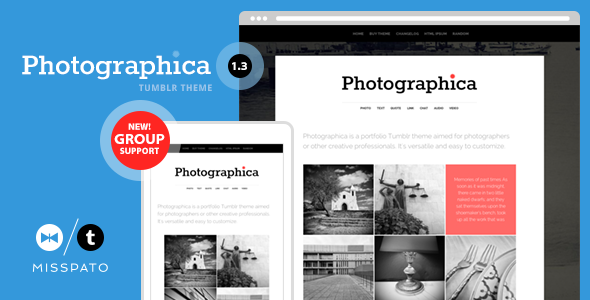
Photographica is a Tumblr theme built for photographers and visual creatives who want a gallery-first portfolio rather than a text-led blog. It turns a Tumblr account into a thumbnail grid of work, with tag-based navigation, lightbox image viewing and support for every Tumblr post type. It suits photographers, illustrators and design studios already committed to Tumblr; anyone running a self-hosted WordPress site should look elsewhere. Photographica Blogging sits in an unusual niche, because Tumblr themes are a small and ageing corner of the commercial template market.
What Photographica actually does well
The core idea is a homepage or tag page that shows posts as thumbnails, so a visitor sees a wall of images before reading a single caption. That is the right structure for portfolio work, and it is the feature most buyers will judge the theme on.
Around that grid, the theme layers a set of practical controls:
- Tag-driven navigation. Two separate menu areas can be filled with tags and pages, so a photographer can split work into categories such as weddings, portraits or editorial without building a custom site structure. The vendor added extra tag slots and an option to swap or relocate the secondary menu in later updates.
- Photoset handling. Tumblr’s multi-image posts can be arranged in a flexible grid, with an optional layout choice and an option to fall back to Tumblr’s native photoset arrangement. Images tagged for Instagram can display at full size rather than being cropped.
- Full-screen image viewing. A lightbox script lets visitors open a photo into the whole browser window, which matters when the work itself is the product.
- Every post type, not just photos. Text, quote, link, chat, audio, video and answer posts are all styled. Audio and video entries can show cover or preview thumbnails where Tumblr supplies them, so a mixed feed still looks consistent in the grid.
- Branding controls. Custom colours, Google WebFonts, a text or image logo, and font size options for headings and body copy give a reasonable amount of visual control without touching code.
- Comments and analytics. Disqus can be switched on for post comments, Google Analytics is supported, and a footer code field accepts any additional script.
- Sharing and social links. Posts carry Facebook, Twitter, Google+ and Pinterest share buttons, and the theme can display profile links for a long list of networks including Behance, Dribbble, Flickr and Instagram.
- Responsive layout and localisation. The design adapts to phones and tablets, and interface strings can be translated.
Group blogging is also supported as an option, which is useful for a studio where several people publish to one account.
Who Photographica fits, and where it does not
The strongest fit is a working photographer who already posts to Tumblr and wants that feed to look like a portfolio rather than a diary. Wedding and event photographers, illustrators, and visual artists who publish frequently and casually benefit most, because the theme rewards a steady stream of image posts. A small studio using Tumblr’s group posting to share one account across a team is another good match, as is anyone who wants a portfolio that updates from a phone without a separate publishing workflow.
It is a poor choice for a business that needs a self-hosted site with plugins, e-commerce or detailed on-page SEO control. Tumblr’s platform limits apply regardless of the theme, and a premium WordPress theme will serve those needs better. It is also a weak fit for a text-heavy blog or a publication with long articles, since the design is optimised around images. Finally, anyone who needs a theme under active development should note that the last update was in April 2019.
Setting Photographica up in practice
Installation is a theme file upload through Tumblr’s appearance settings, followed by configuration in the theme options panel. There is no server, hosting or database work involved, which keeps the technical barrier low.
The prerequisites are simple: a Tumblr account, some published posts to populate the grid, and a logo image if the image logo option is used. Beyond that, the work is mostly editorial. The buyer needs to decide which tags become navigation categories, which pages belong in the secondary menu, and whether Disqus, analytics and the footer code field will be used. Colour and font choices come next.
A basic setup with existing content takes roughly half an hour to an hour. A careful build, with tag structure planned, custom colours matched to a brand, social links filled in and a test pass on mobile, is more like two to three hours. Buyers should test the lightbox and photoset layouts on a phone before going live, because those are the elements most likely to need adjustment.
Strengths and limitations
Strengths
- Gallery-first layout that puts images ahead of text, which is the correct priority for portfolio work.
- Broad post type coverage, so a mixed Tumblr feed does not break the design.
- Two configurable navigation areas driven by tags, giving structure without custom coding.
- Lightbox viewing and responsive photoset grids suited to showing photographs at size.
- Disqus, analytics, social sharing and a footer code hook cover the common integration needs.
- 251 sales on ThemeForest indicate a reasonable base of buyers for a niche Tumblr product.
Limitations
- The last release was version 1.7 in April 2019. Tumblr has changed ownership and platform behaviour since then, and the vendor does not state that the theme has been retested against current Tumblr.
- Google+ appears in the social sharing options. The network no longer exists, so that button is dead weight.
- The theme depends on Tumblr’s own post and tag system. There is no drag-and-drop page builder and no way to restructure content beyond what tags and pages allow.
- SEO is constrained by the platform. The theme cannot deliver the title, schema and redirect control a self-hosted CMS offers.
- Customisation is option-based. Deeper layout changes require editing the theme’s HTML and CSS directly.
- The bundled libraries are old, including an Internet Explorer compatibility script, which signals the codebase has not been modernised.
How Photographica compares with the wider category
Against premium portfolio themes for WordPress, Squarespace or Webflow, Photographica trades flexibility for simplicity. Those platforms offer page builders, richer SEO controls, e-commerce and ongoing updates. Photographica offers none of that, but it also requires no hosting, no maintenance and no separate publishing routine. For someone already posting to Tumblr, that is a real advantage.
Against free Tumblr themes, the difference is polish and control. Free themes often handle one post type well and fall apart on the rest; Photographica styles all of them and adds options for navigation, fonts, colours and comments. Against other premium Tumblr themes, the differentiator is the thumbnail grid and the tag-based menu system, which are more developed here than in a typical minimal Tumblr theme. The trade-off is age: a newer Tumblr theme is more likely to have been tested against the platform as it stands now.
Frequently Asked Questions
Is Photographica a WordPress theme or a Tumblr theme?
It is a Tumblr theme, installed through Tumblr’s appearance settings rather than a WordPress dashboard. That means it cannot be used on a self-hosted WordPress site, and it does not support WordPress plugins. Buyers searching for a WordPress portfolio theme should treat Photographica Blogging as a different category of product entirely.
Can Photographica be used for a photography portfolio?
Yes. The thumbnail grid, tag-based navigation and full-screen lightbox are built for exactly that purpose. Photographers can organise work into categories using tags and present images at full size. The main caveat is that the theme has not been updated since 2019, so it is worth testing on a live Tumblr account before committing.
Does Photographica support video and audio posts?
Yes. All Tumblr post types are styled, including audio and video, and the theme can display cover or preview thumbnails for those posts where Tumblr provides them. Video embeds are resized fluidly so they fit the layout. This keeps a mixed feed visually consistent alongside photo posts.
How much does Photographica cost?
It is listed at $24 on ThemeForest as a one-off purchase. There is no subscription. Support is handled by the developer, themelantic, through the email address given in the listing. Buyers should factor in that updates have been infrequent, so ongoing support expectations should be modest.
Verdict
Photographica is a sensible buy for a photographer or visual creative who already publishes on Tumblr and wants that feed to read as a portfolio. The grid layout, tag navigation and lightbox are well matched to the job, and the price is low enough to justify a single-project purchase. It is not the right choice for a business needing a self-hosted site, e-commerce or strong SEO control, nor for anyone who requires a theme under active development. The 2019 update date is the main reason to hesitate, and buyers should verify current behaviour on a live Tumblr account before relying on it.