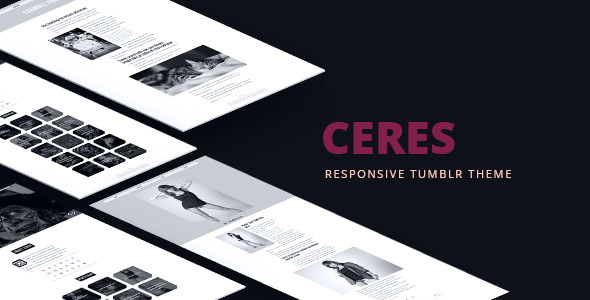
Ceres Blogging is a Tumblr theme built by the developer adraft and sold on ThemeForest for $24, aimed at photographers, illustrators and designers who want a portfolio-style blog rather than a standard Tumblr layout. It replaces Tumblr’s default templates with a light, minimal grid of work, a slideshow header and a long list of appearance controls, and it has been purchased around 370 times. Anyone running a visual portfolio on Tumblr should consider it; anyone who publishes mostly long-form written posts or audio should not.
What the Ceres Blogging theme actually lets a site owner do
The central idea behind Ceres Blogging is that a Tumblr blog can behave like a small portfolio site without leaving the Tumblr platform. The theme presents posts as a grid of thumbnails, and each thumbnail opens into a full post view. That structure suits image-heavy work, and it is the reason the theme exists at all.
Customisation is the headline capability. The listing claims more than 80 options, and the changelog supports the claim: over roughly three years the developer added controls for colours, transparency, dividers, preloader animations, navigation behaviour, avatars, RSS links and thumbnail cropping. In practice this means a site owner can adjust the look substantially from the Tumblr customisation panel without editing code. Specific controls worth knowing about include the ability to hide the portfolio section on the home page only, to display full-size images inside post captions, to remove the slideshow arrows, and to switch between several preloader animations.
The header slideshow supports up to six slides, each with its own description text and link. That gives a photographer a way to lead with a commissioned series or a current project rather than whatever was posted most recently. Below it, the theme handles up to eight categories and up to twenty social profile links, which is generous for a portfolio site that needs to point visitors at Behance, Instagram or a print shop.
Post-type support is deliberately narrow: Photo, Photoset, Text and Video only. This is a constraint rather than an oversight, and it shapes what the theme is good for. Audio posts, quote posts, chat posts and link posts are not styled, so a blog that relies on them will look inconsistent.
Other functional pieces include an optional infinite scroll mode, so visitors keep loading thumbnails as they scroll instead of paging; an “Ask” contact form built on Tumblr’s native ask feature; Disqus comments for readers who want threaded discussion rather than Tumblr’s own replies; and Google Analytics integration for traffic measurement. Google Fonts support means typography can be swapped without hosting font files. Social sharing buttons let a visitor push a post to another network.
The package includes the theme files, a fully layered PSD file for anyone who wants to design graphics that match the layout, and written documentation. Third-party libraries do the heavy lifting on the front end, including jQuery, FitVids for responsive video embeds, and a pagination script for the infinite scroll behaviour.
Where Ceres Blogging fits, and where it does not
The strongest fit is a working photographer or visual artist who already has an audience on Tumblr and wants that audience to see a portfolio rather than a feed. Tumblr’s reblog culture is genuinely useful for discovery in photography and illustration, and Ceres Blogging keeps that advantage while fixing the presentation problem. A freelancer who wants a lightweight portfolio that costs $24 instead of a monthly site-builder subscription is another good match, provided the work is primarily photographic.
A second fit is a side project or personal archive. Because the theme is minimal and light by design, it loads quickly and does not compete visually with the images. Someone documenting a body of work over time, such as a daily drawing project or a travel series, can use the category limit of eight to organise it cleanly.
The clearest case against buying is a writer. Ceres Blogging supports Text posts, but the design language is built around thumbnails and a slideshow, and a text-heavy blog will feel like it is fighting the template. Long essays need readable column widths, comfortable line spacing and typographic hierarchy, and this theme’s priorities lie elsewhere. Anyone publishing podcasts, music or audio interviews should also look past it, because audio posts are not among the supported types. Finally, an agency that needs multiple authors, custom post types or a CMS with structured content should be looking at WordPress rather than Tumblr at all.
Setting up Ceres Blogging in practice
There is no hosting to arrange and no software to install. A Tumblr account is the only prerequisite, and the process is to download the theme files from ThemeForest, then paste or upload the theme into the Tumblr theme editor and save. Tumblr’s own customisation panel then exposes the options the theme registers, so most of the work is choosing colours, uploading a logo, setting the slides, and picking which categories appear.
Realistically, a straightforward setup takes under an hour for someone comfortable with Tumblr’s dashboard. The variables are content, not configuration: populating six slides with descriptions and links, deciding whether infinite scroll suits the amount of work on display, and connecting Disqus and Google Analytics, both of which require accounts elsewhere and a snippet to be pasted in. The bundled documentation covers installation and customisation, and the vendor updated it as recently as the final release.
One practical note: the listing states plainly that the images shown in the preview are not included. Buyers need their own photography, and the PSD file exists so that graphics can be produced to match the layout.
Strengths and limitations of Ceres Blogging
Strengths
- Deep appearance controls for a $24 theme, with colour, transparency, spacing and layout options that reduce the need for CSS edits.
- Purpose-built for visual portfolios, with thumbnail grids, a six-slide header and full-size image display in captions.
- Supports infinite scroll, Disqus comments and Google Analytics out of the box, covering the three things most portfolio blogs eventually want.
- Includes a layered PSD file, which is unusual at this price and useful for matching promotional graphics to the site.
- A long, documented changelog showing sustained maintenance between 2013 and 2016, including mobile and iPad fixes.
Limitations
- Only four post types are styled. Audio, quote, chat and link posts will not match the rest of the site.
- The last vendor update was in September 2016. The theme has not been revised for changes Tumblr has made since, and buyers should assume no further support.
- The eight-category limit is a hard ceiling. A portfolio with more than eight distinct bodies of work will need to consolidate or use tags instead.
- Infinite scroll and pagination are alternatives, not complements. Sites with large archives may find that infinite scroll makes older work harder to reach.
- No stated accessibility work. The vendor does not document keyboard navigation, focus states or screen-reader behaviour.
How Ceres Blogging compares with other Tumblr portfolio themes
The broader category splits into two groups: free Tumblr themes and paid ones on marketplaces like ThemeForest. Free themes usually offer a fixed layout with a handful of colour options, and they are frequently abandoned. Paid themes typically promise more control, and Ceres Blogging sits at the lower end of that price band at $24 while offering an unusually large option set.
Against free alternatives, the case for buying is mostly about the option count and the PSD file. Against other paid Tumblr themes, the differentiator is the narrow focus. Ceres Blogging does portfolio presentation well and does not pretend to be a general-purpose blog theme, so it avoids the bloat that comes with trying to style every post type. The trade-off is flexibility: a theme that supports more post types will handle a mixed-content blog better, even if it looks less considered for pure image work.
Compared with moving to WordPress and a portfolio theme, the decision is really about platform. Tumblr brings an existing social graph and reblog mechanics that WordPress does not replicate. WordPress brings plugins, multiple authors and long-term control. Ceres Blogging is the sensible choice only if staying on Tumblr is already the plan.
Frequently Asked Questions
Is Ceres Blogging still supported or updated?
No. The last update recorded by the vendor was 22 September 2016, and no releases have followed. Buyers should treat it as a finished product rather than one under active development. It still works as a Tumblr theme, but any incompatibility introduced by later Tumblr platform changes will not be fixed by the developer.
Which Tumblr post types does Ceres Blogging support?
It supports four: Photo, Photoset, Text and Video. Audio, quote, chat and link posts are not styled by the theme, so they will render inconsistently if published. A blog centred on any of those unsupported formats is a poor match, and a mixed-content blog will need to accept some visual unevenness.
Can Ceres Blogging be customised without knowing CSS?
Yes, largely. The theme registers more than 80 options in Tumblr’s customisation panel, covering colours, transparency, dividers, navigation, preloaders and thumbnail cropping. Most appearance changes can be made there without touching code. Deeper structural changes, such as altering the grid behaviour itself, would still require editing the theme files directly.
Does the theme include the images shown in the preview?
No. The listing states clearly that the preview images are not part of the package, and they are credited to a separate photographer. Buyers supply their own images. A layered PSD file is included, which helps with producing matching graphics, but it does not provide stock photography or placeholder artwork of any kind.
Verdict
Ceres Blogging is worth buying for photographers, illustrators and visual artists who already publish on Tumblr and want their work presented as a portfolio rather than a chronological feed. At $24 with roughly 370 sales, the option set and the included PSD file make it reasonable value for that specific job. It is not the right choice for writers, podcasters or anyone publishing audio, because the supported post types and the thumbnail-led design work against text-heavy content. The 2016 end date on development is the biggest caveat, and buyers should go in expecting a finished product with no ongoing support. Anyone who needs long-term flexibility, multiple contributors or structured content should be evaluating WordPress instead.