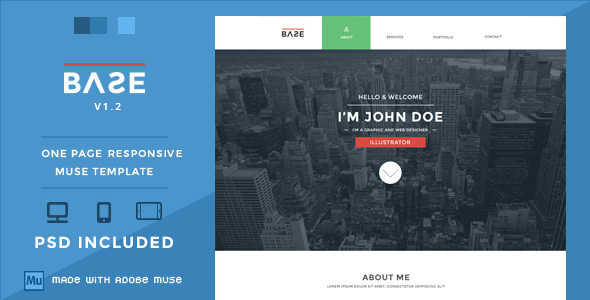
Base is a single-page portfolio template built for Adobe Muse, the now-discontinued visual website design tool that Adobe once offered as part of Creative Cloud. Sold on ThemeForest by developer WellMadePixel for $21, it packages desktop, tablet and mobile layouts together with the original Photoshop source files, so a designer can either publish the Muse project directly or rebuild the design elsewhere. It suits freelancers, illustrators, photographers and small studios who want a compact one-page presence and are already comfortable working inside Muse or willing to treat the file as a design reference.
Base Muse Templates sit in a niche corner of the marketplace: single-page layouts aimed at creative professionals rather than businesses. The template has accumulated 348 sales since its release, which is a modest but real signal of demand within that niche, and the project has been maintained across two documented updates.
What Base Muse Templates Actually Deliver
The core of the product is a one-page layout that stacks every section — introduction, portfolio grid, and contact details — onto a single scrolling canvas. That structure removes the need to design and maintain multiple pages, which is the main reason one-page formats remain popular for portfolios. Visitors scroll rather than click, and the whole site loads as one document.
Responsive behaviour is the headline addition in version 1.2, released in May 2016. Before that update, the template shipped separate desktop and tablet versions; the responsive layout consolidates that into a single project that adapts to screen width. For anyone publishing today, this matters more than any other feature, because a fixed-width Muse site will look broken on phones.
The package includes PSD files alongside the Muse project. That is a meaningful inclusion for two groups: designers who want to customise the visual layer in Photoshop before importing assets, and anyone who intends to rebuild the layout in a different tool entirely. The PSD acts as a portable specification even if the Muse file itself becomes unusable.
Visually, the template follows a flat design approach — solid colour blocks, no gradients or drop shadows, and typography doing most of the heavy lifting. A parallax background effect appears in the home section, giving the opening screen some depth as the page scrolls. Portfolio items support rollover effects and category filter buttons, so a visitor can narrow a mixed body of work down to a single discipline without leaving the page.
Navigation is a fixed bar with rollover states, and the whole structure is deliberately minimal. There is no blog, no e-commerce layer, no multi-language support and no page builder logic beyond what Muse itself provides. That restraint is the point: the template does one job and does not pretend otherwise.
Where This Template Fits and Where It Does Not
The strongest fit is a solo creative professional who needs a portfolio online quickly and does not want to learn a new platform. An illustrator with fifteen pieces to show, a photographer who wants a scrolling gallery with a contact form, or a freelance designer building a holding page while a larger site is developed — all of these map cleanly onto what Base provides.
It also works as a starting point for agencies producing small client sites, provided the agency still has Muse in its toolkit. The PSD layer means a designer can restyle the template for a client’s brand without touching the Muse file at all.
Where it falls down is any project that needs more than one page. A business with services, pricing, a blog and a team page will outgrow a one-page structure almost immediately. The same applies to anyone selling products, running a membership site, or needing content that changes frequently — a single-page portfolio has no natural place to put a stream of updates.
The more serious mismatch is tooling. Adobe Muse reached end of life and is no longer developed or supported by Adobe. Anyone who does not already have Muse installed, or who cannot install it, will find the primary deliverable unusable and will be working from the PSD alone. That is a real constraint, not a minor caveat, and it should shape the buying decision more than any design consideration.
Setting Up Base in Practice
The prerequisite is Adobe Muse itself. The template does not run on WordPress, does not install as a plugin, and cannot be opened in a browser-based editor. Without Muse, the Muse file is inert.
Assuming Muse is available, the workflow is straightforward. The downloaded package is unzipped, the .muse file is opened in Muse, and the designer edits text and images in place. Swapping portfolio thumbnails means replacing image assets and adjusting the rollover states if the new images differ in proportion. Changing the colour scheme means editing the flat colour blocks, which is quicker in the PSD and then re-exported, or done directly in Muse if the designer prefers.
Publishing requires Muse’s built-in FTP upload, which pushes the generated HTML, CSS and JavaScript to a host. There is no separate build step. For someone familiar with Muse, the whole process — open, restyle, swap content, publish — is a few hours of work. For someone learning Muse for the first time, expect a day or more, because the template assumes familiarity with Muse’s master pages, widgets and breakpoint system.
One practical note: the vendor does not state which Muse version the file targets, and the last update was in 2016. Files saved in older Muse versions generally open in later ones, but the reverse is not true, so anyone on a very old Muse build should test before committing.
Strengths and Limitations
Strengths
- Responsive layout covering desktop, tablet and mobile in a single project, added in the final update.
- PSD source files included, which makes the design portable to other tools even if Muse is unavailable.
- Category filtering and rollover effects in the portfolio section give a small body of work more structure than a plain grid.
- Flat, restrained visual style that ages better than trend-driven designs from the same period.
- Low price point at $21 for a complete design system, including layered source files.
- 348 sales and two documented update cycles indicate the project was maintained rather than abandoned at launch.
Limitations
- Built exclusively for Adobe Muse, which Adobe has discontinued. This is the single biggest obstacle to using the template today.
- Last updated in May 2016. There is no indication of ongoing maintenance, and no compatibility statement for current browsers beyond what Muse itself generates.
- One-page structure only. There is no blog template, no inner pages and no way to expand the layout without designing new pages from scratch.
- No CMS integration. Every content change requires opening Muse and republishing, which rules out clients who want to edit their own site.
- Portfolio filtering and rollover behaviour depend on Muse’s generated JavaScript, which cannot be easily audited or replaced by a developer who does not use Muse.
- The vendor does not document the Muse version required, the browser support matrix, or licensing terms for the bundled icons beyond a GPL note.
How Base Compares to Other Muse Templates and One-Page Themes
Within the Muse template category, Base competes on simplicity and price rather than feature depth. Muse templates in this bracket typically offer the same core package — a responsive layout, a portfolio grid, PSD files — and differentiate on visual style and section count. Base sits at the minimal end: fewer sections, less configuration, a narrower set of use cases.
Against one-page themes built for WordPress or other CMS platforms, the comparison is less favourable on flexibility. A WordPress one-page theme lets the site owner edit content through an admin panel, add a blog later, and install plugins. Base offers none of that. What it offers instead is a design-first workflow: the layout is fixed and polished, and the editing experience is visual rather than administrative.
For a designer who already works in Muse, that trade-off is reasonable. For anyone else, the PSD files are arguably the more valuable half of the purchase, since they can be rebuilt in Webflow, Figma or a hand-coded stack. Judged purely as a design asset rather than a working template, Base holds up better than its age suggests.
Frequently Asked Questions
Do I need Adobe Muse to use Base?
Yes, the template file requires Adobe Muse to open and edit. Muse was discontinued by Adobe and is no longer available through Creative Cloud, so anyone without an existing installation cannot use the primary deliverable. The included PSD files remain usable in Photoshop regardless, and can serve as a design reference for rebuilding the layout in another tool.
Is Base suitable for a business website?
No, it is designed for personal portfolios and similar single-page showcases. A business typically needs separate pages for services, pricing, about and contact, plus a way to publish news or updates. Base offers one scrolling page with a portfolio grid and contact section, and adding more pages means designing them from scratch in Muse.
Can I edit the content without touching code?
Yes, within Muse the editing is visual — text and images are changed directly on the canvas. There is no code required for basic content swaps. However, there is no separate admin panel, so every change means opening the Muse project and republishing the site through Muse’s FTP upload. Site owners who want to edit content themselves will need Muse installed.
Does the template include the images shown in the preview?
The vendor does not state that preview images are included in the download. The listing credits photography to an external Flickr source and icons to two GPL-licensed icon sets, which suggests those assets are referenced rather than bundled. Buyers should expect to supply their own portfolio images and verify icon licensing before publishing commercially.
Verdict
Base is a well-executed one-page portfolio design that has been overtaken by the discontinuation of the platform it was built for. For a designer who still has Adobe Muse installed and needs a clean, responsive portfolio live quickly, it remains a sensible $21 purchase — the layout is restrained, the PSD files add genuine value, and the responsive update brought it in line with modern screen sizes.
For everyone else, the calculation is different. Anyone without Muse is effectively buying a layered Photoshop mockup and a set of design decisions, which may still be worth the price if the intention is to rebuild in Webflow, Figma or a custom stack. Anyone who needs a CMS, multiple pages, or a site they can update without specialist software should look at WordPress or a hosted site builder instead.
The 348 sales and the two update cycles suggest Base found its audience and served it adequately. That audience has since narrowed considerably, and buyers should go in with clear eyes about what they are actually getting.