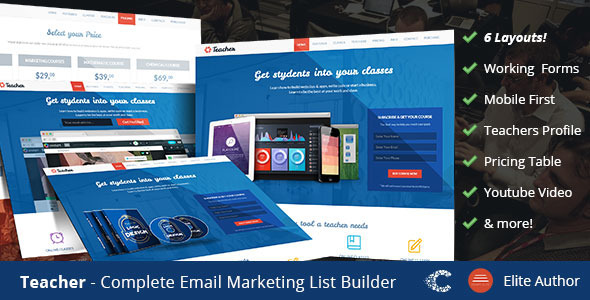
Teacher- Education One Page Responsive Template is a static HTML landing page kit built on Bootstrap 3, sold on ThemeForest by CoralixThemes for $22. It bundles five separate one-page layouts aimed at schools, course sellers and training providers who need a single lead-capture page with a working enquiry form and newsletter signup. It suits freelancers and small agencies building a campaign page quickly, and it is a poor fit for anyone who needs a content-managed site or modern front-end standards.
The product has sold 248 copies since its first release in February 2014, which places it in the low-volume, long-tail end of the ThemeForest catalogue. That sales figure is worth keeping in mind: this is a niche template that has been maintained sporadically, not a flagship item with an active development roadmap.
What the Teacher- Education One Page Responsive Template corporate package actually contains
The headline claim is five landing pages for the price of one. In practice that means five distinct one-page layouts sharing a single Bootstrap 3 grid, each aimed at a slightly different pitch: an online university or degree programme, a career or college recruitment page, a general education landing page, and variants built around requesting information. Buying the pack gives a choice of starting points rather than five unrelated designs, so the visual language stays consistent if a client wants to A/B test two versions of the same campaign.
The two forms are the functional core. One collects request-information submissions, the other handles newsletter registration, and the listing describes both as working rather than decorative. For a lead-generation page that matters more than any visual flourish, because a form that silently fails is worse than no form at all. The newsletter form is presented as Mailchimp-compatible, which in a static HTML template normally means the markup is pre-wired to a Mailchimp action URL that the buyer substitutes with their own list endpoint.
Supporting elements include a responsive pricing table for course tiers, a modal lightbox for video or image content, and a library of more than 390 icons. Colour handling is described as unlimited, which in Bootstrap 3 terms usually means a LESS or CSS variable layer rather than a settings panel. Typography runs on Google Fonts, interactions are jQuery-driven, and the markup is presented as valid HTML with documentation. Two PSD files ship with the download, which the vendor values at $10 and which are useful if a designer needs to adapt the mockup imagery before slicing it back into the layout.
Where this template fits, and where it does not
The obvious use case is a short-lived recruitment or enrolment campaign: a single page promoting a course intake, a bootcamp, a tutoring service or an open-day event, with one call to action and one form. Freelancers who are handed a small education client and a two-day deadline will find the pre-built sections and pricing table remove most of the layout work. Agencies running paid traffic to a landing page also benefit from having five layouts to test without commissioning new design each time.
It is also reasonable for a non-profit or training arm inside a larger business that needs a standalone page outside its main CMS, hosted on a subdomain or a separate marketing stack.
It is the wrong choice in several common situations. Anyone who expects to edit copy, swap images and publish without touching code should look at a WordPress theme or a page builder instead, because this is plain HTML, CSS and JavaScript with no admin interface. Projects with accessibility requirements or a need to support current browsers and assistive technology should be cautious: a Bootstrap 3 codebase from 2014 predates most modern accessibility expectations. And any client who wants a blog, multiple pages or ongoing content will outgrow a one-page static template within weeks.
Setting it up in practice
Deployment is a file upload rather than an installation. The buyer unzips the package, opens the chosen layout in an editor, replaces the demo text and imagery, and uploads the folder to any static host or conventional shared server. There is no database, no build step and no server-side runtime, so the prerequisites are simply a text editor, an FTP or file manager, and a host that serves static files. A local development environment helps but is not required.
The work that takes real time is the configuration, not the upload. Pointing the request-information form at a live recipient usually means editing a PHP mail script or swapping in a third-party form endpoint, and the newsletter form needs a Mailchimp list ID and action URL pasted into the markup. Replacing the colour scheme across five layouts takes longer than on a single-page template because the change has to be repeated or propagated through the shared stylesheet. Realistically, a developer familiar with Bootstrap can have one layout live in half a day; a first-time buyer working through the documentation should budget a full day, plus whatever time the client takes to supply copy and images.
Strengths and limitations
Strengths
- Five layouts in one purchase at $22, which is competitive for a multi-layout landing pack.
- Two functioning form patterns already wired up, saving the fiddliest part of a lead-capture build.
- Bootstrap 3 grid means predictable responsive behaviour and a structure most front-end developers already understand.
- Pricing table and modal lightbox cover the two components education campaigns most often need.
- Two PSD source files included, which is unusual at this price point.
- Documented and cleanly organised markup, per the listing, which shortens the handover to a client’s in-house team.
Limitations
- The last update was October 2017, and that release fixed a single Chrome menu bug. The template has effectively been frozen for years, so no expectation of future browser fixes is reasonable.
- Bootstrap 3 is end-of-life. Its grid and JavaScript plugins are not maintained, and some behaviours differ from Bootstrap 4 and 5 conventions that newer developers expect.
- No CMS, no page builder and no visual editing. Every text change is a code edit.
- Static HTML mail forms depend on the host’s PHP mail configuration, which frequently lands in spam or fails silently on modern hosting; a third-party form service is usually the safer route.
- Accessibility provisions are not stated by the vendor, and a 2014-era codebase rarely meets current contrast, focus and ARIA expectations out of the box.
- The demo imagery is licensed to its respective owners, so all photography must be replaced before launch.
How it compares with the wider landing page category
Landing page templates split roughly into three groups: static HTML kits like this one, CMS themes that plug into WordPress or a similar platform, and hosted builders such as Unbounce or Leadpages that charge monthly and handle hosting, testing and form routing. This product sits firmly in the first group, and the vendor even points buyers toward an Unbounce version of the same design, which is a fair signal of where the two options diverge.
Against CMS themes, the trade-off is control versus convenience. A static kit loads fast, has no plugin surface to maintain and can be hosted almost anywhere for almost nothing, but every content change is a developer task. Against hosted builders, the trade-off is cost structure and feature depth. A one-off $22 purchase beats a monthly subscription for a single campaign, but it comes without built-in A/B testing, analytics dashboards, CRM integrations or automatic form delivery. The Teacher- Education One Page Responsive Template corporate pack wins on price and on the number of layouts included; it loses on longevity, accessibility and the absence of any editing layer.
Frequently Asked Questions
Is this a WordPress theme?
No. It is a static HTML template built on Bootstrap 3, with no PHP theme files, no WordPress hooks and no admin panel. It cannot be installed through the WordPress dashboard. It can be hosted alongside a WordPress site on the same server, but it runs as an independent set of files.
Can the contact and newsletter forms send email without extra services?
The request-information form is designed to submit through a server-side mail script, which requires a host that permits PHP mail. Reliability varies widely by host, and deliverability is often poor. The newsletter form is built for Mailchimp, so a Mailchimp account and list are needed regardless.
Does the template still work in current browsers?
Largely yes, because the underlying HTML, CSS and jQuery are standard and browsers remain backward compatible. The last vendor update in October 2017 addressed a Chrome menu fault, and nothing has shipped since. Minor visual drift on very new browser features is possible and would need to be fixed by the buyer.
How much customisation is possible without a developer?
Very little beyond swapping images and text in a code editor. Colours, fonts, section order and form destinations all live in the source files. A user comfortable editing HTML and CSS can reshape it substantially; someone expecting drag-and-drop controls will not find them here.
Verdict
Buy this if a developer or confident tinkerer needs a cheap, fast, self-hosted landing page for an education campaign and is comfortable working directly in HTML. The five layouts, working forms and included PSDs represent solid value at $22, and the Bootstrap 3 foundation is familiar enough that most front-end freelancers can move quickly. Do not buy it if the page will be edited by a non-technical client, if accessibility compliance is a requirement, or if the project needs to live and grow for years. The 2017 freeze date is the deciding factor: treat this as a finished artefact to adapt, not a platform to build on.