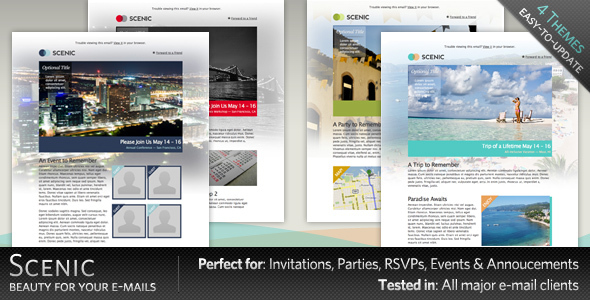
Scenic is an HTML email template sold on ThemeForest for $10, built around photographic background imagery and aimed at event promotion, conference announcements, workshop invitations and RSVP requests. It ships with eight finished HTML files, four layered PSD source files and pre-configured layouts for four event types. It suits small businesses, event organisers and freelancers who need a ready-made, table-based email design they can edit without building one from scratch.
The template comes from a developer trading as index2 and has been purchased 361 times on the marketplace. That is a modest but real sales history rather than a launch-day figure, and it tells a buyer something useful: the file has been in circulation long enough to accumulate a track record, but it is not a high-volume product with an active release schedule behind it.
What Scenic Email Templates Actually Include
The core of the package is eight complete HTML files, one for each layout variation the vendor provides. These are written with inline CSS, which matters more than it sounds. Email clients — Gmail, Outlook, Apple Mail and the rest — strip out or ignore external stylesheets and many style blocks, so a design that depends on a linked CSS file will fall apart in the inbox. Inline styling is the standard workaround, and Scenic uses it throughout.
Four PSD files accompany the HTML. These are layered Photoshop documents, fully labelled and organised, which means a designer can open them, swap the background photograph, adjust the colour treatment and re-export the imagery without guessing which layer does what. For anyone who wants the template to look like their own brand rather than a stock design, the PSDs are the most valuable part of the bundle.
The vendor also supplies pre-configured versions for four specific use cases: conferences, workshops, vacation promotions and RSVP invitations. Each is a starting point rather than a finished campaign, but it removes the blank-page problem. An organiser announcing a two-day conference can open the conference layout, replace the copy and the hero image, and have something sendable in an afternoon.
The layouts themselves are described as expandable, meaning sections can be duplicated or removed to lengthen or shorten the email. That flexibility is what separates a usable template from a fixed design. A single-event invitation needs three sections; a multi-track conference programme needs eight.
The distinctive visual feature is the scenic background imagery — large photographic backdrops behind the content blocks. This is the template’s whole identity, and it is also the thing most likely to need replacing, since stock scenery rarely matches a specific brand.
Where Scenic Email Templates Fit and Where They Do Not
The obvious fit is event marketing. Conferences, workshops, retreats, festivals, product launches with a venue and a date — anything where the email’s job is to make a place look appealing and push a registration. The photographic backgrounds do real work here, because travel and venue marketing depends on atmosphere in a way that a plain transactional email does not.
It also works for hospitality and tourism businesses running seasonal promotions. The vacation layout exists precisely for that, and a hotel or tour operator promoting a destination has an obvious use for large scenic imagery.
A third fit is the freelancer or small agency that gets asked for “a nice invitation email” a few times a year. At $10, the template is cheaper than an hour of design time, and the PSDs mean the output can be adapted rather than sent as-is.
Where it is the wrong choice: transactional email. Order confirmations, password resets, shipping notifications and receipts should be plain, fast-loading and text-forward. A heavy photographic background in a receipt email slows delivery, hurts readability and looks out of place. Anyone shopping for a transactional template should look elsewhere.
It is also a poor fit for teams that need a maintained, actively updated product. The last vendor update is dated February 2010. Email client behaviour has changed considerably since then, and while inline-styled table layouts remain broadly compatible, a buyer should expect to test and patch rather than assume everything still renders correctly everywhere.
Setting Up the Template in Practice
No software licence beyond an image editor is strictly required, but Photoshop or a free alternative such as GIMP or Photopea is needed to work with the PSD files. Without one of those, the buyer is limited to editing the HTML directly and swapping in images produced elsewhere.
The workflow is straightforward. Open the HTML file matching the desired layout, replace the placeholder text and image paths, adjust the links, then send a test to a handful of real inboxes — Gmail, Outlook web, Apple Mail and a mobile client at minimum. The vendor states the template was tested across major email clients for form and functionality, and documents the customisation process, though the depth of that documentation is not specified in the listing.
Realistically, a first customisation takes one to three hours for someone comfortable with HTML, and considerably longer for anyone who is not. The bulk of that time goes into image preparation, not code. Because the design leans on large background photographs, file sizes need watching; a hero image exported at full resolution can push an email past the point where some clients clip it or refuse to load images by default.
Strengths and Limitations of Scenic Email Templates
Strengths
- Eight complete HTML layouts with inline CSS, which is the correct approach for email client compatibility.
- Four layered, labelled PSD files give designers genuine control over the visual identity rather than forcing a fixed look.
- Pre-built versions for conferences, workshops, vacation promotions and RSVPs remove setup friction for the most common event use cases.
- Expandable sections mean the same template can carry a short invitation or a long programme.
- At $10, the cost is negligible against the time saved on layout and testing.
- 361 sales provide a reasonable signal that the files are functional and the purchase is not a gamble.
Limitations
- The last vendor update is February 2010. Anyone buying should assume testing and possible fixes are their responsibility, particularly for newer email clients and dark mode rendering, which did not exist as a design concern when this was released.
- Photographic background images are the template’s signature, but they also make emails heavier and less reliable when images are blocked by default — a common setting in Outlook and some corporate mail systems.
- The design is visually specific. Replacing the scenic imagery with something plainer leaves a layout that was built around a large image and may look sparse without one.
- No responsive or mobile-specific layout is mentioned in the listing. Modern email templates typically include media queries for narrow screens; this one does not state that it does.
- The vendor does not specify which email clients were tested, or when, so the compatibility claim cannot be verified from the listing alone.
How Scenic Compares to Other Email Template Options
The email template category splits roughly into three groups: drag-and-drop builders bundled with an email service, modern responsive template packs, and older fixed-layout HTML files like this one.
Builders inside platforms such as Mailchimp or Brevo are easier to use and handle hosting, list management and delivery, but they lock the design into that platform and typically charge monthly. Scenic is a one-off file that can be used with any sending service, which suits agencies managing multiple clients across different platforms.
Modern responsive template packs generally offer more layouts, documented mobile behaviour and recent compatibility testing. They cost more — often $20 to $60 — and they are the safer choice for anyone who needs confidence that the email renders correctly on a phone without manual work.
Scenic sits in the older, fixed-layout group. Its advantage is the PSD source files, which many cheaper template packs omit entirely, and its price. Its disadvantage is age. A buyer comparing on capability should weigh whether the design flexibility is worth handling compatibility testing personally.
Frequently Asked Questions
Do Scenic Email Templates work with Mailchimp and similar platforms?
Yes, in most cases. The HTML files can be imported into Mailchimp, Brevo, Constant Contact and comparable services using their custom HTML import option, or pasted into a campaign’s code view. The inline styling is what makes this work, since platforms that strip style blocks will still preserve inline CSS. Exact import behaviour varies by platform and is worth testing before a live send.
Is Photoshop required to use this template?
No, but it helps considerably. The four PSD files are layered Photoshop documents, so editing them properly needs Photoshop or a compatible editor such as GIMP or Photopea. Without one, the buyer can still edit the HTML and swap in images created elsewhere, but loses the ability to adjust the layered background compositions the design is built around.
Is Scenic suitable for mobile email?
The listing does not state that it includes responsive or mobile-specific layouts. The table-based, inline-styled structure will render on phones, but without media queries the layout will scale rather than reflow, which can make text small on narrow screens. Anyone prioritising mobile readability should test carefully or consider a newer responsive template.
How old is this template and does that matter?
The vendor’s last update is dated 1 February 2010. Age matters mainly for compatibility: email clients have changed since then, and dark mode, newer Outlook rendering engines and stricter image-blocking defaults were not design considerations at the time. The underlying inline-CSS approach still works, but buyers should expect to test and adjust rather than send straight from the download.
Verdict on Scenic Email Templates
Scenic is worth buying for event organisers, hospitality businesses and freelancers who need a photographic, atmosphere-led email and are comfortable handling their own compatibility testing. The four PSD files and eight layouts represent fair value at $10, and the pre-built conference, workshop, vacation and RSVP versions save real setup time.
It is not the right purchase for anyone who needs guaranteed modern rendering, mobile-first layouts or ongoing vendor support. The 2010 update date makes that a genuine risk rather than a theoretical one. Buyers who want a maintained, responsive product with documented client testing should expect to pay more elsewhere.
For a one-off event campaign where the design does the heavy lifting and the sender is willing to test across inboxes, the template does its job. For a recurring, high-volume email programme, it is a starting point at best.