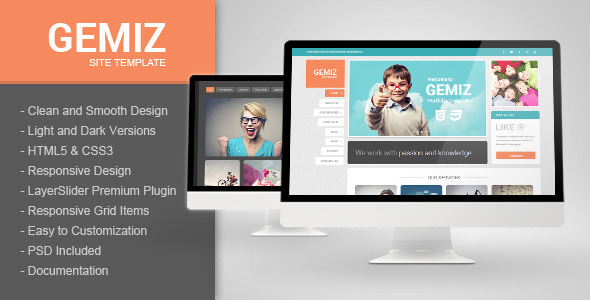
Gemiz is a static HTML portfolio template sold on ThemeForest for $17. It provides a set of pre-built, responsive pages for showing creative work — photography, design, illustration, video — along with a blog, a gallery with filtering, and a working contact form, all in matching light and dark versions. It is aimed at freelancers, small studios and agencies who want a ready-made site they can rebrand quickly rather than build from scratch, and it is most relevant to buyers who are comfortable editing HTML directly. The template comes from developer pophonic and has been purchased 268 times.
What the Gemiz creative template actually gives a buyer
The package is built on standard front-end technology: HTML5 markup, CSS3 styling and jQuery for interaction. Nothing here requires a build tool, a package manager or a server-side framework, which keeps the learning curve low for anyone who has hand-edited a web page before.
The most practical inclusion is the pair of complete colour schemes. Every page exists in a light and a dark variant, so a studio with an existing brand palette can pick whichever base is closer and adjust colours in the stylesheet rather than restyling from zero. For portfolios where images are the main content, a dark canvas often flatters photography, and having that option pre-built saves a meaningful amount of work.
Two homepage slider setups ship with the template. One uses LayerSlider, a premium jQuery slider plugin that supports layered animation and is licensed for use inside the template; the other is a lighter synchronised slider. Both let a site owner lead with a small number of hero images or a showreel without writing animation code.
The portfolio and gallery pages use a responsive media grid plugin, which means the item grid reflows to fit the screen rather than breaking on tablets and phones. The grid can be arranged to suit the work, and visitors can filter items by category — useful when a single page has to hold weddings, product shots and editorial commissions side by side. Individual portfolio entries accept embedded video and SoundCloud audio, which matters for musicians, videographers and anyone whose work is not a still image.
Beyond the portfolio itself, the template includes a blog, a PHP-based contact form that processes submissions without a third-party service, Font Awesome icons, lightbox scripts for enlarging images, a social sharing script, and a full set of PSD source files. The PSDs are the detail that separates a template like this from a bare page kit: a designer can adjust a layout or produce a matching graphic asset in Photoshop before touching the code.
The vendor also notes that the HTML is commented panel by panel, which is a small thing that pays off during editing — a buyer can see where a section starts and ends instead of hunting through unlabelled markup.
Where Gemiz fits, and where it does not
The clearest fit is a solo creative professional or a two- or three-person studio that needs a credible portfolio site live quickly and has someone on hand who can edit HTML and CSS. Photographers, illustrators, motion designers and small agencies all map onto the page types included. Because the blog and social sharing are part of the package, it also suits people who want to publish written work alongside images without bolting on a second system.
It is a reasonable choice for a freelance developer building a client site on a tight budget, too. At $17 with a full PSD set, the template can be rebranded and handed over, and the light and dark variants mean one purchase can serve two different client briefs.
The wrong choice is a buyer who wants a content-managed site. Gemiz is static HTML: there is no admin panel, no database and no way for a non-technical owner to add a project without editing files and re-uploading them. Anyone planning to publish frequently, or handing the site to a client who expects to log in and post, should be looking at a WordPress portfolio theme instead. The same applies to anyone who needs e-commerce, multi-language support or membership features — none of that is in scope here.
What setup involves in practice
The prerequisites are modest but real. A buyer needs a text editor, an FTP client or hosting control panel to upload files, and enough HTML and CSS knowledge to swap demo text, images and links for their own. The included documentation covers the structure, and the commented markup helps, but this is not a drag-and-drop builder.
The contact form is the one piece that needs server configuration. Because it is PHP, it requires hosting with PHP enabled and a working mail setup; on hosts that restrict mail sending, the form may need an SMTP adjustment before messages arrive reliably. That is a hosting question rather than a template flaw, but it is worth confirming before purchase.
For someone comfortable with HTML, replacing the demo content across the main pages is a matter of a few hours. A full rebrand — new colours, new typography, custom slider artwork and a reworked portfolio grid — is realistically a day or two of work. Buyers should also budget time to source their own imagery, since the vendor states plainly that the people and product photos in the demo are for preview only and are not included in the download.
Strengths and limitations of the Gemiz portfolio template
Strengths
- Light and dark versions of every page ship together, so one purchase covers two distinct design directions.
- A premium slider plugin (LayerSlider) is bundled and licensed, which offsets part of the price on its own.
- Portfolio entries support video and SoundCloud embeds, extending the template beyond still-image work.
- Category filtering on the portfolio and gallery makes a large body of work navigable on a single page.
- Full PSD files are included, so layouts and graphics can be adjusted in Photoshop before coding.
- The PHP contact form works without a third-party form service.
- Commented markup and step-by-step documentation lower the cost of customisation.
Limitations
- The template was last updated in March 2016. The bundled jQuery plugins, including the slider and grid libraries, date from that period, and a buyer should expect to review and possibly update them for security and browser compatibility rather than assume they are current.
- There is no content management system. Every project, blog post and image has to be added by editing files directly.
- The demo photography is not included, so the site will not look like the preview until original images are sourced and cropped.
- Bundled third-party scripts add page weight, and a buyer wanting fast load times will need to strip out anything unused.
- Support is handled through the developer’s profile page rather than a ticketing system, and response times are not stated.
How it compares with other portfolio template options
Static HTML templates compete on three things: how much design work is already done, how easy the files are to modify, and how current the underlying code is. Gemiz scores well on the first two. The dual light and dark builds, the bundled premium slider and the PSD set represent more finished design work than many templates at this price, and the commented markup makes the files approachable.
On currency it trails the category. A buyer comparing it with newer HTML templates will find those built on more recent versions of jQuery and modern CSS layout techniques, often with lighter page weight and better accessibility defaults. Gemiz relies on plugin-driven grids and sliders rather than native CSS, which is a common approach for its era but not the leanest option today.
Against WordPress portfolio themes, the trade-off is control versus convenience. A WordPress theme gives a non-technical owner an admin panel and ongoing updates; Gemiz gives a self-contained set of files with no database, no plugin maintenance and no hosting requirements beyond PHP for the form. For a small, rarely changing portfolio, that simplicity is a genuine advantage. For anything that grows, it becomes a limitation.
Frequently Asked Questions
Is Gemiz a WordPress theme?
No. Gemiz is a static HTML5 template, not a WordPress theme. It consists of HTML, CSS, JavaScript and a PHP contact form, and it is uploaded to standard web hosting as a set of files. Anyone who needs an admin dashboard for adding projects or posts should choose a WordPress portfolio theme instead.
Do I need coding skills to use the Gemiz creative template?
Basic HTML and CSS knowledge is effectively required. Content changes mean editing markup directly, and rebranding means adjusting stylesheets. The vendor includes documentation and comments the code panel by panel, which helps, but there is no visual builder. Buyers with no coding experience will need a developer or should pick a different product.
Are the images in the demo included with the template?
No. The vendor states that the people and product photos shown in the preview are for demonstration only and are not part of the download. Buyers must supply their own photography or licensed stock images. The full PSD files are included, so graphics and layout elements can be adapted, but the demo photos cannot be reused.
Does the contact form work out of the box?
It works if the hosting supports PHP and can send mail. The form is a PHP script, so it needs a server with PHP enabled and a functioning mail configuration. On hosts that block or restrict outgoing mail, the recipient address or an SMTP setting may need adjusting before messages are delivered reliably.
Verdict: who should buy Gemiz and who should walk away
Gemiz suits a freelancer, designer or small studio with basic front-end skills who wants a polished, self-contained portfolio live in a day or two and is happy to maintain the files by hand. The light and dark builds, the bundled LayerSlider licence and the full PSD set make $17 easy to justify, and 268 sales with a solid rating suggest buyers have generally got what they expected.
It is the wrong purchase for anyone who needs a content-managed site, expects the vendor to keep bundled libraries current, or cannot edit HTML. The 2016 last-update date is the single biggest caveat: the design still holds up, but the underlying scripts should be reviewed before going live. Buyers who weigh convenience above control should look elsewhere; those who value a clean, editable file set will find this a sensible, low-cost starting point.