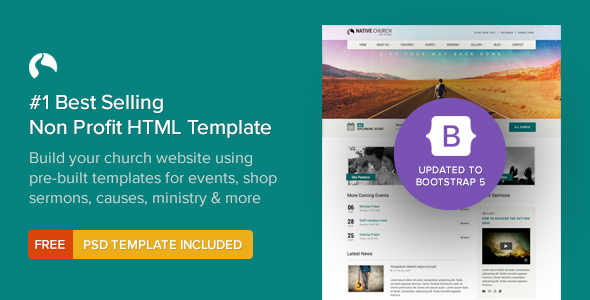
NativeChurch is a responsive HTML5 template built for churches, charities, mosques and other religious or nonprofit organisations that need a complete website without starting from a blank page. It ships with more than 32 prebuilt pages, sermon audio and video support, an events calendar, gallery layouts and shop templates, and it is sold on ThemeForest for $18 under the imithemes author account. The NativeChurch Nonprofit package suits small congregations, community groups and freelancers building on a tight budget who are comfortable working directly with HTML, CSS and JavaScript.
Sermon Media, Events and Galleries: What the NativeChurch Nonprofit Template Actually Delivers
The feature that separates this template from a generic business theme is its handling of sermon content. Audio and video files can be embedded on dedicated sermon pages, and the template includes a sermon albums page for grouping talks into series. For congregations that publish weekly recordings, that structure saves a meaningful amount of layout work compared with assembling media pages by hand.
Events are handled through FullCalendar, a widely used JavaScript calendar library, alongside a dedicated events listing page and an upcoming events countdown timer. The practical result is that a visitor can see a month view of services, fundraisers and community gatherings, while a countdown on the homepage draws attention to the next major date. A featured event widget is also included on the events list page.
Visual content gets similar attention. The template offers seven gallery page types, including Isotope-powered sorting galleries that let visitors filter images by category without a page reload, plus FlexSlider and Nivo slider options with touch and swipe support for mobile devices. Ten prebuilt colour schemes are included, with unlimited custom colours available through the stylesheet, and both boxed and wide layout options are provided.
Beyond the core nonprofit features, the package includes three shop templates, blog and events timeline layouts, a mega dropdown menu, Google Maps integration, a working contact form, a Twitter feeds widget and Font Awesome icon support. The template is built on Twitter Bootstrap, is retina ready, uses valid HTML5 markup and the vendor describes it as SEO optimised. Eight fully layered PSD files are bundled for designers who want to modify the visual design before coding.
Where the NativeChurch Nonprofit Template Fits, and Where It Does Not
This template is a strong match for a single congregation or a small charitable organisation that wants a brochure-style site with a sermon archive, an events calendar and a photo gallery. It also works for a freelancer or small agency delivering a fixed-scope church website on a short timeline, because the page inventory covers most of what a religious organisation publishes: ministries, causes, sermons, events, staff and contact details.
The vendor tags also list political and corporate use, and the template does include portfolio and corporate page variants. A campaign site or a small business site could technically be assembled from the same files, though the visual language leans toward religious and charitable organisations, and a buyer choosing it for an unrelated sector would be working against the design rather than with it.
The clearest case where this is the wrong purchase is a project that needs a content management system. NativeChurch is a static HTML template, not a WordPress theme, so there is no admin dashboard, no database and no plugin ecosystem. Anyone who needs non-technical staff to publish sermons weekly without touching code should look at a CMS-based option instead. The same applies to organisations that need member logins, online giving with recurring donations, or multilingual content management, none of which a static template provides out of the box.
Setting Up the NativeChurch Nonprofit Template in Practice
Installation is a file-copy exercise rather than a guided wizard. The buyer downloads a ZIP archive from ThemeForest, extracts it, and opens the HTML files in an editor such as Visual Studio Code or Sublime Text. From there, the workflow is to duplicate the page that most closely matches the required layout, rename it, and edit the markup directly. Text, images and links are changed in the HTML; colours and typography are changed in the stylesheet.
Prerequisites are modest. A code editor and a basic understanding of HTML and CSS are enough to get a site live. Knowledge of JavaScript helps when adjusting slider behaviour or the calendar, but the vendor ships documentation intended to make editing straightforward, and the bundled PSD files help designers plan changes before touching code. Images shown in the live preview are not included in the download, so a buyer needs to supply their own photography or licence stock images separately.
A straightforward five-page church site can realistically be assembled in a day or two by someone who already knows HTML. A full build using the sermon archive, events calendar, galleries and shop templates is a larger job, and the calendar in particular needs event data entered in the format the FullCalendar script expects. Support runs through the vendor’s ticket system, and buyers must register using their Envato account to access it.
Strengths and Limitations of the NativeChurch Nonprofit Template
Strengths
- Sermon audio and video pages plus a sermon albums structure, which most general-purpose templates do not include.
- FullCalendar events system with a listing page, countdown timer and featured event widget.
- Seven gallery layouts, including filterable Isotope galleries, for photo-heavy community sites.
- 32 or more prebuilt pages covering ministries, causes, events, sermons and contact.
- Eight layered PSD files included, which is unusual at this price point.
- Bootstrap 5 and RTL versions were added in the v2.0 release, so the codebase is not stuck on an obsolete framework.
- 1,671 sales on ThemeForest give a reasonable signal that the template has been used and maintained over time.
Limitations
- It is a static HTML template, so there is no CMS, no database and no admin interface for non-technical editors.
- Preview images are not included, adding a real cost for buyers who do not already own suitable photography.
- Revolution Slider is bundled as a jQuery plugin, and the vendor does not state whether the licence covers future major versions of that plugin.
- The changelog shows long gaps between updates, including a stretch from 2017 to 2021, so buyers should not expect rapid iteration.
- Shop templates are included, but there is no stated integration with a payment gateway or ecommerce platform, so they function as styled page layouts rather than a working store.
- The vendor does not publish a stated browser support matrix beyond “all latest browsers”, which is difficult to verify.
How the NativeChurch Nonprofit Template Compares With the Wider Category
Static HTML templates and CMS themes occupy different positions in the market, and the choice between them matters more than the choice between individual products. A CMS theme gives non-technical staff the ability to publish sermons, events and news without developer involvement, and it usually connects to plugins for donations, newsletters and SEO. A static template gives full control over markup, faster page loads on cheap hosting, and no ongoing platform maintenance or security patching.
Within the static template category, NativeChurch Nonprofit competes on breadth. Many HTML templates aimed at churches cover the homepage, an about page and a contact form, then stop. This one goes further with sermon media pages, a functioning calendar, filterable galleries and shop layouts, which reduces the amount of custom page building required. Against general-purpose corporate templates, it wins on fit rather than raw page count: the content structure already matches what a congregation publishes, so less time is spent deleting sections that do not apply.
Where it loses is flexibility for teams. A CMS-based alternative costs more upfront and carries hosting and maintenance overhead, but it removes the developer from routine publishing. Buyers weighing the two should decide first whether the site will be edited by a developer or by volunteers, because that answer determines the category before price or features are considered.
Frequently Asked Questions
Is NativeChurch a WordPress theme or an HTML template?
It is a static HTML5 template, not a WordPress theme. The download contains HTML, CSS, JavaScript and PSD files that are uploaded to any web host and edited in a code editor. There is no WordPress installation, no database and no admin dashboard, so content changes are made directly in the markup rather than through a browser interface.
Does the NativeChurch Nonprofit template include a donation or payment system?
No working payment system is included. The template provides causes pages and three shop templates that can display fundraising campaigns or products, but the vendor does not state any integration with a payment gateway or donation platform. Any online giving would need to be added separately, typically through an embedded third-party donation form or an external link.
Can sermon audio and video files be hosted inside the template?
No, the template only provides the player and page layout. Audio and video files must be hosted elsewhere, such as a media server, a podcast host or a video platform, and then embedded or linked from the sermon pages. The template supplies the audio player component and the sermon albums page structure, not the media storage itself.
How much does the NativeChurch Nonprofit template cost and what support is included?
The template sells for a one-time $18 on ThemeForest. Support is delivered through the vendor’s dedicated ticket system, and buyers must register using the Envato account used for the purchase to gain access. Standard marketplace terms apply, so support covers template-related questions rather than custom development or third-party plugin issues.
Verdict on the NativeChurch Nonprofit Template
Buyers who should purchase this are developers, freelancers and technically confident church volunteers building a static site for a congregation, charity or religious organisation that needs a sermon archive, an events calendar and photo galleries. At $18 with more than 1,600 sales and a Bootstrap 5 update in the changelog, the value proposition is clear for that audience. Buyers who should not purchase it are organisations that need non-technical staff to publish content regularly, or that require member accounts, recurring donations or multilingual management, because a static template cannot deliver those without significant custom work. The deciding question is who will maintain the site after launch: if the answer is a developer, this template is a sensible fit; if the answer is a volunteer with no coding background, a CMS-based option will serve the organisation better over time.