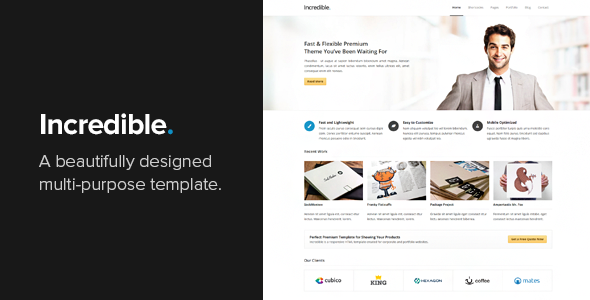
Incredible is a responsive HTML template built for corporate and portfolio websites, sold on ThemeForest for $17. It is a static front-end template rather than a WordPress theme, which means it ships as a set of HTML, CSS and JavaScript files that a developer wires into a site by hand. It suits freelancers and small studios producing brochure-style marketing pages or creative showcases where a clean, minimal look matters more than a content management system.
The template comes from Vasterad, a developer with a long track record on the marketplace, and the listing has drawn 1,798 sales. That is a solid but not exceptional figure for a business template of this age, and it points to a product with a settled, loyal audience rather than a runaway bestseller. Buyers should read the feature set carefully before purchasing, because the value here depends entirely on whether the project needs a hand-coded build.
What the Incredible business template actually includes
The core of the package is a set of 18 HTML pages. That covers the usual ground for a corporate site: several home page variations, an about page, a services page, pricing tables, a shortcodes reference page, a full-width layout, a blog index, a single post template, multiple portfolio layouts, a single project page and a contact page. Having multiple home and portfolio variants is more useful than it sounds, because it lets a project pick a layout that matches the content volume instead of stretching one design across every scenario.
Layout sits on a 960-pixel grid, which is the classic fixed-width approach. The grid keeps spacing consistent across pages and makes it straightforward to drop in new sections without breaking alignment. The trade-off is that a fixed grid is less fluid than a modern flexbox or CSS grid system, so unusually wide content or very large screens will show more empty margin than a newer template would.
Interactivity is handled with jQuery. Two pieces stand out. Portfolio filtering lets visitors narrow a project list by category without a page reload, which is a genuine convenience on a portfolio with more than a handful of items. The image lightbox opens images in an overlay and scales them to the viewport, so a photography or design portfolio can show large previews without leaving the page.
The contact form submits through Ajax with PHP handling on the server. That means messages send without a full page refresh, and the visitor sees inline feedback. It also means the site needs a PHP-capable host, since the form will not function on purely static hosting.
Two widget blocks are bundled: a latest tweets feed and a Flickr image strip. Both depend on third-party services and API credentials, so they are only worth enabling if the project genuinely uses those platforms. The listing credits a Twitter 1.1 OAuth library among its resources, and Twitter’s API terms have changed substantially since libraries of that generation were written, so anyone relying on the tweets widget should expect to verify or replace it.
Rounding out the package are custom shortcodes for common page elements, pricing table markup, a CSS dropdown menu that works without JavaScript, and cross-browser compatibility work. The download also includes 12 PSD files and documentation. The PSDs matter more than they might appear: they let a designer restyle the template in Photoshop before touching code, which is often faster than editing CSS blind.
Where this template fits and where it does not
The strongest fit is a small business or agency site that needs to go live quickly with a polished, understated appearance. A consultancy, a design studio, a training company or a professional services firm with five to fifteen pages will find the page set covers almost everything without custom layout work. The portfolio variants make it a reasonable choice for a creative freelancer who needs to present case studies alongside a services page and a blog.
It also works well as a starting point for a developer who wants a known-good HTML foundation and intends to modify it heavily. The grid, the shortcode set and the PSDs give enough structure to build on without fighting the original design.
Where it is the wrong choice is any project that needs a content management system out of the box. There is no WordPress version, no admin panel and no database layer. A client who wants to edit their own pages without touching code will need a separate CMS integration, which adds cost and complexity that the $17 price does not reflect. The same applies to e-commerce, membership sites, multi-language setups and anything requiring user accounts. Those are not gaps in the template; they are simply outside what a static HTML package does.
A second poor fit is a project with a very large content archive. A blog with hundreds of posts, or a portfolio with dozens of filterable projects, will need pagination, search and taxonomy logic that the template does not provide. It offers the presentation layer, not the application.
Setting up the Incredible template in practice
Installation is a file copy, not an installer. The buyer downloads a ZIP from ThemeForest, extracts it, and uploads the HTML, CSS, JavaScript and image folders to a web host. Opening the main HTML file locally in a browser will render the design immediately, which makes it easy to preview before committing to a server.
Prerequisites are modest but real. A code editor is needed for any text changes. A PHP-capable host is required if the Ajax contact form is to work, along with an email address configured for the mail function. If the tweets or Flickr widgets are used, API keys or account credentials are needed for each service. No build tools, package managers or command-line setup are involved, which keeps the barrier low for anyone comfortable with HTML.
Realistic time to a working site depends on how much of the content is ready. Swapping text, images and logo across the standard pages is a few hours of work for someone fluent in HTML and CSS. Restyling colours, typography and spacing takes longer, particularly if the PSDs are used for the design pass first. Wiring in a CMS, if required, is a separate project measured in days rather than hours. The documentation shipped with the template covers the basics; the vendor does not state how extensive it is beyond that.
Strengths and limitations of this business template
Strengths
- Eighteen ready-made pages cover the standard corporate and portfolio structure, so most projects need no new layouts.
- Multiple home and portfolio variations allow the design to match the amount of content rather than the other way around.
- Portfolio filtering and a responsive lightbox give the site a level of interactivity that plain static pages lack.
- The 960 grid keeps alignment consistent and predictable across pages.
- Twelve PSD files let a designer restyle the design before writing any CSS.
- The CSS dropdown menu degrades gracefully when JavaScript is unavailable.
- Buyer feedback on the listing repeatedly highlights fast, direct support from the developer, which is unusual for a template at this price.
Limitations
- It is a static HTML template with no CMS, so non-technical clients cannot edit content themselves without an added system.
- The Ajax contact form requires PHP hosting and configured mail; it will silently fail on static hosting platforms.
- The bundled tweets widget relies on an older Twitter API library, and that integration should be treated as needing verification or replacement.
- The fixed 960-pixel grid is dated next to fluid or CSS grid layouts, and leaves wide margins on large displays.
- No e-commerce, membership, multi-language or search functionality is included.
- jQuery is a dependency throughout, which adds a script load that a modern vanilla JavaScript build would avoid.
How it compares with other business templates
The main decision is not which HTML template to pick, but whether an HTML template is the right category at all. A WordPress business theme costs more, typically in the $40 to $70 range, but includes an admin panel, plugin compatibility and a content model. For a client-managed site, that difference usually outweighs the price gap within the first round of content edits.
Against other static HTML templates, the comparison comes down to page count, design restraint and how much of the package is reusable. Eighteen pages plus twelve PSDs is a generous bundle at $17, and the minimal aesthetic ages better than heavily styled alternatives that date quickly. Templates built on Bootstrap or Tailwind bring a modern utility framework and a larger ecosystem of components, but they also bring a learning curve and a heavier asset payload. This one stays close to plain HTML and CSS, which makes it easier to read and modify for anyone without framework experience.
The other axis is support. Many low-cost templates are abandoned shortly after release. This one was last updated in August 2024, and buyer reviews specifically praise the developer’s responsiveness. For a template being used on a live client site, that reliability is worth more than a marginally richer feature list.
Frequently Asked Questions
Is Incredible a WordPress theme or an HTML template?
It is a static HTML template, not a WordPress theme. The download contains HTML, CSS, JavaScript and image files plus PSDs, with no PHP theme files, no admin panel and no database. It can be converted into a WordPress theme by a developer, but that work is not included and would need to be budgeted separately.
Does the contact form work without a server?
No. The Ajax contact form relies on PHP running on the host to process and send messages. On static hosting services that only serve files, the form will not deliver anything. A PHP-capable host and a configured sending address are both required before the form functions correctly.
Can the Incredible business template be used for an online store?
Not on its own. There is no cart, checkout, product catalogue or payment integration in the package. It can serve as the front end for a store if a separate e-commerce platform handles transactions and the template is adapted to link into it, but that integration is custom work rather than a built-in capability.
How much does the template cost and what support comes with it?
The listed price is $17 as a one-time purchase on ThemeForest. Support is provided by the developer, Vasterad, and buyer reviews on the listing consistently describe quick replies with practical fixes rather than generic responses. The vendor does not state a formal support period, so the duration of assistance should be confirmed before purchase.
Verdict
Buy this template if the project is a brochure-style corporate or portfolio site with a manageable number of pages, the content is largely fixed, and someone on the team is comfortable editing HTML and CSS. The page count, the PSDs and the active developer support make it good value at $17. Do not buy it if the client expects to edit their own content, if the site needs a store or membership area, or if the plan is to build on a modern utility framework. In those cases a WordPress business theme or a framework-based template will cost more upfront but save considerably more later.