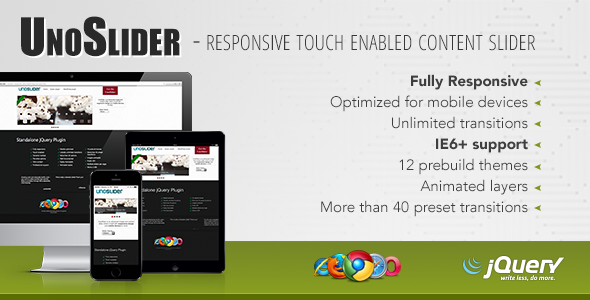
UnoSlider is a jQuery-based content slider plugin that adds responsive, touch-enabled slideshows to a website, with animated layers and a transition system that the developer describes as effectively unlimited. It is sold on ThemeForest for $10 and was built by Unodor, the same author behind other front-end items on the marketplace. It suits freelancers and small agencies who need a lightweight, self-hosted slider they can restyle to match a client’s brand, rather than a hosted slideshow service.
What UnoSlider javascript actually delivers in the browser
The core of the plugin is its transition engine. Instead of a fixed menu of named effects, UnoSlider javascript generates transitions from parameter combinations, which is why the vendor can claim an unlimited number. In practice that means a site owner is not restricted to the twenty or thirty stock animations most slider scripts ship with; the effect can be tuned until it matches the motion language of the rest of the site. More than 40 preset transitions are included as starting points, so a working slider can be assembled without touching the transition parameters at all.
Animated layers are the second capability worth understanding. A layer is any element — a heading, a paragraph, a button, an image — placed on top of a slide and given its own entrance and exit animation. Because layers animate independently of the slide transition, a single slide can stage a sequence: the background image moves in, then the headline fades up, then a call-to-action button slides in from the side. This is the feature that separates a content slider from a plain image rotator, and it is the reason the plugin is aimed at marketing pages rather than photo galleries alone.
Touch support and a mobile-optimised interface mean the slider responds to swipe gestures on phones and tablets rather than relying on arrow buttons that are awkward on a small screen. Responsiveness is handled automatically, and version 1.7 added the ability to build a full-width slider, which matters for hero sections that need to span the viewport edge to edge.
Beyond the visual features, the plugin ships with more than 30 global options and a separate set of per-slide options, so individual slides can override the defaults — useful when one slide needs a longer display time or a different transition than the rest. There is an image preloader to stop slides flashing in half-loaded, support for multiple sliders on a single page, and a public API for controlling the slider from other scripts. Content is plain HTML, which means text inside slides remains selectable and indexable rather than being baked into an image. Twelve prebuilt themes are included, and the styling is exposed enough to be overridden with custom CSS.
Where this slider fits and where it does not
UnoSlider is a reasonable fit for a small business site, a portfolio, a landing page or a WordPress theme build where the developer wants a slider that can be dropped in and themed. The $10 price makes it easy to justify on a single client project, and the HTML content support means it can carry promotional copy and buttons, not just photographs. Agencies that build several sites a year will find the theming system and the layer editor more useful than a one-off purchase suggests, because the same configuration approach carries across projects.
It is the wrong choice for anyone who wants a slider managed entirely from a CMS admin screen without touching code. UnoSlider is a JavaScript plugin, not a WordPress plugin, so integrating it into a WordPress site means enqueueing the script, writing the markup and handling the slide data yourself or through a custom field setup. A site owner with no development help should look at a hosted slideshow service or a dedicated WordPress slider plugin instead.
It is also a poor fit for projects that need a modern build pipeline. The plugin predates the widespread move to module bundlers and component frameworks, and the vendor’s last update was in January 2015. Anyone building in React, Vue or a similar framework will find that a native component or a current library integrates far more cleanly than a jQuery plugin from that era.
Setting UnoSlider up on a real project
Installation assumes a working knowledge of HTML, CSS and jQuery. The basic steps are to include the plugin’s JavaScript and stylesheet after the jQuery library, add a container element with the slide markup inside it, and initialise the slider with a configuration object. The vendor provides an installation video and documentation, and the changelog shows several releases dedicated to fixing documentation typos, which suggests the docs have been maintained rather than abandoned.
Prerequisites are modest: a jQuery dependency, a place to host the plugin files, and enough CSS confidence to adjust the twelve themes or write custom styles. There is no build step and no package manager involved. A straightforward image slider with default settings can be running in well under an hour. A layered hero slider with custom transitions, tuned timing and brand-matched styling is a half-day job for someone comfortable with the plugin, and longer for a first-time user working through the layer options.
The practical friction point is the age of the codebase. jQuery 1.11 and 2.1 compatibility arrived in version 1.6, and nothing in the changelog indicates testing against the jQuery versions in use today. A developer should expect to verify behaviour against the jQuery release their site already loads, and to check that the touch handling still behaves correctly on current mobile browsers.
Strengths and limitations
Strengths
- The transition system is genuinely open-ended rather than a fixed list, which gives more control over motion than most sliders at this price.
- Animated layers allow staged, multi-element sequences within a single slide, which is what marketing hero sections usually need.
- Touch and swipe support plus automatic responsiveness cover mobile without extra work.
- Global and per-slide options mean one slide can behave differently from the rest without duplicating configuration.
- HTML content keeps slide text selectable and readable by search engines.
- Twelve prebuilt themes and a public API give both a fast starting point and an escape hatch for custom behaviour.
- At $10, the cost is low enough that a single successful project pays for it many times over.
Limitations
- The most recent vendor update is from January 2015. There is no indication of testing against current jQuery releases or recent browser versions, so compatibility is the buyer’s responsibility to verify.
- It is a standalone JavaScript plugin, not a WordPress plugin or a page-builder module, so CMS integration requires custom development.
- There is no visual drag-and-drop editor. Slides and layers are configured in code, which raises the skill floor compared with admin-driven sliders.
- Documentation quality is only as good as the vendor’s last pass; the changelog records repeated typo fixes, which hints the docs have needed attention over time.
- Older browser support extends back to IE6 and IE7 with stated limitations, but that legacy support is of little value on modern projects and does not offset the age of the code.
How UnoSlider compares with the wider slider category
The slider market splits roughly three ways: hosted services, CMS plugins with visual builders, and standalone JavaScript libraries. Hosted services are the easiest to run but add a recurring cost and an external dependency, and they generally offer less control over transitions. CMS plugins win on convenience for non-technical editors but tie the slider to one platform and often bundle far more code than the page needs.
UnoSlider sits firmly in the standalone library group, competing on transition flexibility and layer animation rather than on ease of use. Against a general-purpose animation library, it offers a narrower, more opinionated feature set — slides, layers, transitions, touch — which means less setup work for the specific job of building a slideshow. Against a modern lightweight slider library, its advantage is the layer system and the breadth of preset transitions; its disadvantage is that it carries jQuery as a dependency and has not been refreshed in a decade.
For a developer already running jQuery on a site, that dependency costs nothing and the plugin is a straightforward addition. For a project with no jQuery, the calculation changes: adding a full library to support one slider is harder to justify when current alternatives exist.
Frequently Asked Questions
Is UnoSlider free or paid?
UnoSlider is a paid commercial plugin sold on ThemeForest for a one-time price of $10. There is no free version and no subscription. The licence covers use on a project, and buyers should check the marketplace’s standard licensing terms for how many sites a single purchase permits.
Does UnoSlider work with WordPress?
Not directly. UnoSlider is a standalone jQuery plugin rather than a WordPress plugin, so it has no admin screen or shortcode. Using it in WordPress means enqueueing the script and stylesheet through the theme or a custom plugin, then outputting the required markup and slide data manually.
Is UnoSlider still maintained?
No. The vendor’s last recorded update is version 1.7 in January 2015, which added full-width slider support. No later releases appear in the changelog. The plugin still functions as written, but buyers should treat compatibility with current jQuery and browser versions as something they need to test themselves.
Can UnoSlider show more than one slider on the same page?
Yes. Multiple sliders on one page is a stated feature, so a site can run a hero slider and a separate gallery slider simultaneously. Each instance is initialised independently, which also means each can carry its own options and transitions without affecting the others.
Verdict
UnoSlider is worth buying for developers and agencies who already work in jQuery and want a slider with unusually deep transition control and a proper layer animation system. At $10, with roughly 9,660 sales on ThemeForest and a strong rating behind it, the risk is low and the feature set is broader than the price suggests. It is not the right pick for site owners who need a visual editor, for WordPress users who want slider management from the dashboard, or for teams building on modern JavaScript frameworks. The absence of updates since 2015 is the single biggest consideration — buyers should plan to test it against their jQuery version and current mobile browsers before committing it to a client project.