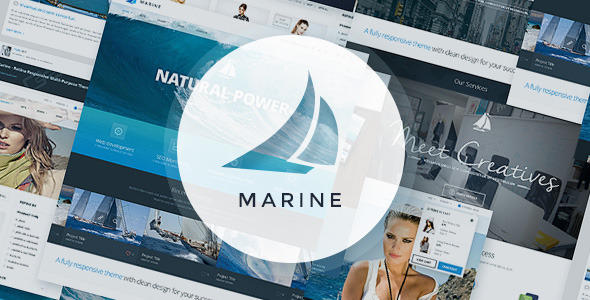
Marine PSD Template corporate is a layered Adobe Photoshop design kit for business, agency and portfolio websites, sold on ThemeForest by the developer louisdesign. It ships as 35 separate .psd files covering homepages, blogs, portfolio layouts, an online shop and supporting pages, all built on a 1170px twelve-column grid. It is aimed at designers and studios who want to build a corporate site mockup or hand off a visual design to a developer, rather than at site owners looking for something they can install and run.
What the Marine PSD Template corporate package actually contains
The headline number is 35 PSD files, and the spread is wider than the count alone suggests. Four separate homepage layouts are included, which matters because corporate projects rarely settle on a single structure in the first round of client feedback. Having four starting points means a designer can present genuinely different directions without rebuilding the grid from scratch each time.
The inner pages fall into recognisable groups:
- Company pages. About Us, Team Member, Services, FAQ, Contacts and Contacts Basic, plus a 404 error page and a side navigation layout.
- Blog layouts. A grid index, a list-style index, a basic title variant, a single post template and a timeline view — five distinct ways to present editorial content.
- Portfolio layouts. Full width, one column, one column with sidebar, two columns, three columns with sidebar, four columns, plus basic and extended single-item pages. That is eight portfolio arrangements, which is unusually thorough for a template at this price.
- Ecommerce screens. Shop index, shop categories, product detail, cart, empty cart and checkout.
- Component sheets. Headers, shortcodes and sliders, provided as standalone files so common elements can be found and reused across pages.
Every file is fully layered, and interactive elements — buttons, menus, text fields — are grouped together. In practice that grouping is the difference between a template a designer can restyle in an afternoon and one that turns into a layer-hunting exercise. The design uses a twelve-column grid at 1170px width, which is the standard desktop container most front-end frameworks assume, so translating the layout into HTML and CSS is comparatively predictable.
Typography relies on three Google web fonts: Open Sans, Montserrat and Nella Sue. Because the first two are free and widely available, there is no licensing cost to reproduce the design. The files were authored in Adobe Photoshop CC and the vendor states they should open in other Photoshop versions.
Where this template fits, and where it does not
The strongest fit is a design studio or freelance designer producing a corporate or agency website concept. The nautical-leaning demo imagery suggests a marine, yachting or travel business, but the underlying grid is neutral enough that the same layouts work for a consultancy, a law firm or a creative agency with a different photo set. The four homepage variants and eight portfolio variants are the real selling point here: a designer pitching three directions can do so from one purchase.
It also suits a front-end developer who has been handed a visual concept and wants a realistic reference for spacing, type scale and component states before writing markup. The headers, shortcodes and sliders sheets are useful for that.
The wrong choice is anyone who wants a working website. This is a design file package, not a theme. There is no HTML, no CSS, no WordPress installation and no page builder. A site owner without Photoshop skills, or without budget to hire someone who has them, will get nothing usable from this purchase. It is also a poor fit for teams that have standardised on Figma or Sketch, since converting layered PSDs into those tools is manual work and rarely clean.
What is involved in getting started
Setup here means opening files, not installing software. The prerequisites are an Adobe Photoshop licence and enough familiarity with layers, groups and smart objects to navigate a well-organised document. Anyone comfortable with Photoshop can open a homepage file and begin swapping content within minutes.
The first real task is replacing the placeholder imagery. The vendor is explicit that all photographs are for demonstration only and are not included in the purchase, so a buyer must source their own. That is normal for this category but it is worth budgeting for, because the demo relies heavily on large hero images and the layouts look sparse until equivalent photography is dropped in.
Next comes adapting the grid content to the actual brand — colours, type, logo, navigation labels — then exporting assets for the developer. A single page can be adapted in an hour or two. Working through a full corporate site of ten to fifteen pages, including the shop screens, is realistically a few days of design time. The vendor offers support by email and through their profile page for questions or customisation requests, though no response time is stated.
Strengths and limitations
Strengths
- Thirty-five layered files at $10 works out to well under a dollar per page layout, which is unusually good value for a corporate PSD kit.
- Eight portfolio variations and five blog variations cover most content-heavy business sites without additional design work.
- Grouped interactive elements make slicing and handoff noticeably faster than in loosely organised files.
- The 1170px twelve-column grid maps cleanly onto common CSS frameworks, reducing guesswork during development.
- All three fonts are free Google web fonts, so there is no hidden typography cost.
- A 379-sale count and a long-standing presence on the marketplace give some indication that buyers have found it workable.
Limitations
- The last vendor update was June 2014. The layouts reflect design conventions of that period — heavier use of flat colour blocks and larger static hero areas — and do not include modern patterns such as dark-mode variants or mobile-first artboards.
- No mobile or tablet layouts are listed among the 35 files, so responsive behaviour has to be designed from scratch.
- All demo images are excluded from the purchase, and the credits list runs to dozens of external sources, meaning every visual must be replaced.
- There is no Figma, Sketch or Adobe XD version. Teams working outside Photoshop face a manual conversion.
- The shop screens are static mockups only; no ecommerce logic, states or edge cases are documented.
- Support is offered informally by email with no stated service level.
How it compares with other corporate PSD templates
The corporate PSD category splits roughly into two groups: single-purpose kits with a handful of pages, and large multipurpose bundles that try to cover every page type a business might need. Marine sits firmly in the second group. Its page count and portfolio depth are closer to a bundle than to a $10 single-layout file.
Where it diverges from newer alternatives is currency. Templates released in the years since tend to ship with mobile artboards, design-token documentation and sometimes a companion Figma file. Marine offers none of those. What it does offer is breadth at a very low price, and a grid structure that is straightforward to extend. For a designer who is comfortable filling those gaps, the trade-off is favourable. For a team that needs responsive artboards out of the box, a newer kit will save more time than the price difference is worth.
Against a custom design engagement, the comparison is simply cost against originality. Marine provides a competent starting structure, not a bespoke identity, and any studio using it should expect to do meaningful visual work to avoid producing something that looks like the demo.
Frequently Asked Questions
Is the Marine PSD Template a WordPress theme?
No. It is a set of layered Adobe Photoshop files, not an installable theme. There is no PHP, no CSS and no WordPress integration of any kind. Buyers receive design source files that must be converted into a working website by a developer, or used purely as a visual mockup for client approval.
Does the Marine PSD Template include mobile or responsive layouts?
No mobile or tablet artboards are listed among the 35 files. The design is built on a fixed 1170px twelve-column desktop grid. Responsive behaviour has to be designed separately, either by the buyer or by the developer implementing the build. This is one of the clearest gaps compared with templates released after 2014.
Are the images shown in the Marine PSD Template demo included?
No. The vendor states plainly that all photographs are for demonstration purposes only and are not part of the purchase. The credits section lists dozens of external image sources. Buyers need to supply their own licensed photography, and should budget for that cost alongside the $10 template price.
Which Photoshop version is needed to open the Marine PSD Template files?
The files were created in Adobe Photoshop CC, and the vendor states they should open in other Photoshop versions. In practice, any reasonably recent version of Photoshop should handle the layered documents. Very old releases may struggle with some layer effects, so testing one file before committing to a full project is sensible.
Verdict
Marine PSD Template corporate is worth buying for designers and small studios that need a broad, well-organised set of corporate page layouts and are comfortable working in Photoshop. The portfolio and blog variations alone justify the price, and the grouped layers make handoff faster than most files at this level. It is not suitable for site owners without Photoshop skills, for teams working in Figma or Sketch, or for anyone who needs responsive artboards and current design conventions out of the box. The 2014 update date is the single biggest consideration: treat this as a structural starting point that needs modernising, not a finished design system.