Rapture is a premium Tumblr theme sold on ThemeForest for $32, built by developer ChristineWilde. It gives a Tumblr blog a custom front end with an optional jQuery image slider, a configurable sidebar of widgets, and an options panel for fonts, analytics and social links, without requiring the owner to edit template code. It suits bloggers, photographers and small businesses who want a more polished Tumblr presence than the free themes provide, and it has sold 271 copies.
What the Rapture Blog theme actually does
The core proposition is control without code. Tumblr’s default themes are deliberately plain, and customising them usually means editing HTML. Rapture moves most of the common changes into Tumblr’s own Appearance menu, where each option appears as a checkbox, dropdown or text field. That matters because it lowers the technical barrier: a blog owner can change fonts, toggle widgets and swap social icons without touching a template file.
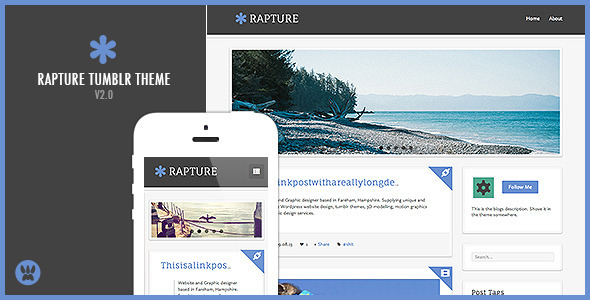
The most visible feature is the image slider. It sits at the top of the blog and cycles through images with captions, which makes it useful for photography, design work or product shots. Crucially, it can be switched off entirely from the options panel. A text-heavy personal blog that does not want a carousel is not forced into one, which is a sensible design decision that many premium themes overlook.
The sidebar is where the theme concentrates most of its functionality. It supports a Posts I Like widget, a latest Twitter feed, a Flickr photostream feed, a tag cloud, and an affiliate banners area where images are uploaded through the options panel rather than hard-coded. Each of these can be turned on or off individually, so the sidebar can range from a dense information column to almost nothing. For a Rapture Blog used as a business site, the affiliate banner slot is the most commercially relevant piece; for a personal blog, the Flickr and Twitter feeds do the work.
Beyond the sidebar, the theme supports all Tumblr post types — text, photo, quote, link, chat, audio and video — and assigns a distinct icon to each so visitors can tell them apart at a glance. Comments run through Disqus, enabled by entering an account name in the options panel. Sharing uses ShareThis links for Facebook, Twitter and Google+, and there are separate buttons in the post sidebar for posting straight to Facebook or Twitter. The theme also supports Tumblr Pages, Ask and Submit, which means contact pages, about pages and reader submissions all work within the design.
Smaller details round out the package: a scroll-to-top button, an author name and avatar block that can be hidden, a choice of ten Google Fonts, a PrettyPhoto lightbox for viewing images at full size, and a field for a Google Analytics ID so tracking can be added without editing code. The vendor also lists documentation and free updates as part of the purchase.
Where Rapture fits, and where it does not
Rapture is a good match for a portfolio-style Tumblr where images lead. Photographers, illustrators and designers who post work regularly can use the slider for featured pieces and the PrettyPhoto viewer for full-size viewing, and the post-type icons keep a mixed feed readable. It also works for a group blog or a small business blog that wants a sidebar carrying social proof, feeds and promotional banners alongside the writing.
Personal blogs benefit from the toggles. Someone who wants a clean single-column reading experience can disable the slider and most widgets and end up with something close to a minimal theme, while still keeping the typography controls and the Disqus comments.
The wrong choice is a Tumblr site that needs to feel current. The theme was last updated in February 2014, and that date is the single most important fact in this review. Web design conventions have moved on considerably since then: the slider pattern, the dense multi-widget sidebar and the Google+ sharing button all read as products of their era. Anyone building a new Tumblr presence in a competitive niche, or a brand that needs to look contemporary, should treat Rapture as a period piece rather than a modern starting point. It is also a poor fit for anyone who wants a block-based or highly editorial layout, since Tumblr’s newer theme options and modern premium themes address that need directly.
Setting up the Rapture Blog theme
Installation follows the standard Tumblr route for premium themes. The buyer downloads a file from ThemeForest, then pastes the theme’s HTML into Tumblr’s theme editor, either by using the “Edit HTML” panel and replacing the existing code, or by restoring from a file. The vendor provides a written help file and a video tutorial covering this process, which is helpful because the Tumblr theme editor is unforgiving if a step is missed.
Prerequisites are modest: a Tumblr account with a blog already created, and the theme files. No hosting, database or server access is involved, since Tumblr handles all of that. Optional integrations require their own accounts — a Disqus account for comments, a Google Analytics property for tracking, and Twitter and Flickr credentials if those feeds are wanted.
Configuration happens in Tumblr’s Appearance menu, where the theme’s options appear as form controls. Expect to spend roughly 20 to 40 minutes on a first setup: pasting the theme, choosing a font, uploading social icons and affiliate banner images, entering the Disqus shortname and analytics ID, and deciding which sidebar widgets to enable. Populating content and tuning the slider takes longer, but that is content work rather than theme work. The vendor does not state whether the theme has been tested against Tumblr’s current theme engine, so a buyer should verify compatibility before committing a live blog to it.
Strengths and limitations
Strengths
- Most customisation happens in Tumblr’s Appearance menu, so no template editing is required for fonts, widgets, icons or analytics.
- The image slider can be disabled entirely, which keeps the theme viable for text-first blogs.
- Every sidebar widget toggles independently, giving fine control over how busy the page looks.
- All Tumblr post types are supported with distinct icons, so mixed-format feeds stay legible.
- Disqus, ShareThis, Google Analytics and social links are all wired in through simple text fields.
- Written documentation and video tutorials are included, along with free updates.
- At $32 it is inexpensive relative to the time it saves on manual template work.
Limitations
- The last vendor update was February 2014. More than a decade of Tumblr platform changes sits between that release and today, and the vendor does not state current compatibility.
- The design language is dated: a carousel header, a crowded sidebar and a Google+ share button all signal mid-2010s web design.
- There is no indication of responsive breakpoint testing on modern devices, despite “responsive” appearing in the product name and tags.
- Third-party dependencies are baked in — Disqus for comments, ShareThis for sharing, Flickr and Twitter for feeds — and any of those services changing or retiring its embed will affect the theme.
- The affiliate banner slot requires uploading images at whatever dimensions the theme expects; the vendor does not publish those dimensions in the listing.
- Support is described only as “after sales support” with no stated response time or support period.
How Rapture compares with the wider Tumblr theme market
Premium Tumblr themes generally compete on three axes: visual style, the depth of the options panel, and how recently they were maintained. Rapture is strong on the second. Its options panel covers more ground than most budget themes — fonts, analytics, social icons, affiliate banners, per-widget toggles and per-post sidebars — and that breadth is genuinely useful for someone who wants to configure rather than code.
On maintenance it compares poorly with actively updated alternatives. A theme that has not been revised since 2014 carries real risk on a platform that has changed its editor, its post formats and its mobile rendering since then. Buyers weighing Rapture against newer premium themes should treat the update date as a tiebreaker, not a footnote.
On style, Rapture occupies a specific niche: the image-led, sidebar-heavy blog layout. Modern alternatives tend toward wider margins, larger type and fewer widgets. Neither approach is objectively better, but the choice should be driven by the content. A photography archive with lots of images and a desire for visible social proof fits Rapture’s model; a text publication aimed at long-form reading does not.
Compared with free Tumblr themes, Rapture’s advantage is the options panel and the included integrations. Its disadvantage is that free themes are often maintained by active developers and updated when Tumblr changes. That trade-off — polish and control versus currency — is the central decision for anyone considering this theme.
Frequently Asked Questions
Is the Rapture Tumblr theme still compatible with Tumblr in 2024?
The vendor does not state current compatibility, and the last recorded update was February 2014. Tumblr has changed its theme engine and mobile rendering considerably since then, so buyers should test the theme on a staging blog before applying it to a live site. Assuming compatibility without checking is risky.
Do I need to know how to code to use the Rapture Blog theme?
No coding is required for the options the theme exposes. Fonts, sidebar widgets, social icons, affiliate banners, Disqus comments and Google Analytics are all configured through Tumblr’s Appearance menu using checkboxes, dropdowns and text fields. Editing the underlying HTML is only necessary for changes the options panel does not cover.
Can the image slider at the top of the Rapture theme be turned off?
Yes, the slider can be disabled from the options panel. That makes the theme usable for text-first personal blogs that do not want a carousel header. Disabling it leaves the rest of the layout — sidebar widgets, post icons and typography controls — intact and functional.
What does the Rapture theme cost and what is included?
Rapture costs $32 as a one-time purchase on ThemeForest. The package includes the theme files, a written help file, video tutorials covering installation, and free updates from the vendor. A Disqus account, Google Analytics property and any social accounts used for feeds are separate and free to create.
Verdict
Rapture is a well-equipped Tumblr theme for its era, with a deeper options panel than most budget alternatives and a sensible decision to make the slider optional. Buyers should purchase it only if they specifically want its image-led, sidebar-heavy layout and are prepared to test compatibility themselves, because the 2014 update date is a genuine liability. It is not the right choice for a new brand blog, a modern editorial site, or anyone who needs assurance of ongoing maintenance. The 271 sales and the vendor’s five-star rating request suggest a small, satisfied user base rather than a widely adopted product. For a hobbyist or archivist reviving an existing Tumblr with a known-good theme, it remains a reasonable $32 experiment; for a client project with a long lifespan, the risk outweighs the price.