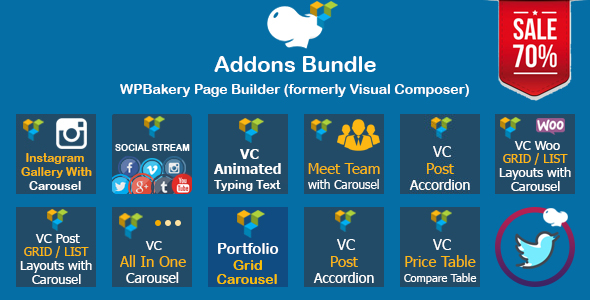
WPBakery Page Builder Addons Bundle is a collection of thirteen separate add-on plugins that extend the WPBakery Page Builder for WordPress, sold as a single package on ThemeForest by the developer saraggna. The bundle adds content elements the core builder does not include — post grids, carousels, social feeds, price tables, team sections and more — so a site owner can assemble richer layouts without buying each extension individually. It suits WordPress developers and agencies already committed to WPBakery who want a broad element library at a fraction of the cost of the individual items.
What the WPBakery Page Builder Addons Bundle Add Ons actually add to a site
The bundle’s value lies in the range of elements it hands to the page builder. Rather than one large plugin, it is thirteen focused add-ons that each register new drag-and-drop blocks inside the WPBakery editor. Grouped by what they help a site do, the capabilities fall into a few clear areas.
Content display and post layouts
Several add-ons handle how posts and pages are presented. A post grid and list element with carousel support lets a site show blog entries in configurable columns or a sliding row, which is useful for magazine-style homepages. A post accordion collapses multiple posts into expandable panels, a format that works well for FAQ pages or archives where vertical space is tight. A portfolio and gallery element with carousel adds filterable image showcases, the kind of layout a design studio or photographer would use to present work.
Social and third-party feeds
A cluster of add-ons pulls external content into pages. There are elements for Instagram galleries, Twitter feeds and a general social stream, each with carousel options, plus a dedicated social stream post type grid and a search-driven social stream. For a business that wants its latest Instagram posts or tweets displayed on the homepage without manual updates, these elements do that job directly inside the builder. A separate WooCommerce grid with carousel connects product listings to the same layout system, letting an online store feature products in a sliding row.
Marketing and presentation blocks
The remaining add-ons cover common marketing sections. A price table and comparison table element handles pricing tiers and feature comparisons. A meet-the-team element with carousel builds staff or contributor sections, and an animated text add-on adds motion to headings and calls to action. A general all-in-one carousel provides a flexible slider container for mixed content. Together these cover the recurring sections most business sites need.
Where this bundle fits and where it does not
The clearest fit is a WordPress site already running WPBakery Page Builder where the owner wants to expand layout options without switching builders. Freelancers building multiple client sites benefit most, because the bundle’s licence terms and element range let them reuse the same toolkit across projects. Agencies maintaining a library of WPBakery sites gain a consistent set of elements to standardise on. A single site that needs only one or two of these functions — say, just an Instagram feed — is better served buying that one add-on rather than the full package.
It is the wrong choice in two situations. First, for anyone using a different page builder such as Elementor, Gutenberg blocks or Beaver Builder: these add-ons register inside WPBakery only and will not appear elsewhere. The vendor states plainly that buyers should confirm they are purchasing Visual Composer add-ons before buying, because the elements depend on that builder being active. Second, for projects where long-term maintenance is critical and the site must run on the newest WordPress and PHP versions immediately. The listing was last updated in February 2022, so a buyer should verify current compatibility rather than assume it.
Setting up the bundle in practice
Installation follows the standard WordPress plugin route. The prerequisite is an active installation of WPBakery Page Builder — the plugin these add-ons extend — plus a WordPress site running a compatible theme. Each of the thirteen add-ons installs and activates separately, so setup involves uploading and activating multiple plugins rather than one. After activation, the new elements appear in the WPBakery element picker, usually grouped under their own tab or category.
For a single site, activating the plugins takes only a few minutes. The longer part is configuration: social feed elements require connecting an account or supplying API credentials, and each element has its own display settings to tune. A realistic estimate for a developer setting up the full bundle on one site and testing the social elements is under an hour. Rolling it out across several client sites multiplies that time, though the settings can often be copied.
Strengths and limitations worth weighing
Strengths
- Thirteen add-ons in one purchase. The vendor lists individual values totalling $222 against a $59 bundle price, so the saving is substantial if more than a few elements are needed.
- Broad coverage of common layout needs — posts, portfolios, products, social feeds, pricing and team sections — from a single source.
- Carousel support runs through most elements, giving consistent sliding layouts without a separate slider plugin.
- A track record of 555 sales on ThemeForest, which indicates the bundle has been bought and used by a meaningful number of site owners.
- Elements integrate directly into the WPBakery interface, so no separate editing workflow is introduced.
Limitations
- The last vendor update was February 2022. Buyers should confirm the add-ons work with their current WordPress, PHP and WPBakery versions before relying on them, since the listing does not state compatibility with recent releases.
- Social feed elements depend on third-party platforms. Instagram, Twitter and similar services change their access rules regularly, and feeds can break when those rules shift — a risk that applies to any social stream plugin, not just this one.
- Because the bundle is thirteen separate plugins, it adds more code to a site than one consolidated add-on would, which means more items to keep updated and more potential for conflicts with other plugins.
- There is no single settings panel for the whole bundle; configuration is spread across each add-on individually.
- The bundle covers layout and display, not functionality such as forms, e-commerce checkout logic or membership features.
How it compares with other WPBakery add-on options
Buyers researching this category generally face three choices: a single large all-in-one add-on plugin, individual add-ons bought as needed, or a bundle like this one. An all-in-one plugin typically offers one unified settings screen and one update stream, which is simpler to maintain, but it often costs more and may include elements a given site never uses. Buying individually keeps a site lean and lets the owner pick only proven, actively maintained items, but the per-item cost adds up quickly and each purchase is a separate relationship with a different developer.
This bundle sits between those poles. It offers the breadth of an all-in-one package while keeping the elements modular, and the price advantage over buying separately is its main argument. The trade-off is maintenance: thirteen plugins from one developer, last updated in 2022, means the buyer inherits the responsibility of checking that each still works. For a developer comfortable managing plugin updates, that is manageable. For someone who wants a hands-off, always-current solution, a single actively maintained add-on may be the safer fit.
Frequently Asked Questions
Do I need WPBakery Page Builder installed to use this bundle?
Yes. These are add-ons that extend WPBakery Page Builder, so that plugin must be installed and active for the elements to appear. The vendor explicitly warns buyers to confirm they are purchasing Visual Composer add-ons before buying. Without the parent builder, the add-ons have nothing to attach to and will not function.
Is the WPBakery Page Builder Addons Bundle compatible with the latest WordPress version?
The vendor does not state current compatibility. The listing was last updated in February 2022, so buyers should test the add-ons against their WordPress, PHP and WPBakery versions before committing a live site to them. Checking the ThemeForest comments and support tab for recent user reports is a sensible first step.
Can I use these add-ons with Elementor or Gutenberg instead?
No. The add-ons register elements specifically inside WPBakery Page Builder, so they will not appear in Elementor, the Gutenberg block editor or other builders. Anyone using a different page builder would need equivalent plugins built for that platform rather than this bundle.
How many add-ons are included and what do they cover?
Thirteen add-ons are included. They cover post grids and lists, post accordions, portfolios and galleries, WooCommerce product grids, Instagram and Twitter feeds, general social streams, price and comparison tables, team sections, animated text and a general carousel. Most include carousel support, and all are configured through the WPBakery editor.
Verdict
This bundle makes sense for WordPress developers and agencies already using WPBakery Page Builder who want a wide set of layout elements at a clear discount over buying them separately. The breadth of coverage and the 555-sale track record support that case. It is not the right purchase for anyone on a different page builder, nor for a site that needs only one or two elements. The 2022 update date is the main caveat: buyers should verify compatibility before depending on it for a production site, and should be prepared to manage thirteen plugins rather than one.