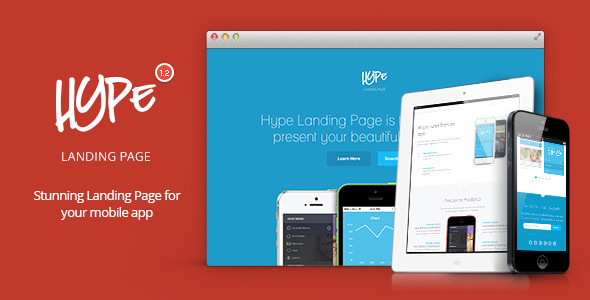
Hype is a static HTML landing page template for mobile app marketing, sold on ThemeForest by the developer Shegy. It provides a single-page promotional site with pre-built sections for app features, screenshots, video, pricing and newsletter signup, plus optional blog pages. It suits indie developers and small studios that need a polished app showcase online quickly and are comfortable editing HTML and CSS by hand.
The template has been purchased 1,440 times, which puts it in the established tier of ThemeForest landing pages rather than the experimental fringe. That sales history matters for a simple reason: a template with a four-figure install base has usually had its obvious bugs reported and fixed.
What Hype Landing Pages Actually Deliver
The core of the product is a responsive, retina-ready layout built on Bootstrap 3. In practice that means the same markup adapts from phone to tablet to desktop without a separate mobile build, and image assets are supplied at double resolution so they stay sharp on high-density screens. For an app landing page, where screenshots of the app itself are the main visual argument, that sharpness is not cosmetic.
Three homepage variants ship in the package: one with a solid colour background, one built around a hero image, and one that leads with video. Each is a separate file rather than a toggle, so switching means replacing the page you uploaded rather than flipping a setting. Eight colour variants are included on the same basis.
The mockup assets are the most distinctive part. The package includes HiDPI device mockups for iOS, Android and Windows Phone, so the same app screenshots can be presented inside a phone frame that matches the platform being targeted. A developer shipping on all three platforms can produce three credible variations of the same page without commissioning artwork.
A newsletter form is bundled and works without a database. Submitted addresses are appended to a plain text file on the server. That is genuinely convenient for a small launch, and it is also the single most important technical caveat in the whole package — more on that below.
Supporting assets include more than 130 SVG icons, which scale cleanly because they are vector rather than raster, and the original PSD files for designers who want to alter the layout before it becomes code. The markup is HTML5 and CSS3, and the vendor states the code is organised and commented.
Version 1.2, released in February 2014, added a blog section with a separate index page and single post page. The package deliberately includes both the 1.1 and 1.2 builds, so a buyer who only wants the simpler pre-blog structure can start from the older version instead of deleting sections.
Where Hype Landing Pages Fit, and Where They Do Not
The strongest fit is a pre-launch or recently launched app that needs a credible marketing page this week. An indie developer who has finished the build and now needs somewhere to send press, beta testers and early adopters can have the solid-colour variant live in an afternoon. The three-platform mockups make it equally practical for a studio shipping the same product to iOS, Android and Windows Phone, which was a common pattern when this template was current.
A second good fit is an agency or freelancer producing a fixed-scope app marketing site for a client. The PSD files mean the visual design can be adjusted and approved before any HTML is touched, which shortens the revision cycle considerably.
The wrong choice is any project that needs a content management system. Hype is a static template: there is no WordPress theme, no admin panel and no database layer. A client who expects to log in and edit copy, swap screenshots or publish a post without touching code will not be served by it. The blog pages are templates, not a publishing system — someone still has to write the HTML for each post and upload it.
It is also a poor fit for anyone who wants ongoing vendor support. The last update was in February 2014, so the template has not tracked changes in browsers, device screen ratios or front-end tooling for over a decade. That does not make it broken, but it does mean the buyer is on their own.
Setting Up a Hype Landing Page
There is no installation process in the software sense. The buyer downloads a package, opens the HTML files in a code editor, edits the copy and image references, and uploads the folder to any static host. No build step, no package manager and no server-side runtime is required, which keeps the barrier low.
The prerequisites are modest but real. Comfort with HTML and CSS is necessary — the template is described as easy to customise, and that is accurate for someone who already knows how to edit markup, but it is not a drag-and-drop builder. A code editor and an FTP or file manager account round out the requirements.
Realistically, a straightforward deployment using one of the three homepage variants with the buyer’s own copy and screenshots takes a few hours. Recolouring beyond the eight supplied variants, restructuring sections, or adapting the newsletter form to a real mailing list provider takes longer. The vendor’s documentation is described as detailed, and questions not covered there are directed to the item’s FAQ page and comment section rather than a formal support desk.
Strengths and Limitations
Strengths
- Three homepage layouts and eight colour schemes cover most app marketing briefs without custom design work.
- HiDPI mockups for iOS, Android and Windows Phone let one set of screenshots serve three platform-specific pages.
- PSD source files are included, so the design can be revised before it becomes code.
- More than 130 SVG icons scale cleanly and suit retina displays better than raster alternatives.
- Both the 1.1 and 1.2 builds ship in the package, giving a simpler starting point for buyers who do not want the blog.
- Bootstrap 3 compatibility means anyone already familiar with that framework can read the layout quickly.
- At $13, the cost is low enough that it functions as a starting point rather than a commitment.
Limitations
- The newsletter form writes email addresses to a plain text file on the server. That is a weak storage method: the file is unencrypted, there is no unsubscribe handling, no double opt-in and no export tooling, and it may conflict with data protection obligations depending on where the site’s visitors live. Most buyers should replace it with a hosted mailing list service.
- No CMS. Every content change is a code edit and a re-upload.
- The last vendor update was February 2014. Nothing in the package has been revised for current browser behaviour, modern image formats or present-day device aspect ratios, so some manual testing and adjustment should be expected.
- Switching homepage variant or colour scheme means swapping files rather than changing a setting, which is clumsier than it first sounds.
- Support is community-based through the item comments and FAQ, not a formal ticket system.
- The blog templates give structure only — there is no search, no categories, no pagination logic and no comment system.
How Hype Landing Pages Compare to Other App Landing Page Options
The app landing page category splits roughly three ways: static HTML templates like this one, WordPress themes, and hosted page builders. The trade-off is control against convenience.
Against WordPress landing page themes, Hype loses on editing workflow and wins on weight. A WordPress theme gives a non-technical client a familiar admin interface and a plugin ecosystem for forms, analytics and email capture. Hype gives a folder of files that loads fast, has no database to maintain, no plugin updates to chase and no security surface beyond the web server itself. For a one-off campaign page that will not change much, that is often the better trade.
Against hosted page builders, the difference is ownership. A hosted builder is faster to start and easier for a non-developer, but the page lives on someone else’s platform and carries a recurring fee. Hype is a one-time $13 purchase that produces files the buyer keeps and can host anywhere.
Within the static template category itself, the differentiators are the platform-specific mockups, the PSD source files and the icon set. Templates that lack PSDs force design changes to happen in code, which is slower and less precise. That combination is the main reason Hype Landing Pages still gets considered despite its age.
Frequently Asked Questions
Is Hype a WordPress theme?
No. Hype is a static HTML, CSS and JavaScript template, not a WordPress theme. It cannot be installed through the WordPress admin and does not connect to a database. Buyers who need a WordPress-based app landing page should look at themes built for that platform instead, or expect to convert the markup into a custom theme themselves.
Does the newsletter form work without any third-party service?
Yes, it works on its own by saving submitted addresses to a text file on the server. No database or external account is needed. However, that method offers no unsubscribe handling, no double opt-in and no encryption, so it is best treated as a placeholder and replaced with a proper mailing list provider before a real launch.
Can the template be used for an Android or Windows Phone app?
Yes. The package includes device mockups for iOS, Android and Windows Phone, added in version 1.1. The same page structure can be reused for each platform, with the relevant mockup and screenshots swapped in. The layout itself is platform-neutral and does not assume any particular app store.
Is Hype still maintained and updated?
The vendor’s last recorded update was 14 February 2014, which released version 1.2 with the blog section. No later releases are listed. The template still functions as static HTML, but buyers should budget time for manual testing and small fixes to account for browser and device changes since then.
Verdict
Hype Landing Pages is a sensible purchase for a developer or small studio that needs a lightweight, fast-loading app marketing page and is comfortable working directly in HTML and CSS. The platform-specific mockups, PSD source files and icon set give it more practical value than the $13 price suggests, and the 1,440 sales indicate it has been used widely enough to be a known quantity.
It is the wrong purchase for anyone who needs a content management system, expects a client to edit the page without code, or requires active vendor support and updates. The newsletter form’s text-file storage is the one feature that should be replaced rather than used as shipped.
Buyers who understand those boundaries and treat the template as a starting point rather than a finished product will get good value. Those who need an editable, maintained platform should look at WordPress-based alternatives instead.