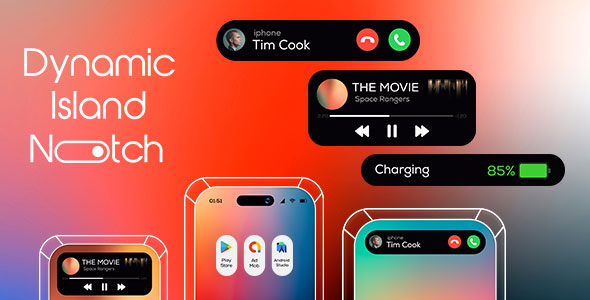
Dynamic Island is an Android application source code package sold on ThemeForest for $99 that recreates the iPhone 14 Pro’s pill-shaped notification and control area on Android phones. It turns the front punch-hole camera cutout into an interactive widget that displays music controls, timers, charging status and call popups. It is aimed at Android developers and studios who want to ship a ready-made iOS-style interface element rather than build one from scratch.
The product is a code template, not a consumer app on Google Play. Buyers receive a project they can rebrand, extend and publish under their own name, which puts it in a different category from the polished utility apps that already occupy this space.
What the Dynamic Island Android template actually does
The core mechanic is a visual overlay. The app draws a dark, rounded shape around the front-facing camera hole so the cutout reads as a deliberate design feature rather than a manufacturing compromise. That shape is the anchor for everything else the template does.
Media and timer controls in the collapsed state
When audio plays in the background, the island shows the current track and exposes pause, next and previous actions without opening a full player. Timer apps get similar treatment. The value here is glanceability: a user can check progress or skip a song without leaving whatever app is on screen. The listing confirms support for music and timer apps but does not name which specific apps are compatible, so that is something a buyer would need to test against their own target list.
Expandable notification handling
Tapping the small island expands it into a wider panel where notifications can be read and scrolled. This is the part that separates a decorative overlay from a functional one. A static pill shape is easy to draw; routing notification content into a scrollable expanded view and keeping it readable at that size is the harder engineering problem, and it is where most of the template’s value sits.
System state indicators
Battery percentage, charging state, silent mode and vibration mode are surfaced through the island rather than the status bar. For users who keep the status bar hidden for a cleaner look, this recovers information that would otherwise be lost. The call popup adopts the iPhone 14 Pro and 14 Max visual style, which matters for anyone chasing a consistent iOS feel across the whole interface.
Customisation and re-skinning
The vendor describes the interaction as customisable and the design as easy to re-skin. In practice that means colours, sizing and behaviour can be adjusted to match a host app’s branding. This is the single most important attribute for a commercial buyer, because a template that cannot be restyled is only useful for a clone app, not for a product with its own identity.
Where this Dynamic Island Android package fits, and where it does not
The clearest fit is an Android developer or small studio building an iOS-themed launcher, a custom ROM companion, a widget pack or a personalisation app. The template supplies the signature interaction of that aesthetic, which saves weeks of overlay work, window management and animation tuning. Freelancers pitching iOS-style concepts to clients can also use it to produce a working prototype quickly instead of mocking everything up in a design tool.
It also suits anyone building a demo or portfolio piece around modern Android UI patterns, since the visual payoff is immediate and recognisable.
The wrong buyer is a non-technical site owner looking for an app to install. This is source code with an Android Studio requirement, and there is no indication of a compiled APK for end users. Anyone without Java or Kotlin experience, or without a developer on hand, will find nothing usable here.
It is also a poor choice for a production app that must behave identically across a wide device range. Punch-hole camera position varies by manufacturer and model, and an overlay anchored to that cutout is inherently device-sensitive. A team shipping to a broad audience should expect to invest in per-device testing before release.
Setting up the Dynamic Island Android project
The stated prerequisite is Android Studio 2012.3.1.19, which is the vendor’s version string and appears to reference an Electric Eel-era release. Buyers should confirm compatibility with their installed toolchain before purchasing, because the listing does not describe how the project behaves on newer or older Studio versions.
The workflow is conventional for a ThemeForest code item: purchase, download the archive, open the project in Android Studio, let Gradle sync, and build. The vendor promises full step-by-step documentation, which for a template of this type usually covers project structure, where to change colours and assets, and how to point the media and timer listeners at the right sources. That documentation is the main unknown, since the listing does not show sample pages or state its length.
A realistic timeline for a competent Android developer is an afternoon to get the project building and running on a test device, then several days to rebrand it and verify the overlay behaves correctly on the specific hardware being targeted. Budget extra time for notification access permissions, which Android treats as a sensitive capability and which users must grant manually.
Strengths and limitations
Strengths
- Delivers a recognisable, high-visibility interface element that would otherwise take substantial custom view and overlay work to build.
- Goes beyond decoration by wiring in media controls, timers, notifications and system state.
- Explicitly designed to be re-skinned, which makes it viable for commercial apps rather than only clones.
- Described as lightweight, which matters for an always-on overlay that runs alongside other apps.
- Documentation is included, reducing the guesswork of reverse-engineering someone else’s project structure.
Limitations
- No sales figures or ratings are disclosed on the listing, so there is no independent signal of how the template performs in real projects.
- The vendor does not name which music or timer apps are supported, leaving compatibility to be verified by the buyer.
- Device dependence is unavoidable: punch-hole placement differs across Android hardware, and the listing offers no compatibility matrix.
- The Android Studio version cited is specific and dated, with no stated support for current releases.
- Notification access requires user-granted permissions, which adds friction to onboarding that the template cannot remove.
- At $99 it is priced as a commercial code item, so it only makes sense for projects with a commercial return.
How it compares with the alternatives
The obvious alternative is a free or low-cost Dynamic Island Android app from Google Play. Those are finished products: install, grant permissions, done. They cost nothing or close to it, but they cannot be rebranded, extended or shipped as part of another product. For an end user who simply wants the effect on a personal phone, a store app is the rational choice and this template is overkill.
The second alternative is building the overlay in-house. That gives full control and no licensing questions, but it means designing the expanded notification view, handling animation states, managing window permissions and testing across devices. For a team with spare capacity and a long timeline, custom development wins on fit. For a small team on a deadline, a template that already solves the layout and interaction problems is the faster route.
The third alternative is a general-purpose UI kit or component library. Those cover far more ground but rarely include a finished island implementation, so the buyer still assembles the feature from parts. This product’s advantage is narrowness: it does one recognisable thing and includes the surrounding plumbing.
Frequently Asked Questions
What is Dynamic Island Android?
It is an Android app source code template that recreates the iPhone 14 Pro’s pill-shaped control area around the front camera cutout. It shows music controls, timers, notifications, battery and charging state, and iOS-style call popups. Buyers get a project they can rebrand and publish, not a finished app from Google Play.
Can Dynamic Island Android be used in a commercial app?
Yes, that is its intended purpose. The template is built to be re-skinned, so colours, assets and behaviour can be adapted to a host app’s branding before release. Buyers should still read the ThemeForest licence terms carefully, since regular and extended licences grant different rights for products sold to end users.
Does it work on every Android phone?
No, and the vendor does not claim otherwise. The overlay is anchored to the punch-hole camera, and its position varies between manufacturers and models. Devices without a punch-hole cutout have nothing to anchor to. Expect to test on each target device before shipping to a wide audience.
Do I need coding skills to use this template?
Yes. It requires Android Studio and working knowledge of Android development to build, modify and publish. The included documentation covers setup and customisation, but it does not remove the need to understand Java or Kotlin, Gradle builds and Android permissions. Non-developers should look at a finished Play Store app instead.
Verdict
This template is worth buying for Android developers and small studios who need a convincing iOS-style island interface and want to skip the overlay, animation and notification-routing work. The combination of expandable notifications, media controls and re-skinnable design gives it real utility beyond a visual gimmick.
It is not for end users, non-coders, or teams that need guaranteed behaviour across a wide hardware range without extra testing effort. The absence of published sales figures and a named compatibility list means buyers are taking some risk on documentation quality and device support.
For a developer with a specific iOS-themed project in mind, the $99 outlay is easy to justify against the hours it saves. For everyone else, a finished app or a custom build remains the better fit.