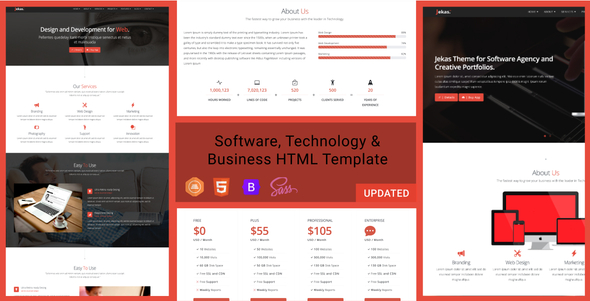
Jekas is a Bootstrap 5 HTML template aimed at software companies, IT consultancies, SaaS startups and technology-focused agencies that need a marketing site without building one from scratch. It ships as a static template — 32 HTML files, ten colour skins and six homepage layouts — so buyers get finished markup rather than a content management system. It suits freelancers and small studios who want a fast, editable front end at a low one-off cost, and it is a poor fit for anyone who needs a database-driven site or a drag-and-drop page builder.
What the Software, Technology & Business Bootstrap Html Template Actually Delivers
The headline number is 32 HTML pages. That matters less as a count and more as coverage: the template includes the page types a technology business normally needs — several home layouts, service and product pages, pricing tables, portfolio or case-study grids, blog and news templates, team pages, and the usual contact and error pages. A buyer can assemble a complete site without designing a single new section from zero.
Six distinct home versions are included, and they are not colour swaps of one another. That gives a project room to test different positioning — a product-led landing page versus a services-led one — without purchasing a second template. Ten pre-built skins sit on top of that, so a palette change is a class swap rather than a rebuild.
The template is built on Bootstrap 5, the current major version of the most widely used front-end framework. In practice this means anyone who already knows Bootstrap’s grid and utility classes can read the markup immediately, and the large pool of Bootstrap documentation and third-party components applies directly. The vendor also supports both one-page and multi-page structures, which covers the common split between a single scrolling landing page for a campaign and a deeper multi-page corporate site.
Parallax and video background sections are included for hero areas. These are standard visual devices in software and agency marketing, and having them pre-built saves the fiddly work of getting background media to behave across screen sizes. The layout is responsive throughout, so the same markup serves desktop, tablet and mobile without a separate build.
Documentation is bundled in the download, and the vendor states support requests are typically answered within 24 hours through the item discussion board or by email. The author, iwthemes, has a track record on ThemeForest, and the template has accumulated 1,089 sales — a reasonable volume that suggests the code has been exercised by enough buyers to surface obvious problems.
Where This Template Fits and Where It Does Not
The clearest fit is a software or IT services company that needs a credible marketing presence quickly. A small agency pitching a client on a two-week turnaround, a SaaS startup validating a landing page before committing to a full application, or a consultancy that wants a portfolio and pricing page live this week — all of these are served well by a static Bootstrap template.
It also works as a prototyping tool. Because the pages are plain HTML and CSS, a developer can hand them to a back-end team to wire into a CMS or application framework, and the front-end work is already done.
Where it does not fit is any project that expects to be edited by non-technical staff after launch. There is no admin panel, no visual editor and no content API. Every text change is a code edit. A marketing team that wants to publish blog posts without a developer will find this template actively obstructive, and should be looking at a WordPress theme or a hosted site builder instead.
It is also the wrong choice for a business whose brand depends on a bespoke visual identity. The layouts are distinctive but they are shared with every other buyer of the template, and while colours and content can be changed freely, the underlying structure will look familiar to anyone who has seen another Jekas site.
Setting Up the Template in Practice
There is no installation process in the usual sense. The download is a zip containing the HTML theme files and the documentation. A buyer extracts it, opens the files in a code editor, and either uploads them to a web host or runs them locally.
The prerequisites are modest but real. Editing the template requires comfort with HTML and CSS; customising the Bootstrap components meaningfully requires some familiarity with how Bootstrap’s class system works. No build tools, package manager or command line are needed — the files are ready to serve as they are. A local development server is helpful for testing but not strictly required.
For a developer already fluent in Bootstrap, dropping in branding, swapping copy and publishing a five-page site is realistically an afternoon’s work. For someone learning as they go, expect a few days, most of it spent on content rather than code. The documentation covers the structure and the available components; the vendor does not state whether it includes guidance on migrating the markup into a specific CMS.
One practical note: images shown in the live preview are not included in the download. Buyers need to supply their own photography or licensing, which is a real cost that the $17 price does not cover.
Strengths and Limitations
Strengths
- Thirty-two pages and six homepage layouts give broad coverage of the page types a technology business needs, reducing design work to content and branding.
- Bootstrap 5 means the markup follows a framework with extensive public documentation and a large ecosystem of compatible components.
- Ten skins and generous layout variation allow meaningful visual differentiation between projects built on the same template.
- Static HTML files deploy anywhere — shared hosting, a static host, or inside an existing application — with no server-side requirements.
- At $17 with 1,089 sales and a documented update history, the cost-per-page is very low and the code has been widely tested.
Limitations
- No CMS, admin panel or content API. Every content change is a manual code edit, which rules out non-technical editors.
- Preview images are excluded from the download, so buyers must source and license their own photography.
- The template has no bundled JavaScript build pipeline, so there is no Sass compilation or asset bundling out of the box — customisation beyond CSS variables means working directly in the stylesheets.
- Because it is a static template, features that most software businesses eventually want — a blog with an author workflow, gated content, form submissions stored in a database — require separate integration work that the template does not provide.
- The vendor does not state accessibility conformance or performance benchmarks, so buyers with strict requirements in either area should test before committing.
How It Compares With Other Bootstrap Templates
The category here is multipurpose Bootstrap HTML templates sold on marketplaces, and the differentiators are usually page count, framework version, layout variety and support quality. Jekas competes well on the first three: 32 pages is above average, Bootstrap 5 is current rather than a version or two behind, and six home layouts plus ten skins is a generous spread at this price point.
Where it sits in the middle of the pack is tooling. Some templates in this category bundle a Sass source tree, a task runner or a set of reusable partials; Jekas does not, based on the vendor’s file listing. That matters if the project involves heavy theming across many pages, because changes have to be applied consistently by hand. For a straightforward site with a single brand palette, it is a non-issue.
Against WordPress themes specifically, the trade-off is control versus convenience. A static template gives faster load times, no plugin maintenance and no security surface from a CMS, but it gives up the editing workflow entirely. The right answer depends on who will maintain the site after launch, not on which product is technically better.
Frequently Asked Questions
Do I need to know how to code to use this template?
Yes, at least basic HTML and CSS. Jekas is a static Bootstrap template with no visual editor or admin panel, so every text and image change is made directly in the files. Someone comfortable with Bootstrap can work quickly; someone without coding experience will need a developer for even minor updates.
Is Jekas compatible with WordPress or another CMS?
Not directly. The download contains plain HTML files, not a CMS theme, so there is no install-and-activate path into WordPress. A developer could convert the markup into a WordPress theme or wire it into a headless CMS, but that is custom work and is not covered by the template purchase or its support.
Are the images shown in the live preview included?
No. The vendor states explicitly that images from the live preview are not part of the download. Buyers receive the HTML theme files and the documentation only, so photography, icons and any licensed assets must be sourced separately, which adds cost beyond the $17 purchase price.
How many pages and homepage layouts come with the template?
Thirty-two HTML files in total, including six separate homepage versions and ten colour skins. The pages cover the usual technology and business needs — services, pricing, portfolio, blog, team and contact — and the template supports both single-page scrolling layouts and conventional multi-page structures.
Verdict
Jekas is a solid buy for developers, freelancers and small agencies who need a technology or software marketing site built quickly and are comfortable working in HTML. The page coverage, current Bootstrap version and layout variety justify the price many times over, and the sales volume suggests the code holds up in real use.
It is the wrong purchase for anyone who wants to edit their own site without touching code, for businesses that need a blog with a publishing workflow, and for projects where a fully custom visual identity is a requirement rather than a preference. Those buyers should look at a CMS-based theme or a hosted platform instead.
For everyone in between — a studio delivering a client site on a tight timeline, a startup shipping a landing page, a developer who wants the front end done — the Software, Technology & Business Bootstrap Html Template is a practical, low-risk starting point that removes most of the repetitive work from a build.