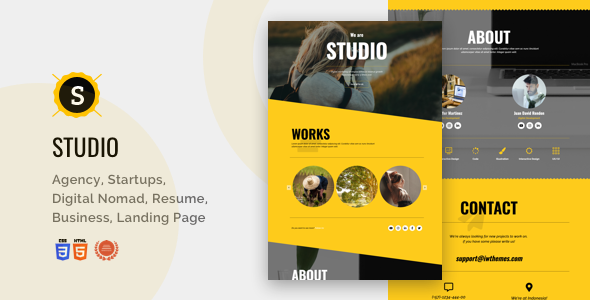
Studio is a single-page HTML landing template built on Bootstrap and sold on ThemeForest by the developer iwthemes. It packages a one-page layout, a responsive grid and a set of pre-styled sections into a downloadable ZIP containing the theme files and documentation, and it is aimed at freelancers, photographers, small agencies and solo operators who need a promotional page rather than a full multi-page website. At $11 it sits at the low end of the Studio creative market, and the 433 recorded sales suggest a steady trickle of buyers rather than a breakout hit.
The important context is the date. The listing was last updated by the vendor in April 2020, and the changelog shows the bulk of the design work landed between 2013 and 2017. That does not make the template unusable, but it does mean anyone evaluating it should understand exactly what they are buying: a static HTML and CSS package, not a WordPress theme, not a page-builder template, and not something that receives ongoing feature development.
What the Studio creative template actually gives a buyer
The core deliverable is a one-page layout. Everything a visitor needs — an introduction, a services or skills block, a gallery, contact details — lives on a single scrolling document with an anchor-based menu. That structure suits promotional pages well because it removes navigation decisions and keeps attention on one message.
Because the layout is built on Bootstrap, the responsive behaviour comes from a framework that most front-end developers already know. Columns collapse on smaller screens, and the grid classes will be familiar to anyone who has worked with Bootstrap before. For a buyer who wants to adjust spacing or reorder sections, that familiarity shortens the learning curve considerably.
The vendor highlights a parallax version among the features added in version 1.2. Parallax here means background images that scroll at a different speed to the foreground content, which is a common device on photography and portfolio pages for adding depth without extra media. A 404 page is also included in the package, which matters more than it sounds: a one-page site still needs a fallback for mistyped URLs, and having one styled to match saves a small amount of work.
Version 1.2 also introduced additional colour schemes and what the changelog calls skins, plus a centred-title variant and a revised menu. In practice this means a buyer can switch the visual tone of the page without rewriting the stylesheet from scratch, and can choose between left-aligned and centred headings depending on how formal the content is.
The package is deliberately narrow. The ZIP contains the HTML theme and documentation — nothing more. There is no CMS integration, no bundled plugin, and no design source files mentioned in the listing. Documentation is described as well organised, and support is handled through the item discussion board or a direct email address, with the vendor noting Spanish-language support alongside English.
Where a one-page Studio creative layout fits, and where it does not
This template is a reasonable fit for a photographer building a first portfolio, a freelancer who needs a single promotional page with a contact form area, or a small agency wanting a lightweight presence for one specific service or campaign. It also works as a placeholder or holding page while a larger site is built, because a single HTML file can be deployed almost anywhere.
It is a poor fit for anything that needs a blog, multiple service pages, user accounts, e-commerce, or content that non-technical staff will update regularly. A one-page HTML template has no admin interface, so every text change means editing code. Anyone who expects to hand the site to a client for ongoing updates should look at a CMS-based option instead.
There is a second scenario worth flagging. If the project depends on modern front-end expectations — component-based architecture, a build pipeline, accessibility tooling, or current browser support guarantees — a template whose last meaningful design revision predates 2018 will likely require more remediation than it saves. The vendor does not state which browsers are officially supported in the current version, so that is a question to raise before purchase rather than assume.
Setting up the template in practice
Setup is straightforward for anyone comfortable with HTML and CSS. The buyer downloads a ZIP, extracts it, and opens the theme folder in an editor. From there the workflow is editing markup directly: swapping placeholder text, replacing images in the assets folder, and adjusting colours and typography in the stylesheet. No build step, package manager or local server is strictly required to preview the files, though a local server helps if any relative paths behave differently.
The prerequisites are modest but real. A code editor is essential, basic HTML knowledge is assumed, and some CSS familiarity is needed to change the visual design rather than just the words. A hosting account with FTP or file-manager access completes the picture. Because the template is Bootstrap-based, anyone who has customised a Bootstrap site before will move quickly.
Realistically, a buyer with those skills can have a personalised version live in an afternoon — a few hours for text and image swaps, longer if the colour scheme and typography need reworking. A buyer without HTML experience should budget considerably more, or factor in the cost of hiring someone, because the documentation explains the structure rather than walking through a no-code customisation process.
Strengths and limitations
Strengths
- Low entry price at $11, which makes it cheap to trial on a small project.
- Bootstrap foundation means the responsive grid follows conventions many developers already know.
- Single-page structure is genuinely well suited to portfolios and focused promotional pages.
- Multiple colour schemes and a centred-title variant reduce the amount of restyling needed.
- Includes a styled 404 page, a small detail that saves time on a real deployment.
- Support is offered in both Spanish and English through the item discussion board and email.
Limitations
- Last updated in April 2020, with the substantive design work done between 2013 and 2017. Buyers should expect dated markup conventions and verify current browser behaviour themselves.
- It is a static HTML template, not a WordPress theme or page-builder kit. There is no admin panel, so every content change is a code edit.
- The package contains only the HTML theme and documentation. No design source files, no CMS integration and no bundled form-handling script are mentioned in the listing.
- One-page architecture is a constraint, not a feature, for projects that need multiple URLs or search-engine-friendly separate service pages.
- Documentation is described as well organised but the vendor does not publish a public demo link or a detailed feature matrix in the listing, so expectations should be set from the changelog rather than marketing claims.
How it compares with the wider category
Studio creative templates of this type compete on two axes: price and flexibility. On price, $11 places it among the cheapest options available, and the trade-off is clear — a low-cost static template with no ongoing development. Premium one-page templates that cost three or four times as much typically bundle a page builder, a Figma or Sketch source file, or a WordPress version, and they tend to receive updates when browser standards shift.
On flexibility, the comparison is between a static HTML file and a CMS-driven theme. A static file wins on speed, hosting simplicity and predictability: it will run on almost any host and has no database to maintain. A CMS theme wins on handover, because a client can edit copy without touching code. Which matters more depends entirely on whether the person maintaining the site after launch writes HTML.
There is also the question of upkeep. Templates from active developers get refreshed when frameworks change; this one has been static since 2020. That is not disqualifying for a short-lived campaign page, but it is a real consideration for anything intended to run for years.
Frequently Asked Questions
Is Studio a WordPress theme or an HTML template?
It is a static HTML template, not a WordPress theme. The download contains HTML files, CSS, assets and documentation, and it is deployed by uploading files to a host rather than installing it through a WordPress dashboard. Buyers looking for a theme they can manage from wp-admin should look elsewhere.
Can the Studio template be edited without knowing how to code?
Not comfortably. Text, images and layout are changed by editing HTML and CSS directly, so basic front-end knowledge is effectively required. A visual page builder is not included. Anyone without coding experience should budget for a developer, or choose a template built on a CMS or drag-and-drop builder instead.
Does the $11 price include support and future updates?
Support is provided through the item discussion board and the vendor’s email address, with Spanish and English assistance noted. Updates are a different matter: the listing shows the last vendor update in April 2020, so buyers should treat the current version as the finished product rather than expecting a roadmap of new features.
Is a one-page layout bad for search engine visibility?
A single page can rank, but it limits how many distinct topics a site can target. One page means one URL and one set of headings, so a business offering several unrelated services has nowhere to place dedicated content. For a portfolio or a focused campaign page, that constraint rarely matters.
Verdict
Studio is a sensible purchase for a developer or designer who needs a cheap, lightweight one-page HTML template for a portfolio, a personal page or a short-term promotional site, and who is comfortable editing markup directly. The Bootstrap foundation, the multiple colour schemes and the included 404 page make it more practical than the price suggests, and 433 sales indicate it has found a consistent audience.
It is the wrong choice for anyone wanting a WordPress theme, a page-builder template, or a site a non-technical client will maintain. The 2020 last-update date is the biggest single caveat, and buyers should verify current browser behaviour on a staging copy before committing a live project to it. For a small, static, short-lived page, the trade-offs are acceptable; for anything long-term or content-heavy, the money is better spent on a maintained alternative.