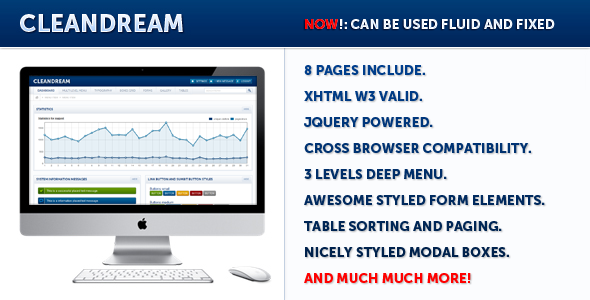
CleanDream is a static HTML admin template sold on ThemeForest for $16, aimed at developers and freelancers who need a ready-made back-end interface rather than a full content management system. It ships as a set of eight pre-built pages — a login screen, dashboard, typography reference, box grid, forms, gallery, tables and a catch-all page — styled with CSS and wired up with jQuery plugins. The listing has drawn 452 sales, which suggests a steady trickle of buyers rather than a breakout hit, and it is best understood as a front-end kit for anyone building a custom control panel who does not want to design one from scratch.
What CleanDream Admin Templates Actually Deliver
The core value here is breadth of interface components rather than depth in any single one. The template covers the pieces most back-end screens need: a dropdown menu that nests three levels deep, a tab system, accordion panels, tree views and tooltips. Those are the building blocks of navigation inside an application, and having them pre-styled removes a chunk of repetitive CSS work.
Form handling is where the template goes furthest. Every standard input is styled, and the vendor added sliders, progress bars, a multi-select box, a compact select variant, autocomplete on text fields and a WYSIWYG editor across a series of updates in late 2011. A modal box option was added in December 2011, which matters because confirmation dialogs and quick-edit panels are otherwise awkward to build consistently.
Data display gets similar attention. The tables page moved from the tablesorter plugin to the datatable plugin in December 2011, which brought live search across table rows. The statistics area supports custom colours and, as of September 2011, month names as labels — a small detail that saves time when building reporting screens.
Two other details are worth noting. The gallery page includes thumbnail options with zoom and delete controls, which is unusual for a template of this vintage and useful for media management screens. And the package includes a layered, named PSD file, so the visual design can be reworked in Photoshop before any code is touched. The markup is xHTML 1.0 transitional and the vendor states cross-browser compatibility, including fixes for Internet Explorer 7 and Opera bugs made in August 2011.
A fluid layout option arrived in January 2012, the last update the vendor logged. That means the grid can stretch to fill the browser window instead of sitting at a fixed width.
Where CleanDream Fits and Where It Does Not
This template suits a specific kind of project: a custom-built admin panel where the back end is written in PHP, Ruby, Python or anything else, and the developer wants the presentation layer handled. Freelancers building internal tools for a client, agencies producing a one-off reporting dashboard, or developers prototyping an interface before committing to a framework will all find the eight pages a reasonable starting point.
It also works as a learning reference. Someone studying how jQuery UI components fit together in a real layout can read through the files and see the wiring, which is more instructive than isolated plugin documentation.
The wrong choice is any project that needs a working application rather than a visual shell. CleanDream Admin Templates contain no server-side logic, no database layer and no authentication beyond a styled login form. Anyone expecting to install this and have a functioning admin area is going to be disappointed. It is also a poor fit for projects with modern accessibility requirements or those targeting current browsers only, because the codebase reflects 2011 conventions and the vendor has not published updates since January 2012. Teams already committed to Bootstrap, Tailwind or a JavaScript framework will find the styling approach foreign and the integration work greater than starting fresh.
Setting Up CleanDream in Practice
Installation is closer to file management than software deployment. There is no package manager, no build step and no configuration file. The buyer downloads a folder, opens the HTML files in a browser to see what is available, then copies the pages and assets into their own project structure.
The prerequisites are minimal: a text editor, a browser for testing, and a basic working knowledge of HTML and CSS. Editing the sliders requires opening the HTML file and changing values directly, which the vendor made possible in an August 2011 update. Customising statistics colours works the same way. Anyone comfortable with jQuery will be able to extend the components; anyone who is not will be limited to what ships in the box.
Realistically, a developer can have a page adapted to their own layout in an afternoon. Rebuilding the full set of eight pages to match a specific brand, including the PSD work, is closer to a day or two. The vendor does not state any support terms, documentation format or update policy beyond the dated changelog, so buyers should assume they are working from the files alone.
Strengths and Limitations
Strengths
- Eight ready-made pages cover the screens most admin panels need, from login through to data tables.
- Form components go well beyond basic inputs, including sliders, progress bars, autocomplete, multi-select and a WYSIWYG editor.
- The datatable integration provides live search across table content without extra setup.
- A layered and named PSD file is included, which is uncommon at this price point and makes rebranding practical.
- Fluid layout support means the interface can adapt to different screen widths rather than being locked to a fixed grid.
- At $16, the cost is low enough that even using two or three components justifies the purchase.
Limitations
- No updates have been published since January 2012, so the jQuery version bundled in the package is well behind current releases and may conflict with newer plugin code.
- The template is presentation only. There is no back-end logic, database schema or user management, so significant development work remains after purchase.
- xHTML 1.0 transitional markup is outdated; projects targeting HTML5 validation or modern semantic standards will need rework.
- Accessibility is not addressed in the listing at all — no mention of ARIA attributes, keyboard navigation or screen reader support.
- The vendor does not state documentation, support terms or a licence summary beyond what ThemeForest provides by default.
- Cross-browser claims date from an era when Internet Explorer 7 was a live concern, so they say little about performance in current browsers.
How CleanDream Compares to Other Admin Templates
The admin template category splits roughly into two groups: static HTML kits like this one, and full application frameworks that bundle routing, state management and pre-built authentication flows. CleanDream sits firmly in the first group, and that distinction matters more than any individual feature comparison.
Against other static kits, the differentiators are the PSD file, the breadth of form components and the datatable integration. Many templates at this price ship only the HTML and CSS, leaving rebranding to guesswork. The trade-off is age. Templates released in the years since have adopted HTML5, flexbox or grid layouts, and responsive breakpoints as standard. CleanDream predates all of that, and its fluid layout option is a simpler approach than modern responsive design.
Against framework-based alternatives, the comparison is not really about capability. A framework gives a working application skeleton; CleanDream gives a visual one. Developers who want to write their own logic and control every line of the front end will prefer this approach. Those who want to ship faster by inheriting someone else’s architecture will not.
Frequently Asked Questions
Is CleanDream a WordPress theme or a standalone template?
It is a standalone static HTML template, not a WordPress theme. The package contains HTML, CSS, JavaScript and a PSD file, with no PHP templates or WordPress hooks. It cannot be installed through the WordPress admin. Developers who want a WordPress admin skin should look at themes built specifically for that platform instead.
Does CleanDream work with current versions of jQuery?
That is unlikely without modification. The last vendor update was January 2012, and the bundled jQuery file dates from that period. Modern jQuery releases removed several deprecated methods the older plugins relied on. Upgrading means replacing the jQuery library and testing each plugin individually, which is real work rather than a drop-in swap.
Can CleanDream be used for a client project?
Yes, subject to the ThemeForest licence purchased with the item. Regular and extended licences carry different terms for end products that are charged for. The vendor does not restate those terms in the listing, so buyers should read the marketplace licence page before deploying to a client. Nothing in the template restricts normal commercial use.
What is included in the download besides the HTML pages?
The package includes the eight HTML pages, the CSS and JavaScript assets, the jQuery plugins used across the components, and a layered PSD file for the visual design. The vendor does not state whether fonts, icons or stock imagery are included, so those should be assumed to be the buyer’s responsibility.
Verdict
CleanDream Admin Templates make sense for developers who need a visual starting point for a custom back-end and are comfortable working with older HTML and jQuery code. The component coverage is genuinely broad for the price, the PSD file adds real rebranding value, and 452 sales with a modest rating indicate a product that has done its job for a reasonable number of buyers.
It is the wrong purchase for anyone expecting a working admin application, for projects with modern accessibility or HTML5 requirements, or for teams already invested in a CSS framework. The absence of updates since 2012 is the single biggest consideration — not because the template is broken, but because the surrounding ecosystem has moved on and the buyer absorbs the cost of catching up.