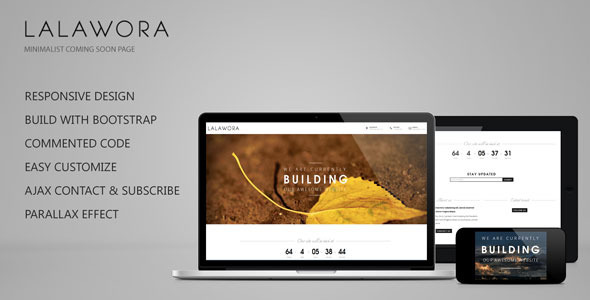
Lalawora is a single-page “coming soon” template sold on ThemeForest for $25. It gives a site owner a placeholder page to publish while a full website is still being built, combining a countdown-style landing layout with a working contact form and email subscribe box. It is aimed at freelancers and small agencies who need something presentable online quickly, and at anyone launching a product who wants to collect email addresses before the real site goes live. The template sits in the broader Lalawora Site Templates family, a small collection of Bootstrap-based layouts from the same developer.
What Lalawora Site Templates Actually Include
The product is built on Twitter Bootstrap, the widely used front-end framework that supplies a grid system and pre-styled components. That choice matters in practice: anyone already comfortable with Bootstrap classes can rearrange the layout without writing CSS from scratch, and the underlying structure is familiar to most developers who might inherit the project later.
The responsive behaviour is the headline capability. The page adapts its layout to phones, tablets and desktops rather than serving a fixed-width design that forces horizontal scrolling. For a holding page that will be seen mostly through social media links and email campaigns, that matters more than it would on a corporate site, because a large share of first visits arrive on a mobile device.
Several features are worth separating out:
- Parallax scrolling. Background layers move at a different speed to the foreground as the page scrolls, which adds depth without requiring video or heavy imagery. The effect is driven by a scrolling parallax script bundled with the template.
- Font Awesome icon set. Social links and interface icons are drawn from Font Awesome, so they render as scalable vector glyphs rather than image files. That keeps the page light and means icons stay sharp on high-density screens.
- AJAX contact and subscribe forms. Both forms submit without a full page reload, so a visitor who signs up stays on the page and sees an inline confirmation. The vendor does not state which mail service the subscribe form connects to, so that integration has to be wired up by whoever installs it.
- Commented code. The source files carry inline comments explaining what each block does. This is a small thing that saves real time when someone else has to modify the template months later.
- Typography and imagery. The demo uses Open Sans, TeX Gyre Adventor Bold and Italianno, plus a supersized slider for full-screen backgrounds. The demo photographs themselves are stock images and are not part of the download, which is standard practice on ThemeForest but catches buyers out regularly.
Where a Lalawora Site Template Fits, and Where It Does Not
The obvious use case is a pre-launch holding page for a product, app or service. A team registers a domain, installs the template, swaps in a logo and a short pitch, connects the subscribe form, and has a live page the same afternoon. Email addresses collected there become the launch list.
It also suits agencies running several small campaigns at once. At $25 per licence, a studio can deploy a distinct holding page per client without the cost of a custom build, and the Bootstrap foundation means a junior developer can customise it without a lengthy handover.
A third fit is the “under maintenance” scenario: an existing site taken offline for a rebuild still needs a page that tells visitors what is happening and offers a way to get in touch. The contact form handles that directly.
Where it is the wrong choice is any project that needs more than one page. This is a single-page template, and stretching it into a multi-page site means building the rest yourself. It is also a poor fit for anyone who wants a modern block-based editing experience: the template predates the WordPress block editor entirely, and there is no drag-and-drop builder inside it. Buyers who need to hand a finished site to a non-technical client for ongoing editing should look at a theme with a visual page builder instead.
Setting Up the Template in Practice
Lalawora is a static HTML template rather than a WordPress theme, which shapes the whole installation process. There is no admin dashboard and no one-click importer. The buyer downloads a folder of HTML, CSS, JavaScript and image assets, then edits the markup directly.
The practical steps are straightforward but hands-on. A code editor is needed to replace the placeholder text, swap the logo, and point the forms at a working mail handler. The subscribe and contact forms use AJAX, which means they need a server-side endpoint to receive the submissions; the template supplies the front-end behaviour, not the back end. Someone comfortable with HTML and a little PHP can have a customised page live in an hour or two. Someone who has never opened a code editor should budget an afternoon, or hand it to a developer.
Hosting requirements are minimal. Any standard shared host will serve the files, since there is no database and no server-side framework to configure. The main prerequisite is the ability to upload files by FTP or through a hosting control panel.
One caveat on timing: the vendor’s last update to this item is dated 17 June 2013, a fix to the Twitter feed. That is a long time ago in web terms, and it has consequences covered below.
Strengths and Limitations
Strengths
- Genuinely responsive layout, so the page works on mobile without extra work.
- Bootstrap foundation makes the structure predictable and easy to modify for anyone with framework experience.
- Working AJAX forms give a smoother signup experience than a standard page-reload form.
- Commented source code lowers the cost of future changes.
- Low price point relative to a custom holding page build.
- 503 sales and a solid rating history indicate the template has been bought and used widely enough to be a known quantity.
Limitations
- The last vendor update was in 2013. The bundled Bootstrap version is therefore several major releases behind current Bootstrap, and the JavaScript libraries shipping with it have not received security patches in over a decade. Anyone deploying this should expect to update or replace those dependencies.
- The demo’s Twitter feed integration was the subject of that final update, and Twitter’s API has changed fundamentally since. That feature should be treated as non-functional without a rewrite.
- The subscribe form has no stated integration with any email marketing platform. Connecting it to a mailing list is additional work, not a configuration step.
- Demo images are not included, so the page will not look like the preview until suitable photography is sourced.
- Single-page scope only. There is no blog, no inner pages, and no content management of any kind.
- No documentation is described in the listing beyond the in-code comments.
How This Compares to Other Coming Soon Options
The category splits roughly three ways: static HTML templates like this one, WordPress coming-soon plugins, and full themes with a built-in pre-launch mode.
Static templates win on weight and hosting flexibility. There is nothing to install, no CMS to maintain, and the page can be hosted anywhere, including on free static hosting. The trade-off is that every text change requires editing a file.
WordPress plugins win on convenience. They install in a few clicks, integrate with the existing site, and let a non-technical owner change the headline from the dashboard. The trade-off is that they only work if the site already runs WordPress, and they add to the plugin stack that has to be kept updated.
Full themes with a pre-launch mode sit in the middle: more capable, considerably more expensive, and heavier than a holding page needs to be.
Within the static-template group, Lalawora competes on design restraint and the Bootstrap foundation rather than on feature count. Buyers comparing options should weigh how much ongoing editing the page will need. A page that changes once a month favours the static approach; a page that changes weekly favours a CMS-driven one.
Frequently Asked Questions
Is Lalawora a WordPress theme or an HTML template?
It is a static HTML template, not a WordPress theme. That means it cannot be installed through the WordPress dashboard and does not appear under Appearance in a WordPress admin. It is uploaded to a web host as a set of files and edited in a code editor. Anyone expecting a WordPress product should check the listing carefully before buying.
Does the subscribe form connect to Mailchimp or another email service?
The vendor does not state any email service integration. The form submits via AJAX, which handles the front-end behaviour, but the destination for those submissions has to be built or configured separately. Connecting it to Mailchimp, ConvertKit or a similar platform requires additional development work beyond what ships in the download.
Can the Lalawora Site Templates layout be customised?
Yes, and the Bootstrap foundation makes that easier than a hand-coded layout would be. Colours, typography and spacing are controlled through CSS, and the grid structure can be rearranged using standard Bootstrap classes. The commented code helps here. Buyers without HTML and CSS experience will likely need a developer to make anything beyond text and image swaps.
Is the template still maintained?
The last recorded vendor update is dated 17 June 2013, so it has not been maintained for well over a decade. The layout itself will still render in modern browsers, but the bundled JavaScript libraries and Bootstrap version are outdated. Buyers should plan to update those dependencies and treat the Twitter feed feature as broken.
Verdict
Lalawora is a reasonable buy for a developer or agency that needs a lightweight, responsive holding page and is comfortable editing HTML directly. At $25, with 503 sales behind it and a Bootstrap structure that most front-end developers already understand, it does a narrow job competently and cheaply. It is not the right purchase for anyone who wants to manage content from a dashboard, needs more than one page, or expects a maintained product with current dependencies. The 2013 update date is the deciding factor for many buyers: if the project requires long-term support or up-to-date libraries, the extra cost of a maintained alternative is money well spent. For a short-lived launch page that will be replaced within months, the age of the codebase matters far less.