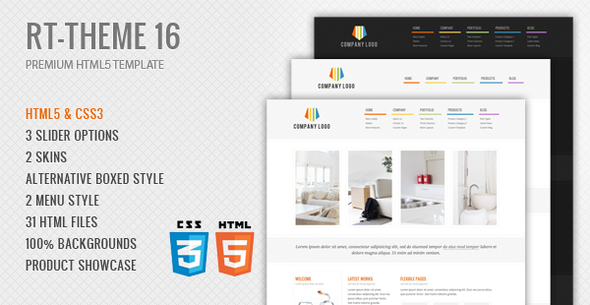
RT-Theme 16 Premium HTML5 Template is a static website template for business, corporate and product catalogue projects, sold on ThemeForest for $17. It ships as 31 hand-coded HTML files with a product showcase layout, three homepage slider options and two colour schemes, and it suits freelancers or small studios building a brochure-style site without a content management system. The template was last updated by its author, stmcan, in June 2015, which is the single most important fact for anyone weighing a purchase.
What the RT-Theme 16 Premium HTML5 Template business package actually includes
The core deliverable is a folder of static pages rather than a theme that installs into WordPress. That distinction shapes everything else about the product. A buyer receives 31 HTML files covering the usual corporate page types, plus a stylesheet and JavaScript layer that ties them together. Because the markup is plain HTML5 and CSS3, the pages can be uploaded to any hosting account and will render without a database, a PHP runtime or a build step.
Three slider scripts are bundled: an accordion slider, a cycle slider and a Nivo slider. Having three rather than one matters more than it sounds, because each behaves differently. The accordion style stacks panels and expands one at a time, which works well when a business needs to present several service categories in a confined space. The cycle and Nivo options rotate content on a timer, which suits a hero banner carrying a handful of campaign images. A buyer can pick whichever fits the page and discard the rest, though all three scripts still load in the default markup unless the files are edited.
The product showcase component is the feature that separates this template from a generic corporate layout. It provides structured presentation for catalogue items, which means a business selling physical goods, tours, or a defined service menu can display them in a grid with supporting detail rather than forcing everything into blog-style posts. The vendor tags also reference a portfolio layout, so the same structure can be repurposed for case studies or completed projects.
Layout flexibility comes from two menu styles, a default and a classic variant, and a boxed page option. Boxed style constrains content to a fixed-width column and lets the background show around it, and the listing claims full background control in that mode. Two colour schemes are included. That is a narrow palette by modern standards, but changing colours in a static template is a stylesheet edit rather than a settings screen, so the practical constraint is how comfortable the buyer is with CSS.
Two functional pieces are worth noting because they are easy to overlook in a static template. The contact form uses Ajax, meaning it submits without a full page reload, and it includes jQuery-based validation so fields are checked in the browser before submission. The vendor also ships PSD files, which allows a designer to alter the visual design in Photoshop and re-export assets rather than working backwards from the CSS.
Where this template fits and where it does not
The strongest fit is a small business or agency that needs a fixed set of pages — home, about, services, product or portfolio listings, contact — and has no intention of publishing frequently. A tour operator listing a stable set of packages, a consultancy presenting its service lines, or a manufacturer with a catalogue that changes once a year would all find the structure adequate. Freelancers who build sites for such clients and want a starting point that can be delivered quickly are the natural buyer.
A second reasonable use is as a design reference. The PSD files and the modular markup make it possible to lift a layout idea and rebuild it in a different stack, which is a legitimate reason to spend $17 even if the template itself never goes live.
It is the wrong choice for anyone who needs a blog, a news section, user accounts, e-commerce checkout, or content that non-technical staff will update. Static HTML has no admin interface, so every text change becomes a file edit and an upload. It is equally wrong for a project with a modern accessibility requirement, since a template of this age predates current expectations around semantic landmarks, focus management and ARIA labelling, and retrofitting those across 31 files is a substantial job. Anyone unwilling to write CSS should also look elsewhere, because the two colour options will not cover most brand guidelines.
What setup involves in practice
There is no installation process in the WordPress sense. The buyer downloads a ZIP from ThemeForest, extracts it, and opens the HTML files in an editor. The realistic workflow is to duplicate the closest matching page, replace the placeholder text and images, then adjust the stylesheet for brand colours and typography. Hosting requirements are minimal: any static host or shared hosting account will serve the files, and no database configuration is needed.
Two prerequisites matter. First, comfort with HTML and CSS, because the template is edited directly rather than configured. Second, a working mail handler for the contact form. Ajax validation happens in the browser, but the form still needs a server-side endpoint to actually deliver messages, and the vendor does not state which mail setup the bundled script expects. That is a detail to confirm before committing.
A straightforward single-page swap takes an hour or two. A full site build with custom imagery, a chosen slider, adjusted colours and a tested contact form is realistically a day or two for someone fluent in front-end work, longer if the design needs to diverge meaningfully from what ships.
Strengths and limitations
Strengths
- Valid HTML5 and CSS3 markup across 31 files, with no framework dependency to maintain.
- Three distinct slider scripts, giving genuine layout choice rather than cosmetic variation.
- A product showcase structure that handles catalogue and portfolio content in the same grid system.
- PSD source files included, which is uncommon at this price point and useful for design-led projects.
- Ajax contact form with client-side validation, saving the buyer from wiring up a form handler from scratch.
- Cross-browser support is claimed by the vendor, and the modular CSS makes targeted fixes practical.
- 285 sales on ThemeForest, indicating a reasonable number of buyers have taken it on.
Limitations
- The last vendor update was June 2015. Any browser quirks that have appeared since then are the buyer’s problem to solve.
- Only two colour schemes ship, and switching them means editing CSS rather than changing a setting.
- No CMS, no admin panel and no content editing interface. Every text change is a code change.
- The contact form’s server-side mail configuration is not documented in the listing, so it needs testing early.
- Accessibility features expected in current front-end work are not part of the package.
- Slider scripts load together by default, which adds page weight unless the markup is trimmed.
How this compares with the wider category
The realistic alternatives fall into three groups. The first is a modern static site generator or a utility CSS framework, which offers far better long-term maintainability and current browser support but requires the buyer to build the layouts from nothing. The second is a WordPress business theme, which costs more and brings hosting complexity but gives non-technical editors a way to update content. The third is a newer HTML template on the same marketplace, which will typically ship with more colour options, a build toolchain and current accessibility practices.
RT-Theme 16 Premium HTML5 Template competes on price and immediacy. At $17 it is cheaper than most WordPress themes in the business category and faster to deploy than assembling a layout from a framework. What it does not offer is currency. A buyer choosing between this and a recently updated template is effectively trading a lower price and a known, stable codebase against an unknown amount of remedial work. For a one-off brochure site that will not change, that trade can make sense. For anything with a multi-year lifespan, it usually does not.
Frequently Asked Questions
Is RT-Theme 16 Premium HTML5 Template a WordPress theme?
No. It is a set of static HTML files, not a WordPress theme, and it cannot be installed through the WordPress admin. The vendor listing notes that a separate WordPress version exists, which would be a different purchase. Buyers expecting theme installation, a customiser or a plugin ecosystem will need to look at the WordPress product instead.
Does the template still work in current browsers?
The HTML5 and CSS3 it uses are standards-based, so the core layouts generally still render. The risk sits in the bundled jQuery plugins, particularly the three sliders, which were written for the JavaScript conventions of their era. The vendor has not published an update since June 2015, so any breakage needs to be fixed by the buyer.
Can the contact form send email without extra setup?
Not reliably. The form validates input in the browser using jQuery, but it still needs a server-side script to actually send the message. The listing does not specify which mail method the bundled handler expects, so the form should be tested on the target host before the site goes live, and the endpoint adjusted if the host blocks it.
How hard is it to change the colours and layout?
Changing colours means editing the stylesheet directly, which is manageable for anyone comfortable with CSS. Layout changes are harder because the 31 files share a modular structure, so a structural edit in one place often needs matching edits elsewhere. Two colour schemes ship, and neither is switchable from a settings screen.
Verdict
RT-Theme 16 Premium HTML5 Template is a sensible purchase for a freelancer or small studio that needs a static business or catalogue site delivered quickly, is comfortable editing HTML and CSS, and accepts that the codebase is a decade old. The product showcase layout, the three slider options and the included PSD files give it more substance than its $17 price suggests, and 285 sales indicate it has found a working audience.
It is the wrong buy for anyone who needs a CMS, expects regular vendor updates, requires current accessibility standards, or wants to hand content editing to a non-technical colleague. Those buyers should pay more for a maintained WordPress theme or build on a modern static stack. The deciding question is lifespan: for a site that will be built once and left alone, this template still earns its price; for anything expected to evolve, the savings are unlikely to hold.