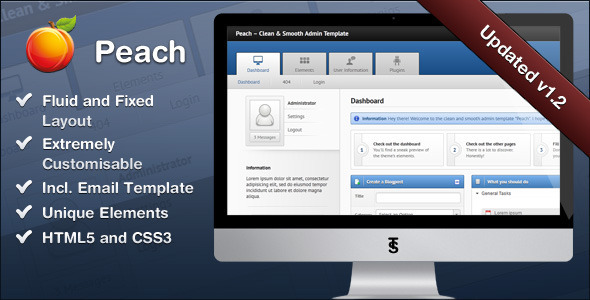
Peach is a clean, smooth admin template built on HTML5 and CSS3, with jQuery and Modernizr handling its interactive behaviour. Stammi, the developer behind it, designed it as a general-purpose backend interface for both small and large applications, and it ships with a large library of pre-styled components rather than a single dashboard layout. Buyers comparing Peach Admin Templates against newer alternatives should understand that this is a mature, well-established product rather than a current one: 918 sales on ThemeForest at $20, a strong rating, and a final vendor update dated June 2015.
What Peach Admin Templates Actually Include
The template’s main selling point is breadth of components rather than novelty of design. Every element a typical backend screen needs has already been styled, which is what allows a developer to assemble a working interface without writing CSS from scratch.
Layout and structural options
Peach supports both liquid and fixed layouts, and the same page can be rendered with an optional sidebar or at full width. That flexibility matters when a project needs a dense data view on one screen and a simpler form on another without maintaining two separate stylesheets. The grid underneath is the 960.gs system, a fixed-width framework that predates flexbox and CSS Grid, so anyone expecting a modern responsive grid should note that the layout logic is column-based and desktop-first.
Forms, validation and input controls
Form handling is where the template is most thorough. Text fields, datepickers, time and datetime pickers, radio buttons, checkboxes and dialogs all have custom styling, and validation plus tooltip behaviour is wired in. A wizard component and a styled WYSIWYG editor are included, along with file upload styling. For admin panels that are mostly data entry, this removes a significant amount of repetitive front-end work.
Data display and feedback
DataTables come fully styled, charts offer several configuration options, and the template includes notification systems, alert boxes, modal dialogs, toggle boxes and tabs. There is also an iPhone-style contact list, a file browser with a lightbox gallery, a login box, and shortcut and step lists. An email template is bundled as well, which is unusual for an admin theme and useful when transactional messages need to match the panel’s visual language.
Technical foundation
The build leans on CSS3 progressive enhancement with minimal image use, which keeps the asset footprint down and makes recolouring more practical. jQuery UI powers the interactive widgets. Cross-browser support extends back to Internet Explorer 7, a claim that reflects the template’s 2011 origins and its target audience at the time. A colour theme generator is included, and the code is described by the developer as well commented with full documentation.
Where Peach Fits and Where It Does Not
This template suits developers building internal tools, content management backends, reporting dashboards and administration panels for web applications. It is particularly well matched to projects where the interface is form-heavy and component-driven: inventory systems, booking backends, CRM-style tools, and any application where dozens of styled input types and table views save weeks of styling effort. Agencies maintaining several similar client projects can reuse the component library across them.
It is also a reasonable choice for a developer who wants a starting point that can be stripped back. Because the elements are modular, an unused chart or gallery component can simply be left out.
The wrong choice is any project with a modern responsive requirement. Peach predates the mobile-first era of admin design, and there is no indication in the product data that it ships with a responsive breakpoint system. Building a panel that must work cleanly on tablets and phones would mean writing that layer independently. Projects that need a component framework with active maintenance, accessibility work, or integration with a modern JavaScript stack such as React or Vue are also better served elsewhere — this is a jQuery-era template, and that is a structural constraint, not a preference.
Setting Up Peach in Practice
Setup is conventional for a ThemeForest admin template. The buyer downloads a package containing the HTML pages, the CSS and JavaScript assets, and the documentation. There is no build step, no package manager and no compilation required — files can be opened directly in a browser or dropped into an existing server directory.
Prerequisites are minimal: a text editor and a basic understanding of HTML and CSS. Customisation is largely a matter of editing markup and overriding stylesheet values. The colour theme generator reduces the effort of rebranding, and the commented code is intended to make locating the right rule straightforward.
Realistically, a developer familiar with HTML templates can have a page running within an hour and a first customised screen within an afternoon. Turning Peach into a functioning admin panel depends entirely on how much backend integration is required, since the template supplies presentation only — no server-side logic, database layer or authentication system is included. The vendor states that support runs through a dedicated forum, and that updates are provided at no extra cost for the lifetime of the purchase.
Strengths and Limitations
Strengths
- Unusually broad component coverage for the price, including charts, DataTables, a wizard, a WYSIWYG editor, a file browser and an email template.
- Both liquid and fixed layouts, with optional sidebar or full-width presentation.
- Form elements and validation are handled in depth, which is the most time-consuming part of most admin builds.
- CSS3-based styling with minimal image dependencies makes recolouring practical.
- Well commented code and full documentation, corroborated by buyer feedback praising the documentation quality.
- Lifetime updates at no additional cost, as stated by the developer.
- 918 sales and a strong rating indicate the template has been used widely and held up in real projects.
Limitations
- The last vendor update was June 2015. The bundled jQuery version dates from the 1.7 era, and no modernisation has been published since, so the dependency stack is roughly a decade behind current practice.
- There is no evidence of a responsive breakpoint system. The 960.gs grid is fixed-width and desktop-oriented, so mobile support would have to be built from scratch.
- Internet Explorer 7 support is listed as a feature, which signals the design assumptions of its era rather than current browser priorities.
- No accessibility provisions are mentioned — no ARIA attributes, focus management or keyboard navigation documentation.
- Support is forum-based rather than a formal ticketing system with defined response times, and the vendor does not state a service-level commitment.
- The template is presentation only. Any expectation of backend logic, authentication or database scaffolding is unmet.
How Peach Compares to the Admin Template Category
Admin templates generally fall into two groups: lightweight UI kits that supply styled components for a developer to assemble, and full application starters that bundle routing, authentication and a build pipeline. Peach sits firmly in the first group, and within that group it competes on component count and documentation quality rather than on tooling.
Against newer templates in the same price band, the trade-off is straightforward. A current template will typically offer a responsive grid, a modern CSS architecture, accessibility considerations and a maintained dependency set. Peach offers a wider spread of pre-built widgets, a longer track record and a lower learning curve, because there is no build tooling to configure. For a project that will live on a desktop intranet and does not need to adapt to phones, that trade can be worth making. For anything customer-facing or mobile-adjacent, the missing responsive layer is a cost that quickly outweighs the savings.
The other distinction is longevity. Templates with active development absorb browser changes and security updates in their dependencies. Peach’s changelog ends in 2015, so a buyer is effectively adopting a frozen codebase. That is not automatically disqualifying — static HTML and CSS do not rot the way server software does — but jQuery and jQuery UI versions from that period do carry known issues that would need addressing manually.
Frequently Asked Questions
Is Peach admin template responsive?
The product data does not list a responsive layout as a feature. Peach uses the 960.gs fixed-width grid system and offers liquid and fixed layout modes, but no mobile breakpoints are documented. Any project requiring tablet or phone support would need a responsive layer written separately, which is a significant addition rather than a configuration change.
What technology does Peach admin template use?
Peach is built on HTML5 and CSS3, with jQuery and jQuery UI powering interactive components and Modernizr handling progressive enhancement. It relies on CSS3 features with minimal image use, and the layout sits on the 960.gs grid. There is no modern JavaScript framework, build tool or package manager involved — it is a conventional static HTML template.
Does Peach include backend code or a database?
No. Peach is a front-end template only. It supplies the HTML markup, stylesheets and JavaScript needed to present an admin interface, but no server-side logic, authentication, database schema or API integration. Developers must connect it to their own backend. This is standard for the admin template category and should be planned for before purchase.
Is Peach still updated and supported?
The vendor’s last recorded update was June 2015, so the template is not under active development. Stammi still lists lifetime updates at no extra cost and runs support through a dedicated forum, but no recent releases are documented. Buyers should treat the codebase as stable but frozen, and expect to modernise dependencies themselves.
Verdict
Peach is a sensible purchase for a developer or agency building a desktop-oriented admin panel who wants a large, well-documented set of pre-styled components at a low one-off cost. The 918 sales, strong rating and repeated buyer praise for the documentation suggest it has delivered on that promise for many projects. It is not the right choice for anyone who needs responsive behaviour, modern JavaScript tooling, accessibility support or an actively maintained dependency stack — those requirements point to a current template instead. The deciding question is simple: if the interface will live on desktops and the priority is assembling screens quickly, Peach remains workable; if it must adapt to mobile or integrate with a contemporary stack, the 2015 codebase will cost more in rework than it saves.