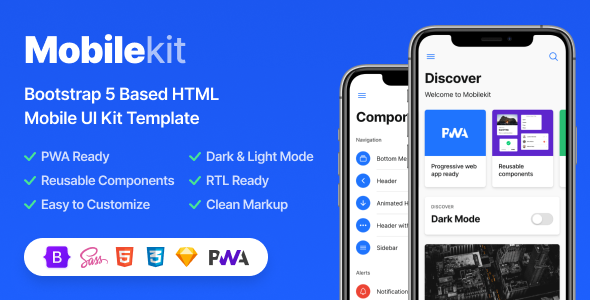
Mobile development has a notoriously fragmented workflow. You design a UI, code it responsively, argue with CSS frameworks, and then hope the final product feels native on a smartphone. The Mobilekit – Bootstrap 5 Based HTML Template by Bragher cuts through that complexity entirely. This is a mobile-first UI kit and HTML template engineered for building mobile websites, application interfaces, and Progressive Web Apps (PWAs) without starting from a blank canvas. For developers, freelancers, and startup founders who need a polished, app-style interface delivered with lightning speed, Mobilekit provides the structural foundation and design language to move from concept to working prototype in a single session. It’s not just a theme; it’s a comprehensive toolkit that anticipates the mobile ecosystem’s demands—from dark mode preferences to offline capabilities.
Key Features
The value of Mobilekit – Bootstrap 5 Based HTML Template lies in its arsenal of developer-friendly utilities. Rather than a single static layout, this template operates as a modular system. Some of the standout capabilities include:
- PWA Ready Architecture: The template functions as a Progressive Web App out of the box. Users can “Add to Home Screen” and experience the site like a native application, complete with offline detection through a service worker.
- Bootstrap 5 Core: Built on the latest stable version of Bootstrap v5.1.3, it eliminates jQuery dependencies entirely, utilizing pure Vanilla JS for faster load times and modern performance standards.
- Dark/Light Mode with Auto-Detect: A single switch toggles between light and dark themes. More impressively, it includes night mode scheduling and an auto-detect feature that respects the user’s OS-level preference.
- RTL Support: The template is fully RTL-ready, allowing developers to enable right-to-left layouts for Arabic, Hebrew, and other languages via the template settings.
- Advanced Template Settings Panel: A dedicated configuration interface lets you enable or disable PWA features, dark mode, RTL, and a test mode to quickly preview the template’s current status.
- Sketch File Included: Designers receive the original Sketch source file, enabling them to modify the UI kit visuals before a single line of code is touched.
- Sass Powered Customization: All CSS is generated from organized, commented Sass files. Developers can change global colors, fonts, and sizes by editing a single variable file (
_theme-settings.scss). - App-Style Component Library: With over 50 unique components—ranging from animated headers and story viewers to action sheets and steppers—the template mimics the feel of a true iOS or Android application.
- Valid HTML5 & CSS3: The codebase adheres to strict web standards, ensuring cross-browser compatibility and a smooth rendering experience across devices.
- Google Fonts Optimization: Typography is flexible, supporting Google Fonts for easy brand alignment.
Who Is This For? Use Cases
Because of its breadth of features, Mobilekit – Bootstrap 5 Based HTML Template serves a wide spectrum of digital projects. It is particularly effective for teams that lack dedicated design resources but still require a premium mobile presence.
Freelance Developers and Agencies
When a client requests a “mobile app” but the budget only allows for a web-based solution, Mobilekit is the bridge. Instead of spending weeks on UI architecture, developers can utilize the pre-built components—such as the Bottom Menu, Sidebar, and Tabs—to assemble a functional prototype. The included documentation and commented code reduce the learning curve, allowing agencies to deliver mobile-optimized web experiences for clients in hospitality, e-commerce, or SaaS without hiring a specialized mobile developer.
Startups Building MVPs
Time-to-market is critical for startups. With this template, you can create a login system, an onboarding slider, a product catalog, and a profile page in a fraction of the time it would take to code from scratch. The PWA capability is a game-changer here; it allows a startup to deploy a “lite” version of their platform that users can install on their phones, bypassing the App Store approval process entirely. The e-commerce pages (Cart, Product, Invoice) make it viable for small retail startups to launch a shopping experience immediately.
UI/UX Designers
Designers moving into front-end development will appreciate the organized Sass files and the included Sketch file. You can design high-fidelity mockups in Sketch, then use the template’s code as the production baseline. The UI Kit’s diverse components—like Chips, Tooltips, and Action Sheets—serve as a visual dictionary for implementing Material Design or iOS guidelines correctly.
Web App Prototypers
Product managers and UX researchers can use the template to run usability tests. Because the template is static HTML, you can quickly wire up multiple pages (FAQ, Blog Post, Contact) and simulate a full user journey without needing a backend. The “Online/Offline Detection” and “Connection Loss” pages also make it perfect for prototyping offline-first applications.
Technical Details & Compatibility
For developers, the technical specifics matter more than visual appeal. Mobilekit – Bootstrap 5 Based HTML Template is built for modern browsers and mobile operating systems.
- Framework Version: Bootstrap v5.1.3 (last updated February 2022), ensuring compatibility with the latest CSS Grid and Flexbox utilities.
- JavaScript Logic: 100% Vanilla JS. There is no jQuery dependency, which significantly reduces the server load and improves page responsiveness on mobile hardware.
- Icon Sets: Includes Bootstrap Icons v1.8.1 and Ionicons v5.5.2, offering over a thousand vector icons to choose from.
- Component Architecture: Elements like the Sidebar, Panels, and Action Sheets are powered by Bootstrap’s Offcanvas component, ensuring smooth slide-in animations.
- Device Optimization: Tested for both phones and tablets, with specific attention to viewport scaling and touch-friendly hit areas.
- File Structure: Organized with separate directories for CSS, JS, and Sass, making it easy to isolate changes and maintain the codebase over time.
- Browser Support: Optimized for the evergreen versions of Chrome, Safari, Firefox, and Edge, particularly their mobile equivalents.
Pros and Cons
While the feature list is dense, a balanced evaluation helps set the right expectations. Here is an honest look at the strengths and potential drawbacks of this toolkit.
Pros
- Comprehensive Component Library: With over 50 components, it covers nearly every UI pattern found in mobile apps, saving hours of CSS work.
- Advanced Dark Mode Options: The inclusion of auto-detect and night-time scheduling is a feature rarely found in standard HTML templates, giving it a significant edge.
- PWA Implementation: Very few HTML templates offer a reliable service worker setup. This one includes it by default, making it a rare find.
- No jQuery Bloat: The vanilla JavaScript approach ensures fast loading, which is critical for SEO and mobile user retention.
- Designer-Friendly: The inclusion of a Sketch file bridges the gap between visual design and code, streamlining the handoff process.
- Value for Money: Priced at $24.00, the cost is far lower than a single hour of custom development, yet it provides a foundation that could take weeks to build manually.
Cons
- Demo Images Excluded: The package does not include the stock photos used in the demo. You will need to source and replace them with your own assets to avoid broken links.
- Not a CMS: This is a static HTML template. It is not a WordPress theme, and it does not include a backend CMS. To make it dynamic, you must integrate it with a custom backend or API.
- Periodic Update Cadence: While the template is updated regularly, some users may find that they need to manually manage the Bootstrap version upgrades to keep up with the latest framework releases.
Frequently Asked Questions
Is the Mobilekit HTML Template compatible with WordPress or other CMS platforms?
No, this is strictly a static HTML template. It is not a WordPress theme. However, because it is built on Bootstrap 5 with clean, commented code, you can integrate it into a CMS platform by converting the HTML into a custom theme or using it as a front-end framework for a headless CMS setup. For those seeking a purely code-based solution without a database, it works perfectly as a standalone website.
Does Mobilekit require jQuery to run its components?
No. As of version 2.6, all jQuery dependencies were completely removed. The template now runs entirely on Vanilla JavaScript. This is a significant performance advantage, as it reduces the number of HTTP requests and the overall file size, leading to faster loading times on 3G and 4G networks.
Does the template actually function as a Progressive Web App out of the box?
Yes. The Mobilekit – Bootstrap 5 Based HTML Template includes a service worker JS file and a web manifest file. This allows users to install the website on their mobile home screen, enable offline modes (with the included connection loss detection page), and receive push notifications if you configure them. However, for the PWA to function on a live domain, you will need to host the files on an HTTPS-enabled server.
Final Verdict
In a crowded market of Bootstrap templates, Mobilekit – Bootstrap 5 Based HTML Template distinguishes itself through sheer comprehensiveness. Developer Bragher has crafted a product that understands the nuances of mobile UX—from the micro-interactions of toasts and dialogs to the macro-structure of full page flows. With over 2,907 sales, it has proven reliable for a community of developers who require a rapid yet robust mobile solution. It eliminates the formidable barrier of starting a mobile project from scratch, offering a slick, app-like interface that your users will immediately recognize and trust.
When you factor in the PWA readiness, the advanced dark mode customization, and the structured Sass architecture, the $24.00 price tag becomes a negligible investment compared to the potential development hours it saves. If you are building anything with a mobile-first strategy—whether it’s a startup MVP, a client project, or an internal web app—this template is the head start you need. Stop wrestling with empty divs and breakpoints. Get Mobilekit today, and transform your mobile web concept into a polished, installable application experience that stands out from the