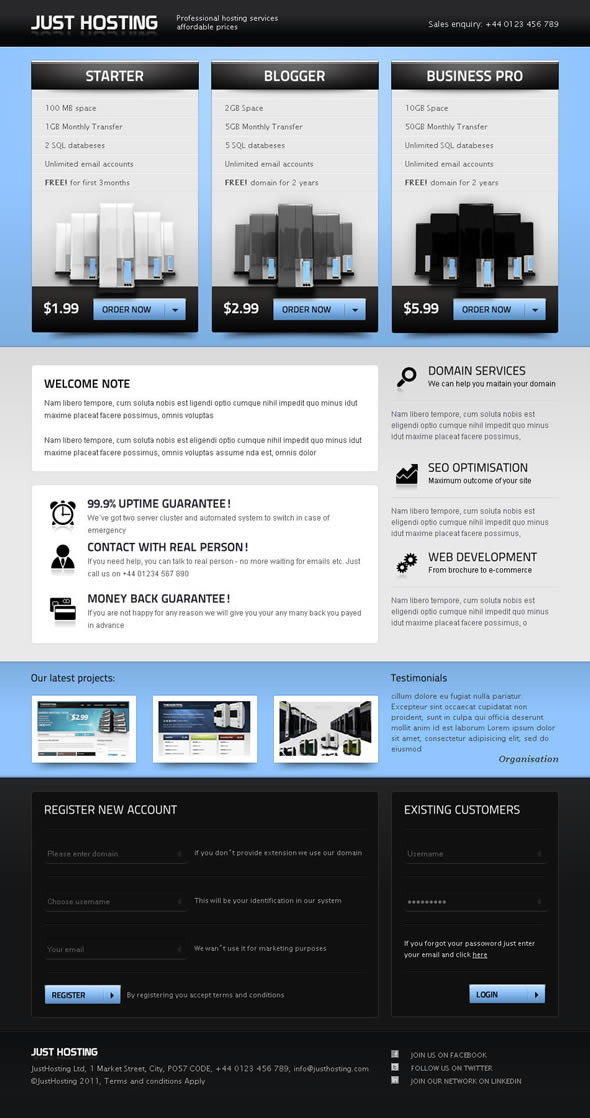
Just Hosting is a landing page template for web hosting companies, sold on ThemeForest for $8. It provides an HTML5 marketing page plus a WHMCS client area skin, aimed at small hosts that want a presentable storefront without commissioning custom design work. The template has been purchased around 340 times and was last updated by its developer, rtofvnt, in April 2012.
That date matters more than any feature list. Anyone evaluating this product in the present day is really deciding whether a thirteen-year-old template still has a place in their stack, and the honest answer depends entirely on what they intend to do with it.
What the Just Hosting template actually includes
The package is built around a single landing page for a hosting or web services business. It ships as valid HTML5, which means the markup follows the current browser standard rather than the older XHTML conventions that were still common when the theme was written. In practical terms, that gives a clean base that modern browsers render predictably and that search engines can parse without workarounds.
Several interactive elements come bundled rather than requiring separate purchases. A CodaSlider carousel handles customer testimonials, and a FancyBox lightbox opens recent project screenshots without leaving the page. There is also a small JavaScript routine that highlights the selected parameters across a pricing table, so a visitor comparing plans sees the differences reflected consistently across every column. That last detail is the kind of thing that usually gets skipped in budget templates, and its presence suggests the original author thought about how hosting buyers actually shop.
The contact form is a working Ajax and PHP implementation rather than a static mockup. That matters because a form that only looks functional is a common trap in cheap templates, and replacing a fake form with a real one is fiddly work. The listing does not state which mail transport the script uses, so anyone deploying it should test delivery before going live.
Two other components round out the package. A Cufon font replacement script swaps in custom typography, and a Latest Tweets plugin pulls a Twitter feed into the page. Both were reasonable choices in 2012. Cufon has since been superseded by native web font loading, and the Twitter integration predates the platform’s current API restrictions, so neither should be treated as a permanent solution. They are starting points.
The WHMCS element deserves separate treatment. WHMCS is the billing and client management system many hosts use to handle orders, invoices and support tickets. The template includes a client area skin so the billing interface matches the marketing site. This is the feature that distinguishes Just Hosting from a generic business template, and it is also the weakest part of the package. The vendor’s own listing states plainly that changes in how WHMCS is updated mean the WHMCS portion cannot be guaranteed to work fully. That is an unusually candid admission, and it should be taken at face value.
Finally, the download includes PSD and PNG source files for the project imagery, giving a designer room to adjust the visuals rather than being locked into the supplied graphics.
Where Just Hosting fits, and where it does not
The template suits a small or newly launched host that needs a credible public face quickly. A freelancer reselling shared hosting under their own brand, a regional ISP adding a hosting page, or an agency spinning up a white-label offering could all use this as a starting point. The minimal, clean layout with its black, blue and white palette reads as competent rather than flashy, which is appropriate for a service business selling reliability.
It also fits a specific budget scenario. At $8, the template costs less than an hour of most designers’ time. For a project where the marketing site is a means to an end rather than a deliverable in itself, that trade-off is defensible.
The wrong choice is any host planning to rely on the WHMCS integration as shipped. Given the vendor’s own caveat, a business that needs a polished, current billing experience should budget for a developer to rebuild or heavily adapt that portion, or should look at a template that is actively maintained against current WHMCS releases. Treating the WHMCS skin as a bonus rather than a core feature is the only realistic posture.
A second poor fit is any project with modern front-end requirements. There is no indication of a build toolchain, a CSS preprocessor, or a component framework. A team expecting to integrate this into a React or Vue application will find nothing to work with. This is a static HTML template, and it should be evaluated as one.
What setup involves in practice
Deployment follows the usual pattern for a static template. The files need to be uploaded to a web server, either via FTP or through a hosting control panel’s file manager. From there, the main work is editing the HTML to replace placeholder text, swap in the company’s own logo and imagery, and adjust the pricing table to reflect real plans and prices.
The prerequisites are modest. A text editor is enough for content changes, though a working knowledge of HTML and CSS is necessary for anything beyond swapping text and images. The PSD files require image editing software if the supplied graphics need modification. For the contact form, a PHP-capable server is required, and the recipient address needs to be configured in the script.
Installing the WHMCS skin is a separate task and the more involved one. It means placing template files into the WHMCS installation’s template directory and selecting it in the admin settings. Because the vendor does not guarantee compatibility with current WHMCS versions, this step may require debugging, and the amount of time it takes cannot be predicted from the listing alone.
For the marketing page by itself, a competent front-end developer should expect a few hours of work to get a live site from the raw files. The WHMCS side is open-ended.
Strengths and limitations
Strengths
- Low price relative to the amount of included material, with source files for the graphics rather than flattened images only.
- Valid HTML5 markup that gives a clean, standards-compliant starting point.
- Interactive components — testimonial slider, project lightbox, plan comparison highlighting — are bundled rather than sold separately.
- A functional Ajax and PHP contact form, not a decorative placeholder.
- The plan comparison highlighting addresses a real need in hosting pricing tables.
- The vendor’s listing is honest about the WHMCS problem rather than burying it, which makes the product easier to assess fairly.
Limitations
- The last update was April 2012. Any security or compatibility fixes made since then are not documented, and the practical risk of running old PHP form code on a current server should be assessed before deployment.
- The vendor explicitly cannot guarantee the WHMCS portion works, which undermines the template’s main differentiator.
- Cufon font replacement and the Twitter feed plugin both rely on approaches that have since been replaced by better native browser and platform features.
- No responsive design is mentioned in the listing. A 2012 template predates the widespread shift to mobile-first layouts, so it should be assumed to need work on smaller screens unless verified otherwise.
- No build tooling, CSS framework or component structure, which limits how easily it fits into a modern development workflow.
- Support depends on the original author responding directly, and the listing gives no indication of current response times.
How Just Hosting compares to the wider template market
Hosting templates generally fall into two groups: standalone marketing pages, and full packages that pair a front-end theme with a billing system skin. Just Hosting sits in the second group on paper, but the WHMCS caveat pushes it back toward the first in practice.
Compared with a generic corporate or SaaS template, Just Hosting has the advantage of hosting-specific structure — pricing tables, plan comparison behaviour, and a visual language that reads as infrastructure rather than generic business. A general-purpose theme would need those elements built from scratch.
Compared with actively maintained hosting themes, the gap is maintenance and modernity. Newer templates typically ship with responsive layouts, current WHMCS compatibility, and ongoing updates. They also cost considerably more. The decision comes down to whether the buyer values the lower price and the included source files more than they value current compatibility and support.
For anyone whose priority is a working billing integration, the category has moved on and this template has not moved with it.
Frequently Asked Questions
Is Just Hosting compatible with the current version of WHMCS?
The vendor does not guarantee it. The product listing states that changes in how WHMCS is updated mean the WHMCS portion of the template cannot be confirmed as fully working. Anyone who needs a reliable billing interface should plan to test it thoroughly or have a developer adapt it before relying on it in production.
Does the Just Hosting template work on mobile devices?
The listing does not mention responsive design, and the template dates from 2012, before mobile-first layouts became standard. It should be assumed to need responsive work. Buyers should check the live preview at narrow viewport widths before purchasing if mobile traffic matters to their business.
What skills are needed to set up Just Hosting?
Basic HTML and CSS knowledge covers content and styling changes. The contact form needs a PHP-capable server and some configuration. Installing the WHMCS skin requires familiarity with WHMCS template directories and admin settings. Image editing software is needed if the supplied PSD source files are to be modified.
Is Just Hosting still worth buying at $8?
It can be, for a small host that wants a hosting-specific landing page cheaply and is willing to treat the WHMCS skin as optional. The included PSD files and working contact form add real value at that price. Buyers needing current WHMCS compatibility or responsive design should look elsewhere.
Verdict
Just Hosting is a reasonable purchase for a small host, reseller or agency that needs a hosting-focused landing page at minimal cost and has the front-end skills to adapt it. The bundled interactive components, working contact form and editable source files justify the $8 price on their own. It is not a good fit for anyone whose decision hinges on the WHMCS integration, since the vendor’s own listing disclaims that portion. It is also a poor choice for projects requiring responsive layouts, modern build tooling or ongoing updates. Buyers should treat this as a static template with a bonus skin, not as a maintained hosting platform theme.