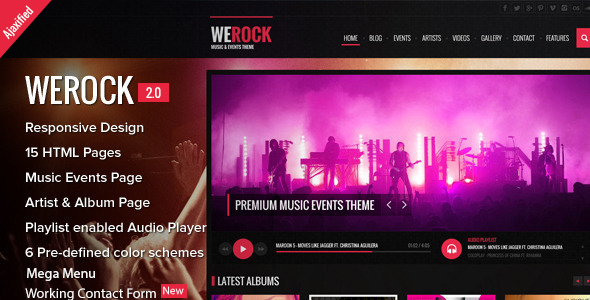
WeRock Entertainment is a static HTML template built for music radio stations, bands, singers and event promoters who need a promotional website without a content management system. It ships as a set of 15 ready-made pages styled with Bootstrap 3, and its standout component is an Ajax-driven audio player that keeps playing while visitors move between pages. It suits freelancers and small agencies building a one-off promotional site, and it is a poor fit for anyone who needs a database-driven platform they can update without touching code.
What WeRock Entertainment Actually Delivers in the Browser
The template’s centrepiece is the playlist-enabled audio player. In the Ajax version, tracks continue playing as the visitor navigates from the home page to a show schedule or a news article, because the page content swaps in without a full reload. That behaviour matters for a radio site: a listener who loses the stream every time they click a link will leave. The player also handles playlist management through plain HTML markup rather than a separate configuration file, which means a developer can reorder or replace tracks by editing the page source directly.
Navigation is handled by a mega menu, a wide drop-down panel that can hold several columns of links, images or short descriptions at once. For a station with many shows, genres or presenters, that structure keeps the header from turning into an unmanageable list. The layout itself is responsive, so the same pages adapt to phone, tablet and desktop widths, and the markup is written to HTML5 validation standards with semantic tags — meaning headings, articles and navigation blocks are labelled by what they are rather than by generic container names. That helps search engines and screen readers interpret the page.
Beyond the player, the package covers the pages a music or events site typically needs: home, about, discography or releases, tour or event listings, gallery, blog or news, and contact. The contact form includes Ajax validation, so errors appear without a page refresh. A tweet plugin was added in a later release to pull social posts onto the site. Font Awesome supplies the icon set, and the visual direction is dark, high-contrast and photography-led — a deliberate choice for band and club imagery.
Where This Template Fits, and Where It Does Not
The strongest match is a working band, DJ or independent radio show that needs a promotional site live quickly and has someone comfortable editing HTML. A freelancer quoting a fixed-price job benefits too: the page count and component set mean most of the layout work is already done, and the $24 licence is a trivial line item against the build.
Event promoters running a single festival or a seasonal series are another reasonable fit, particularly if the site is essentially a brochure with a schedule, a lineup and a gallery. The dark aesthetic also suits nightlife, club and fashion-adjacent media projects, which is why the vendor tags include fashion and photography alongside music and radio.
Where it falls down is any project that expects non-technical staff to publish content. There is no admin panel, no database and no editorial workflow — every change is a file edit and a re-upload. A community station whose volunteers rotate weekly would find that arrangement painful. The same applies to anyone who needs memberships, ticketing with payment processing, listener analytics or a subscriber login. Those are application features, and a static template does not provide them.
What Setup Involves in Practice
Installation is a file transfer rather than a software install. The buyer downloads a ZIP from ThemeForest, unzips it, and uploads the HTML, CSS, JavaScript and image folders to a web host via FTP or a hosting control panel’s file manager. No server-side language, database or build tool is required, so even basic shared hosting will run it.
The first real task is replacing the demo content. That means editing the HTML of each of the 15 pages to swap in the client’s text, then dropping in new images at the dimensions the existing ones use. The audio player needs the track files uploaded and the playlist markup pointed at their paths, along with correct titles and artist names. Anyone who has worked with Bootstrap before will recognise the grid classes and can adjust column widths without much trial and error.
A straightforward single-band site with the demo content replaced and the player loaded typically takes a day or two of focused work. A larger station site with a full show schedule, a populated gallery and a rewritten mega menu runs longer, because the volume of content entry grows rather than the technical difficulty. The main prerequisite is comfort reading and editing HTML; a working knowledge of CSS helps for colour and spacing changes.
Strengths and Limitations
Strengths
- Continuous playback across page changes in the Ajax version, which is the single most useful behaviour for a radio or music site.
- Fifteen pre-built pages cover the usual ground for a band, station or event promoter, reducing layout work to content replacement.
- Playlist handling through HTML markup keeps track management transparent for anyone who can read a page source.
- Bootstrap 3 base means the grid, buttons and form styles follow conventions many developers already know.
- Semantic, HTML5-validated markup gives a cleaner starting point for search visibility and accessibility than table-based or div-soup templates.
- Mobile audio playback was specifically fixed in the 2.0 release, addressing a common failure point in older music templates.
Limitations
- The last vendor update is dated June 2015. Bootstrap 3 has since been superseded, and the template has not been refreshed for newer browser behaviour or modern front-end tooling.
- There is no content management system. Every text change, new show or new track requires editing files and re-uploading them.
- No e-commerce, ticketing, membership or payment functionality is included, and the vendor does not state that any integration exists.
- The design language is fixed to a dark, image-heavy style. Rebranding to a light or minimal look means substantial CSS work rather than a settings change.
- Because the template is static, there is no built-in search, comment system or user account layer.
How It Compares With the Wider Category
Music and entertainment templates generally fall into three groups: static HTML packages like this one, WordPress themes, and full streaming platforms with back-end audio hosting. WeRock Entertainment sits firmly in the first group, and that placement explains most of its trade-offs.
Against WordPress music themes, it loses on day-to-day flexibility. A WordPress equivalent lets a station manager publish a new show or swap a playlist from a browser, which is worth a great deal to a site that changes weekly. It wins on simplicity and cost: no hosting requirements beyond static files, no plugin maintenance, no security patching, and no risk of a theme update breaking a customisation.
Against dedicated streaming platforms, the comparison is even clearer. Those services host the audio, manage the stream and provide listener statistics, but they charge recurring fees and constrain the design. WeRock supplies the front end only — the audio files still need somewhere to live, and there is no listener reporting.
The sensible way to judge it is by update frequency. A site whose content changes a few times a year is well served by a static template. A site that changes weekly is not, regardless of how good the player is.
Frequently Asked Questions
Do I need coding skills to use WeRock Entertainment?
Yes, basic HTML knowledge is required. The template has no admin panel, so text, images, playlist entries and menu links are all changed by editing the source files directly. Someone comfortable with HTML and a little CSS can manage it; anyone expecting a visual editor or a WordPress-style dashboard will find the workflow frustrating.
Does the audio player keep playing when visitors change pages?
Yes, in the Ajax version included in the 2.0 update. Content loads without a full page refresh, so playback continues as the visitor moves between pages. The vendor also states that mobile audio playback was fixed in that same release, which addresses a common problem with older music templates.
Can this template handle ticket sales or paid downloads?
No. WeRock Entertainment is a front-end HTML template with no e-commerce, payment or ticketing functionality, and the vendor does not list any supported integration. Selling tickets or downloads would require adding a third-party service or building that layer separately, which changes the scope and cost of the project considerably.
Is the template still maintained and updated?
No. The last recorded vendor update is 29 June 2015, which was the 2.0 release. It has not been refreshed since, so it is built on Bootstrap 3 and predates current front-end conventions. It still works as static HTML, but buyers should treat it as a fixed product rather than one that receives ongoing support.
Verdict
WeRock Entertainment is worth buying for a band, DJ, radio show or event promoter who needs a polished promotional site with working audio, has someone who can edit HTML, and expects to update the site only occasionally. The 618 sales and the positive rating on ThemeForest suggest the approach has satisfied a steady stream of buyers, and developer xvelopers has delivered a coherent package for the price. It is the wrong purchase for anyone who needs a content management system, ticketing, memberships or regular content publishing — those requirements point to a WordPress theme or a hosted streaming service instead. The 2015 update date is the deciding factor: treat this as a finished static template, not a platform that will grow with the project.