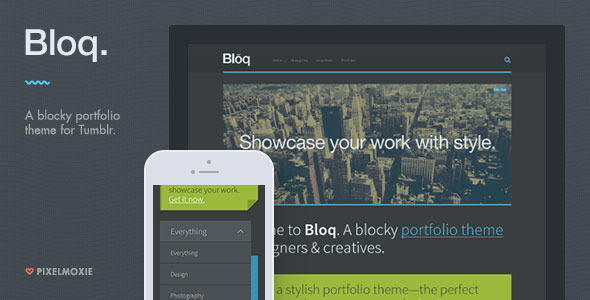
Bloq is a Tumblr portfolio theme built for designers, photographers and other visual creatives who want a block-based grid rather than a traditional scrolling blog. It combines a masonry or segmented-rows portfolio layout with Ajax loading, a touch-friendly slider and a set of homepage sections that can be configured without touching code. It is worth considering for anyone treating a Tumblr blog as a lightweight portfolio, and a poor fit for anyone who needs a self-hosted CMS or an actively developed theme.
What Bloq Blogging Actually Gives You
The core of the theme is its portfolio grid, and it ships with two distinct layout modes. Masonry arranges posts in staggered columns of varying height, which suits mixed-orientation photography and design work. Segmented Rows instead mimics the way Tumblr displays photosets natively, producing tidier horizontal bands. Switching between them is a setting rather than a rebuild, so a site owner can test both against real content before committing.
Several parts of the theme load without a full page refresh. Clicking a filter narrows the grid in place, scrolling to the bottom pulls in the next batch of projects, and opening a project expands its description inline instead of navigating away. Tumblr’s own analytics integration tracks that Ajax-loaded content, which matters because content injected by JavaScript is otherwise invisible to reporting tools. For a portfolio where visitors browse several pieces in one session, keeping them on a single page reduces friction considerably.
The homepage is assembled from optional sections. A hero area carries a welcome message, a call-to-action block sits below it, and a slider supports up to five images, each with its own caption and destination link. That slider uses swipe.js and is built for touch input, so it behaves correctly under a thumb on a phone rather than only responding to mouse drags. A featured posts carousel is also available, with a configurable limit and an optional autostart timeout.
Visual control is handled through Tumblr’s customisation sidebar rather than a separate options panel. Colours are adjustable there, and the theme ships with dark and light presets as starting points. Headings pull from Google Web Fonts, and the logo can be replaced with a custom image, optionally with a hover state and a higher-resolution version for dense screens. The retina claim rests on a mix of HTML5 canvas drawing and webfont icons rather than bitmap images, which is the more durable approach.
Content support is broad. Text, photo, photoset, quote, link, chat, audio, video and answer post types are all handled, and user-created pages work alongside them. Ask and Submit are enabled, Disqus can replace native comments, and Google Analytics can be inserted without editing template files. Feed widgets cover Twitter, Flickr, Dribbble and Instagram, while social icons span fifteen services including Behance, deviantArt, SoundCloud, Vimeo and YouTube. A collapsible widget area sits at the top of the layout and repositions to the side on narrower screens.
Where Bloq Fits and Where It Does Not
The strongest match is a working creative who already has a Tumblr presence and wants it to read as a portfolio rather than a diary. Photographers with mixed portrait and landscape work get the most from the masonry grid. Illustrators and graphic designers benefit from the inline project expander, which lets a visitor move through several pieces without losing their place. Studios wanting a simple, low-maintenance showcase page can use the hero and call-to-action sections to state what they do and how to get in touch.
It also suits people who want to avoid running a server. Tumblr handles hosting, and the theme handles presentation, so there is no WordPress installation, no plugin updates and no security patching to think about.
There are clear cases where it is the wrong purchase. Anyone who needs e-commerce, membership areas, complex forms or custom post types should look at a self-hosted solution instead, because Tumblr’s platform does not offer those things and no theme can add them. Agencies building client sites with staging environments, version control and deployment pipelines will find Tumblr’s workflow restrictive. And anyone who requires a theme with current browser testing and ongoing maintenance should weigh the update history carefully before buying, since the last release was in March 2019.
Setting Up Bloq in Practice
Installation assumes an existing Tumblr account. The theme file is uploaded through Tumblr’s theme customisation screen, either by pasting the HTML into the edit box or by using the install-from-file option, and it then becomes the active theme. No hosting, database or server configuration is involved.
From there, the work is configuration rather than development. Colours, fonts, logo and layout mode are set in the customisation sidebar, and the results appear in a live preview. The slider needs up to five images uploaded with captions and links. Social icon URLs, feed widget accounts and any Disqus shortname are entered as settings. If Google Analytics is wanted, the tracking code is pasted into a dedicated field.
The real time cost is content, not setup. A basic configuration can be finished in under an hour. Populating a portfolio with enough projects to make the grid look intentional takes considerably longer, and the segmented rows layout in particular needs consistent image proportions to look right. The vendor supplies documentation, though the listing does not state how detailed it is or whether it covers the newer MailChimp embed and SSL options added in the final release.
Strengths and Limitations
Strengths
- Two genuinely different grid layouts, so the same content can be presented in a looser or more regimented way without rebuilding anything.
- Ajax filtering, pagination and inline project expansion keep visitors on one page, which suits browsing behaviour on a portfolio.
- Ajax-loaded content is tracked by Google Analytics, a detail many themes in this category overlook.
- Broad post type support, including audio, chat and answer, means most Tumblr content renders properly rather than falling back to plain text.
- Fifteen social icons and four feed widgets cover the services creatives actually use.
- Retina handling relies on canvas and icon fonts rather than image assets, so it holds up as display densities change.
- A track record of 706 sales and a maintained changelog through 2019 suggests the theme was actively supported for several years.
Limitations
- The last update was March 2019. Tumblr’s platform and its API have changed since, and the vendor does not state whether further releases are planned.
- Because it runs on Tumblr, there is no access to the theme’s PHP or a plugin ecosystem. Anything the platform does not support cannot be added.
- Portfolio filtering depends on Tumblr’s tag system rather than a dedicated taxonomy, which limits how precisely projects can be categorised.
- The slider caps at five images, which is restrictive for a photographer wanting to lead with a longer sequence.
- Colour control lives entirely in Tumblr’s customisation sidebar, so there is no separate options panel and no way to export a configuration between blogs.
- Documentation quality is not described in the listing, and buyers cannot verify it before purchase.
How Bloq Compares With Other Tumblr Portfolio Themes
Tumblr portfolio themes broadly split into two groups: minimal grid themes that strip the blog down to images, and fuller themes that keep blogging features intact. Bloq sits in the second group. Its distinguishing choice is the Ajax layer, which most simple grid themes skip entirely. That is what separates a static gallery from something that behaves more like a single-page application.
Against minimal alternatives, Bloq offers more configuration and more content types, at the cost of a heavier page. Against themes built purely for photography, it handles text, chat, audio and quote posts more gracefully, which matters if the blog is not exclusively visual. Against self-hosted options, the trade is control for convenience: no server to manage, but no ability to extend beyond what Tumblr allows. The segmented rows mode is the least common feature in this category and is the main reason to pick Bloq over a generic masonry theme.
Frequently Asked Questions
Is Bloq a WordPress theme or a Tumblr theme?
Bloq is a Tumblr theme, not a WordPress theme. It installs through Tumblr’s theme customisation screen and runs on Tumblr’s hosting, so there is no WordPress installation, no database and no plugin system involved. Anyone looking for a self-hosted solution should search for a WordPress portfolio theme instead.
Does Bloq still work after Tumblr’s recent platform changes?
The vendor does not state whether the theme has been tested against Tumblr’s current platform. The last recorded update was March 2019, and several features depend on third-party services such as Instagram, Dribbble and Disqus that have since changed their APIs. Buyers should verify current compatibility before purchasing rather than assuming it works as originally documented.
Can Bloq Blogging handle a photography portfolio with large images?
Yes, with caveats. The theme is retina-ready and the masonry layout suits mixed image orientations well, but the homepage slider accepts a maximum of five images. Photographers with large bodies of work will rely mainly on the grid and the Ajax pagination to display everything, rather than the slider.
Does Bloq support custom domains and SSL?
SSL support was added in version 1.6.0, and an earlier release fixed Google Analytics so it worked correctly with custom domain names. Tumblr handles both the domain mapping and the certificate on its side. The theme’s role is limited to loading its assets over HTTPS so browsers do not flag mixed content.
Verdict
Bloq is a sensible purchase for a designer, photographer or illustrator who already publishes on Tumblr and wants that blog to read as a portfolio rather than a feed. The two grid modes, the Ajax browsing layer and the breadth of post type support give it more substance than the typical minimal Tumblr grid theme, and the price is low enough that the risk is limited. It is not the right choice for anyone who needs e-commerce, custom content types, staging environments or a theme with a current maintenance commitment, because Tumblr’s platform and the 2019 update date both impose hard ceilings. Buyers in that second group should look at self-hosted alternatives instead. For everyone else, it remains a competent, well-considered option in a category where most themes do far less.