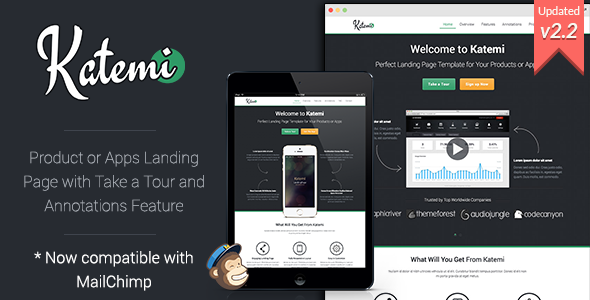
Katemi is a single-page HTML landing template for software products, mobile apps and services, sold on ThemeForest for $19. It ships as static HTML, CSS and JavaScript built on Bootstrap, and it is aimed at freelancers, marketers and small teams who need a promotional page live quickly without a content management system. The template has been purchased 382 times and was last updated by its developer, xwisnux, in June 2015.
Anyone comparing Katemi Landing Pages against the wider pool of one-page templates should understand one thing up front: this is a presentation layer, not a platform. Everything the buyer gets is a set of files to edit by hand and upload to a host. That constraint shapes almost every judgement in this review.
What Katemi Landing Pages Actually Include
The template’s headline capability is a guided walkthrough. A “Take a Tour” script lets the page lead a visitor through a sequence of highlighted elements, each with a short explanatory tooltip. For a product with a non-obvious interface, that removes the burden of explaining the workflow in body copy. A second feature, image annotations, places labelled markers on a screenshot so a visitor can hover or click to reveal detail. Both are the kind of thing usually built as a custom job, and having them bundled is the main reason this template stands apart from generic landing pages.
Around those two features sits a conventional but complete marketing page:
- Responsive Bootstrap grid. The layout is built on Bootstrap 3 and adapts across desktop, tablet and phone widths, so a single file set covers all screen sizes.
- Two page variants. The vendor supplies layouts suited to a product or service launch and to an app, which means the section order and imagery can be matched to the offer rather than forced into one structure.
- Working forms. The contact and subscribe forms include client-side validation, and the subscribe form connects to MailChimp, so email addresses can be pushed into an existing list rather than collected in a database.
- Testimonial and content sliders. A FlexSlider carousel handles rotating quotes or feature panels without additional plugins.
- Toggle FAQ block. Questions collapse and expand in place, which keeps a long objection-handling section from dominating the page.
- Media lightbox. prettyPhoto handles image galleries and embedded video in an overlay.
- Icon fonts and CSS animations. Icons scale cleanly at any size, and hover and scroll effects are handled in stylesheets rather than JavaScript.
- Above-the-fold optimisation. The vendor states the top section is tuned so the primary message and call to action appear before any scrolling.
The code is described as SEO friendly, which in practice means semantic heading structure and clean markup that a crawler can parse without executing scripts. That is a reasonable claim for a static template, though it says nothing about the content placed inside it.
Where This Template Fits and Where It Does Not
Katemi suits a launch that needs a focused, temporary presence: a Kickstarter-style pre-launch page, a SaaS feature announcement, an app store campaign destination, or a paid advertising landing page where the goal is a single conversion. Agencies will find it useful as a starting point for client campaigns because the annotation and tour features are genuinely fiddly to build from scratch, and the $19 price is trivial against the hours saved.
It is the wrong choice in several common scenarios. Anyone who needs to publish blog posts, manage multiple authors, or update pricing without touching code should use a WordPress theme or a page builder instead. The vendor is explicit that Katemi cannot be installed on WordPress because it is an HTML template. It is also a poor fit for a long-term marketing site that will grow: a single static page with hard-coded sections becomes unwieldy once the content set expands, and there is no admin interface to fall back on.
What Setup Involves
Because Katemi is plain HTML, there is no installation process in the usual sense. The buyer downloads a folder, opens the main file in a code editor, and replaces the placeholder headings, paragraphs, images and links with their own. A text editor and an FTP client or hosting control panel are the only prerequisites; no server-side language, database or build tool is required.
For someone comfortable with HTML and CSS, a straightforward rebrand — swapping logo, colours, copy and imagery — is an afternoon’s work. Wiring the subscribe form to a MailChimp account adds a step, since the form action and list details must be configured in the MailChimp dashboard and matched in the markup. Customising the tour steps and annotation coordinates takes longer, because each marker is positioned relative to an image and needs adjusting whenever the screenshot changes. Buyers with no HTML experience should budget for hiring a developer, and the vendor’s documentation, improved across several releases, covers the basics rather than every customisation.
Strengths and Limitations
Strengths
- The guided tour and image annotation features are unusual at this price point and directly support product demonstration.
- Static HTML means fast page loads, no database to maintain, and no plugin security surface.
- Bootstrap 3 provides a predictable, well-documented grid that most front-end developers already know.
- MailChimp integration and validated forms are included rather than left as an exercise.
- A 382-sale history and a public customer comment calling it one of the better landing templates on the marketplace indicate it has been used in the field.
Limitations
- The last update was June 2015. Bootstrap 3.3.5 and prettyPhoto 3.1.6 were current then; both have since been superseded, and older front-end dependencies carry maintenance and security implications that buyers should assess themselves.
- There is no WordPress version and no CMS option at all. Every content change is a code edit.
- The design language reflects mid-2010s conventions. It is clean, but it will not look contemporary next to a 2024-era template without restyling.
- Support expectations should be modest for a product at this price and age; the vendor does not state a support policy in the listing.
- Because it is a single page, there is no built-in structure for a blog, documentation or multi-page site.
How Katemi Compares With Other Landing Page Options
The landing page category splits roughly three ways. Hosted builders such as Unbounce or Leadpages charge monthly and include analytics, A/B testing and form handling, but the buyer never owns the files. WordPress landing themes cost more than $19 but bring a familiar admin, plugin ecosystem and easy content editing. Static HTML templates like Katemi sit at the cheap, fast, fully-owned end of the spectrum.
Against hosted builders, Katemi wins on cost and control and loses on testing tools and ongoing support. Against WordPress themes, it wins on page speed and simplicity and loses badly on editability for non-technical users. Against other static templates, it wins on the tour and annotation features and loses on freshness. The decision usually comes down to whether the page will be edited frequently by a non-developer. If yes, this is the wrong category. If the page is a fixed campaign asset built once and left alone, the trade-offs are favourable.
Frequently Asked Questions
Can Katemi be installed on WordPress?
No. Katemi is a static HTML template and cannot be installed as a WordPress theme. The vendor states this directly. It can be hosted on any web server, and the HTML files can be edited to change content, but there is no admin dashboard and no plugin support. Anyone needing WordPress should choose a landing page theme instead.
Does Katemi include the Take a Tour and image annotation features?
Yes, both are bundled. Take a Tour walks visitors through highlighted page elements with explanatory steps, while image annotations place clickable markers on screenshots to reveal detail. Together they let a product demonstrate its interface rather than describe it. Both require configuration in the markup, and annotation positions must be rechecked whenever the underlying image is replaced.
Is the Katemi template still maintained?
The listing shows a final update on 29 June 2015, which brought Bootstrap to 3.3.5, prettyPhoto to 3.1.6 and added MailChimp integration. No later releases are recorded. Buyers should treat it as a finished product rather than an actively developed one, and plan to update the underlying libraries themselves if that matters for their project.
What skill level does customising Katemi require?
Comfort with HTML and CSS is necessary. Changing text, images and colours is straightforward for anyone who has edited a web page before. Adjusting the tour steps, annotation coordinates or form endpoints requires more care. Buyers without front-end experience should expect to hire a developer, and should factor that cost in alongside the $19 purchase price.
Verdict
Katemi is worth buying for developers, freelancers and agencies who need a fast, self-hosted landing page for a product or app launch and who are comfortable editing HTML directly. The tour and annotation features justify the price on their own for anyone planning to demonstrate a software interface. It is not suitable for non-technical site owners, for anyone who needs WordPress, or for projects that will be updated regularly over a long period. The 2015 final update is the main caveat: the template works, but its underlying libraries are dated and buyers inherit responsibility for keeping them current. At $19, that is a reasonable trade for a fixed campaign asset and a poor one for a long-term website.