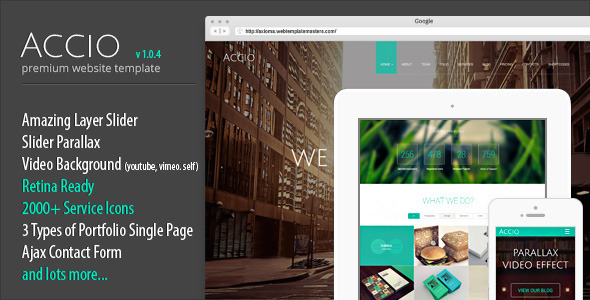
Accio is a one-page parallax website template sold on ThemeForest by the developer ThemeMakers, priced at $15. It packages a full-screen slider, background video, a filterable portfolio and a set of pre-built sections into a single scrolling page that adapts to phones and tablets. It suits freelancers, small studios and agencies that need a polished creative or corporate landing page finished quickly, and it is a poor fit for anyone who needs a multi-page site with a blog or a content management system behind it.
What Accio creative templates actually deliver
The core of the template is the slider system. Three modes ship in the package: a layered slider that stacks text, images and buttons into animated compositions, a parallax slider that moves background layers at different speeds as the page scrolls, and a full-screen video player that pulls from YouTube or Vimeo or plays a file hosted on the buyer’s own server. For a one-page site, that slider is usually the first thing a visitor sees, so having all three options in one purchase removes the need to buy a separate slider plugin.
Behind the slider sits a portfolio section with filter buttons. Visitors can narrow the grid by category, and the sorting runs in the browser without a page reload. Each portfolio item can open into one of three single-item layouts, which matters when a project needs a wide image, a text-heavy case study, or a mix of both. A full-width portfolio variant is included as well.
Supporting sections cover the usual needs of a company or studio page: a team block, pricing tables, a full-width Google Map, a Twitter feed widget and an Ajax contact form. The contact form was given a captcha in a later release, which is a practical detail — an unprotected form on a public page attracts spam within days. The template also ships with a shortcode system, so text columns, buttons and other elements can be dropped into the page without writing markup by hand.
Two navigation styles are available, and smooth scrolling ties the menu links to the sections below. The icon library is unusually large: more than 2,000 service icons plus 25 social icons, which covers most of what a services page needs without hunting for an external icon font. The markup is validated HTML5, and the layout is built on the Bootstrap CSS framework, which is the reason the responsive behaviour is predictable across the four declared breakpoints — mobile portrait, mobile landscape, tablet portrait and tablet landscape. Retina displays are supported, so graphics stay sharp on high-density screens.
A layered PSD file is included. That is worth flagging because it lets a designer adjust the visual design in Photoshop rather than editing CSS blind, which shortens customisation work considerably on client projects.
Where an Accio creative one-page layout fits, and where it does not
The strongest fit is a single-purpose landing page: a design studio showing work, a photographer or illustrator with a filterable gallery, a consultancy presenting services and a team, or a product launch page that needs video and motion up front. Any project where the goal is to hold attention on one scrolling narrative rather than send visitors through a menu of separate pages is a natural match.
It also works for agencies building quick client sites on a fixed budget. At $15 with a PSD included, the template is cheaper than the billable hour it would take to build the same slider and portfolio grid from scratch, and the shortcode layer means a junior developer can assemble sections without deep front-end knowledge.
The wrong choice is a content-heavy site. Accio is a one-page template with no blog, no article templates and no CMS integration described in the listing. A business that publishes regularly, needs category archives, or expects editors to add pages without touching code should look at a full WordPress theme instead. The same applies to anyone who needs e-commerce, user accounts or a multi-language setup — none of that is part of this package.
Setting up the template in practice
Because Accio is a static site template rather than a theme that installs into a CMS, the setup path is different from what many buyers expect. The files are uploaded to a web host over FTP or through a hosting control panel, and the page content is edited directly in the HTML files. Documentation is included, and the vendor maintains a help section with tutorials and a support forum where buyers can open a topic or submit a ticket.
The practical prerequisites are a text editor, a code editor or a tool such as Dreamweaver, basic familiarity with HTML and CSS, and a hosting account. No database, no PHP configuration and no admin panel are involved. A buyer who has never edited HTML will find the first pass slow, though the shortcode structure reduces how much raw markup has to be written.
For someone comfortable with HTML, swapping the demo text and images for real content typically takes a few hours. Adjusting colours and typography through the stylesheet, or through the PSD if a designer is involved, adds more time. The vendor does not state a formal installation time, so estimates should be treated as rough.
One caveat worth noting before purchase: the demo images are licensed from stock libraries and are not included in the package. Buyers must supply their own photography or license it separately, which is an extra cost that is easy to overlook.
Strengths and limitations of this Accio creative template
Strengths
- Three slider types in one package — layered, parallax and full-screen video — with no separate plugin purchase required.
- Filterable portfolio grid with three single-item layouts, which covers most presentation needs for creative work.
- Layered PSD included, making visual customisation far faster than editing CSS alone.
- More than 2,000 service icons and 25 social icons bundled, removing a common dependency.
- Validated HTML5 markup and Bootstrap-based responsive layouts across four declared breakpoints.
- Captcha-protected Ajax contact form, which reduces spam on a live site.
- Established sales history: 861 purchases at the time of writing, with support channels in place.
Limitations
- No CMS. Content lives in static HTML files, so every text change means editing code and re-uploading. For a client who wants to update the site independently, this is a serious drawback.
- No blog, news or article templates. Sites that depend on regular publishing cannot use this as-is.
- The last vendor update was in June 2017. The listing states this plainly, but buyers should weigh it: dependencies such as the Twitter fetcher plugin and the slider scripts have had years of upstream changes since, and browser behaviour has moved on. Older scripts can break or behave inconsistently on current browsers.
- Demo images are not included in the package and must be licensed separately.
- Internet Explorer 8 is listed as supported, which signals the codebase predates modern CSS layout techniques. That is not a defect, but it means the underlying approach is dated.
- Setup requires HTML and CSS knowledge. There is no drag-and-drop builder.
How this compares with other one-page creative templates
The one-page parallax category is crowded, and most entries compete on the same three axes: slider quality, portfolio flexibility and how much customisation is possible without code. Accio sits in the middle of that field. It offers more bundled assets than a bare-bones template — the layered PSD, the icon library and the three slider modes are all things cheaper alternatives often omit — but it does not offer a page builder, and it has no CMS layer.
Against WordPress-based one-page themes, the trade-off is clear. A WordPress theme gives non-technical editors control over content and usually receives ongoing updates, at the cost of a heavier stack, hosting requirements and often a higher price. Accio wins on weight, load simplicity and price, and loses on maintainability and longevity.
Against modern static site generators, the comparison is less favourable on tooling. A generator produces cleaner, faster output and fits into a developer workflow, but requires a build step and technical setup that many buyers of a $15 template are specifically trying to avoid. Accio’s value is that it works out of the box with nothing more than a host and an FTP client.
Where Accio creative templates remain competitive is price-to-asset ratio. Few alternatives at this price point bundle a layered PSD, three slider types and a filterable portfolio in one download.
Frequently Asked Questions
Is Accio a WordPress theme or a static HTML template?
It is a static HTML template, not a WordPress theme. There is no admin dashboard, no database and no plugin system. Content is edited directly in the HTML files and uploaded to a host. Buyers expecting the WordPress installation process should look elsewhere, because the workflow here is entirely code-based.
Does the Accio template include a blog?
No. The listing describes a one-page site with a portfolio, team, pricing and contact sections, but no blog or article templates. Sites that need regular publishing, category archives or comment threads cannot be built on this template without custom development work that falls outside the package.
Can the portfolio be filtered by category?
Yes. The portfolio section includes filter buttons that sort items in the browser without reloading the page, and three different layouts are available for individual portfolio entries. That combination lets a studio present mixed work — image-led projects alongside text-heavy case studies — within a single scrolling page.
Is Accio still supported and updated?
The vendor’s most recent update is dated June 2017, so active development has effectively stopped. Support channels exist, including a forum, a ticket system and documentation, but buyers should not expect new features or fixes for modern browser changes. Treat it as a finished product rather than a maintained one.
Verdict
Accio is a sensible purchase for a freelancer or small studio that needs a single-page creative or corporate site built quickly on a tight budget, and who is comfortable editing HTML. The bundled layered PSD, three slider modes and large icon set give it more substance than most templates at this price, and the 861 sales suggest it has found a working audience. It is the wrong buy for anyone who needs a blog, a CMS, e-commerce or a site a non-technical client will maintain. The 2017 last-update date is the single biggest consideration: the template still works as a static package, but it is a finished artefact rather than a product under active development, and that should shape expectations before purchase.