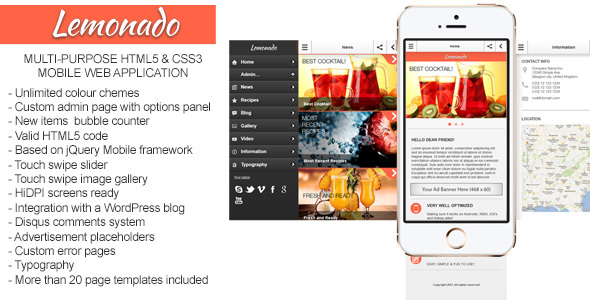
Lemonado Mobile is a multi-purpose mobile web application template sold on ThemeForest for $15, built on the jQuery Mobile framework and shipped in both HTML and PHP versions. It provides a front-end mobile interface plus a password-protected admin panel, and it can pull content from any WordPress-based website. It suits freelancers and small agencies that need to deliver a lightweight mobile web app quickly, rather than teams building a native iOS or Android product from scratch.
The item has been purchased 643 times and was last updated by its developer, Gramatton, in May 2020. That combination of a modest price, a real install base and a long gap since the last release shapes almost everything worth saying about it.
What Lemonado Mobile Actually Delivers
The core of the product is a set of mobile screens that behave like an app inside a phone browser. Because it is built on jQuery Mobile, the pages use touch-friendly navigation, swipe and tap interactions, and animated page transitions instead of the standard desktop-style link behaviour. Anyone who has used a jQuery Mobile site before will recognise the feel immediately: full-width buttons, list views, collapsible panels and a persistent header and footer bar.
The template ships with more than 20 ready-made page types. These cover the screens most small mobile projects need — a home page, a contact page, a blog listing, photo and video galleries, and various content layouts. The practical benefit is that a project does not start from a blank canvas. A developer can pick the pages that match the brief, delete the rest, and have a working navigation structure within an afternoon.
Two versions are included: a static HTML build and a PHP build. The HTML version is useful for prototyping or for projects where content is hard-coded or loaded from a separate API. The PHP version matters more for real deployments, because it supports the admin layer and dynamic content.
The admin panel is the feature that separates Lemonado from a plain HTML template. It is password-protected (the vendor documents the default password as “admin”, which should be changed immediately on any live install) and includes an extendable optional panel. In practice this means a site owner or a client can log in and manage the app’s content without touching code. For agencies handing a finished product to a non-technical client, that is the difference between a one-off build and a maintainable one.
WordPress connectivity is the other headline capability. Lemonado Mobile can connect to any WordPress-based website, which means an existing blog or business site can act as the content source for the mobile app. Posts, pages and media already managed in WordPress can feed the mobile interface rather than being duplicated. The vendor does not specify which WordPress APIs or plugins handle that connection, so the exact mechanism needs to be confirmed from the documentation before committing to it.
Under the surface, jQuery Mobile brings access to a large library of customisable widgets, icons and themes. The framework supports unlimited theme variations, so colours, swatches and typography can be reworked to match a brand. The template also includes utility pages such as error screens, which are easy to forget until a project is nearly finished.
Where Lemonado Mobile Fits and Where It Does Not
The strongest fit is a small business or organisation that wants a mobile presence that feels app-like without the cost and review cycle of a native build. A restaurant with a menu, gallery and contact details is a textbook case — one buyer in the item’s reviews describes exactly that use, a local restaurant directory. A photographer or studio wanting a portfolio that loads quickly on phones is another. A blogger already running WordPress who wants a mobile companion view is a third.
Freelancers and small agencies will get the most out of it commercially. The template shortens the build phase, and the admin panel gives clients something to manage afterwards. At $15, the licence cost is negligible against even a few hours of saved development time.
It is the wrong choice for anyone who needs genuine native functionality. Lemonado is a web application, not a compiled app. It does not provide access to device features in the way a native or React Native build would, and it will not be distributed through the App Store or Google Play as a packaged binary. Projects that depend on push notifications, offline-first data sync, camera hardware control or background location are outside its scope.
It is also a poor fit for teams that need active vendor support or a modern JavaScript stack. The last update was in May 2020, and the changelog for version 1.3.2 lists a single fix for an SSL/HTTPS issue. Anyone building on React, Vue or a headless CMS architecture will find the jQuery Mobile approach dated.
Setting Up Lemonado Mobile in Practice
Installation is straightforward for anyone comfortable with basic web hosting. The package is uploaded to a server, and the PHP version needs a host running PHP with the usual extensions. There is no build step, no package manager and no compilation — the files run as they are, which removes a whole category of setup problems that modern JavaScript tooling introduces.
The first task is choosing between the HTML and PHP builds. The HTML version can be opened locally in a browser for a quick look. The PHP version needs a server environment and a database if the admin panel is to store content.
Next comes the admin panel. It is reached through a dedicated page and protected by the default password supplied in the documentation. That password must be changed before the site goes live; leaving it at the default is the single most likely way to expose a Lemonado Mobile installation.
If WordPress connectivity is required, the WordPress site needs to be reachable from the mobile app’s host, and the connection details configured in the admin area. The vendor provides online documentation, and there is a “Built with Lemonado” showcase page for reference. Because the documentation is external and not included in the source data here, the exact configuration fields cannot be listed. Expect to read it before starting.
Customisation is where most of the time goes. Swapping the demo imagery, adjusting the jQuery Mobile theme swatches, and trimming the 20-plus page templates down to the handful a project actually needs typically takes a few hours for someone familiar with HTML and CSS. A realistic estimate for a simple project is one working day from download to a presentable, branded result. A more involved build with WordPress content mapping and custom pages will take longer.
One practical note: the preview images used in the demo are not included in the download. Replacement photography or graphics must be sourced separately.
Strengths and Limitations
Strengths
- Both HTML and PHP versions are included, so the same purchase covers prototyping and production use.
- More than 20 pre-built page templates remove the blank-canvas problem and cover the common screens a small mobile project needs.
- The admin panel is extendable and password-protected, giving non-technical clients a way to manage content after handover.
- Direct connection to any WordPress-based website means existing content can be reused rather than rebuilt.
- Built on jQuery Mobile, which brings a large set of widgets, icons and unlimited theme customisation.
- At $15 with 643 sales, the cost-to-time-saved ratio is favourable for freelance and agency work.
- No build tooling or compilation step, which keeps deployment simple on ordinary shared hosting.
Limitations
- The last vendor update was 25 May 2020. Any framework or browser changes since then are unaddressed, and there is no indication of ongoing maintenance.
- The default admin password is documented publicly as “admin”. Failing to change it leaves the panel open to anyone who has read the listing.
- jQuery Mobile is an older framework. It does not offer the component ecosystem or performance profile of current front-end libraries.
- The vendor does not state which WordPress APIs, plugins or authentication methods the connection relies on, so compatibility with a specific WordPress setup must be verified before purchase.
- Demo preview images are excluded from the download, adding a sourcing step that is easy to overlook when budgeting time.
- Because it is a web application, it cannot be submitted to native app stores as a packaged binary, and it has no access to native device APIs.
How Lemonado Mobile Compares to the Wider Category
The alternatives fall into three broad groups. The first is native and cross-platform app frameworks, which produce installable apps with full device access but demand a real development effort and, in most cases, a recurring toolchain. The second is modern mobile-first website templates built on current CSS and JavaScript, which are faster and better maintained but usually lack an admin panel or a content-management layer. The third is full application builders and no-code platforms, which offer more automation but tie a project to a subscription and a proprietary environment.
Lemonado Mobile sits between the second and third groups. It offers more than a static template because of the admin panel and WordPress link, but far less than a native framework in terms of capability. Its advantage is speed and price: a working, client-manageable mobile interface for $15 with no recurring cost. Its disadvantage is currency. A modern mobile template will almost certainly be better maintained and lighter on the wire, but it will not hand a client a content panel out of the box.
The decision therefore comes down to whether the admin panel and WordPress connectivity are worth accepting an older framework. For small brochure-style mobile projects, they usually are. For anything performance-critical or feature-heavy, they are not.
Frequently Asked Questions
Is Lemonado Mobile a native app or a website?
It is a mobile web application, not a native app. It runs in a phone browser and is built on the jQuery Mobile framework, so it looks and behaves like an app through touch navigation and page transitions, but it cannot be packaged and submitted to the App Store or Google Play, and it has no access to native device features.
Can Lemonado Mobile pull content from an existing WordPress site?
Yes. The vendor states it can connect to any WordPress-based website, allowing existing posts, pages and media to feed the mobile interface. The listing does not specify which APIs or plugins handle that connection, so the exact requirements should be confirmed in the online documentation before relying on it for a specific WordPress installation.
What is the admin password for Lemonado Mobile?
The default admin password is “admin”, as published in the product listing. It should be changed immediately after installation and before the site goes live. Leaving the default in place means anyone who has read the public listing can reach the admin panel, which is a serious and entirely avoidable security risk.
Is Lemonado Mobile still being updated?
No recent updates are indicated. The last vendor release was version 1.3.2 on 25 May 2020, and its changelog lists only a fix for an SSL/HTTPS issue. Buyers should treat the product as a stable but frozen codebase and expect to handle any future framework or browser compatibility problems themselves.
Verdict
Lemonado Mobile is worth buying for freelancers and small agencies that need to deliver a lightweight, app-like mobile interface on a tight budget, particularly when the client already runs WordPress and will want to manage content afterwards. The combination of an admin panel, 20-plus page templates, both HTML and PHP builds, and a $15 one-time price is genuinely hard to match in the template market, and 643 sales suggest others have reached the same conclusion.
It is not the right purchase for anyone needing native app distribution, modern JavaScript tooling, or a vendor that is actively shipping updates. The 2020 last-update date is the single biggest caveat, and buyers should price in the possibility of maintaining the code themselves.
For small brochure-style mobile projects where speed to delivery matters more than framework currency, the trade-off is reasonable. For anything performance-critical, feature-heavy or long-lived, a newer alternative will serve better.