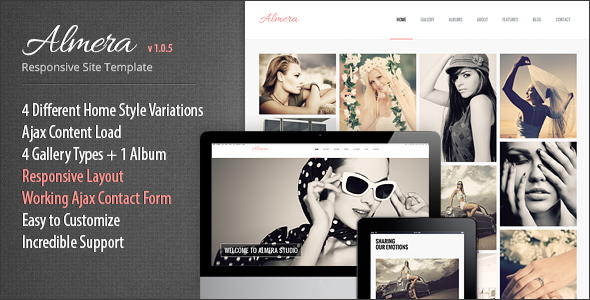
Almera Responsive Portfolio Site Template is a static HTML5 and CSS3 website template sold on ThemeForest for $15, built by the developer ThemeMakers for photographers, artists and small studios that need a visual-first portfolio rather than a blog or a business site. It ships with four home page variations, several gallery and slider styles, an albums page and a dynamic content loader that swaps pages without a full browser refresh. The listing has accumulated 882 sales, and the creative category it sits in is crowded, so the interesting question is not whether it looks attractive but whether its feature set still matches how portfolio sites are built today.
What the Almera Responsive Portfolio Site Template creative package actually includes
The core of the product is a set of pre-built HTML pages rather than a content management system. Everything is hand-coded markup, styled with CSS3 and laid out on the Skeleton grid framework, a lightweight system for building responsive columns. That matters because it means the buyer receives finished files, not a theme that plugs into WordPress, Joomla or any other platform.
Four separate home page layouts are included, which gives a project some room to differentiate itself without touching the underlying structure. Alongside those sit four gallery types plus a dedicated albums page, so a photographer can present a wedding as a single album of images while an interior designer might use a grid gallery for individual rooms. Three slider variants control how a featured project is introduced at the top of a page.
The headline technical feature is Ajax content loading. Ajax is a technique where the browser requests new content in the background and inserts it into the existing page instead of loading a whole new document. In practice this produces a smoother, app-like transition between sections. ThemeMakers also includes a non-Ajax version of the template from version 1.0.2 onward, which is a sensible concession: Ajax navigation can complicate browser history, deep linking and analytics tracking, and some buyers will prefer the conventional page-load behaviour.
Other practical pieces include a working Ajax contact form, a lightbox that handles video from YouTube, Vimeo and local .swf files, multilevel drop-down menus built in CSS, and layered Photoshop files for anyone who wants to rework the visual design before coding. The markup is described as W3C-valid HTML5, and browser support extends back to Internet Explorer 8 alongside Firefox, Opera, Chrome and Safari.
Where this template fits, and where it does not
The vendor positions Almera around three specific gallery contexts: interior design, wedding photography and fashion. That framing is accurate. A wedding photographer shooting a single event, a fashion label showing a seasonal lookbook, or an interior studio presenting completed rooms all need the same thing — large images, minimal interface chrome, and a browsing experience that stays out of the way. The albums page in particular suits anyone who organises work into discrete collections rather than one continuous stream.
It also works as a one-page site for a freelancer or artist who wants a single scrolling presentation with a contact form at the bottom, since the one-page layout is listed among the supported styles.
Where Almera is the wrong choice is any project that needs the owner to update content without a developer. There is no admin panel, no database and no login. Adding a new project means editing HTML and uploading images by hand. A photographer publishing weekly shoots would find that workflow painful, and a client who wants to manage their own site should be steered toward a CMS-based theme instead. The same applies to anyone needing e-commerce, booking, membership areas or blog functionality — none of that is present, and bolting it on would mean writing it from scratch.
What setup involves in practice
Because this is a static template, installation is really just deployment. The files are uploaded to any web host that serves HTML — shared hosting, a static host, or a subdirectory of an existing site. There is no database to configure and no server-side runtime beyond whatever handles the contact form’s mail sending, which typically means PHP on the host.
From there, the work is content replacement. Images and text are swapped in the markup, the colour scheme is adjusted through the stylesheet, and the Photoshop files are used if the layout itself needs reshaping. Someone comfortable with HTML and CSS can have a working single-page portfolio live in an afternoon. A multi-page site with custom galleries, a reworked colour palette and trimmed JavaScript is closer to a few days of focused work.
The prerequisite is real: this is not a drag-and-drop product. A buyer with no HTML or CSS experience will either need to learn the basics, hire someone, or accept the template exactly as delivered. The layered PSDs help with design changes but do not remove the need to translate those changes back into code.
One thing worth flagging before purchase: the vendor’s last update to this item is dated March 2017. The listing does not state whether the template has been revised since, and buyers should treat the codebase as one that has not kept pace with changes in browser behaviour, JavaScript tooling or accessibility expectations over the intervening years.
Strengths and limitations
Strengths
- Four home page variations and multiple gallery types give a portfolio project genuine layout choice without extra cost.
- Both Ajax and non-Ajax navigation versions ship together, so the buyer can pick the smoother experience or the more conventional one.
- Layered PSD files are included, which is unusual at this price point and saves significant time for anyone customising the visual design.
- Lightbox video support covers YouTube, Vimeo and local .swf files, useful for photographers who also shoot motion work.
- At $15 with 882 sales, the price-to-feature ratio is straightforward, and the sales volume suggests the template has been used and tested by a reasonable number of buyers.
Limitations
- No CMS integration. Every content change is a manual code edit, which rules out non-technical site owners.
- The last vendor update was in March 2017. Modern browser quirks, current accessibility standards and contemporary JavaScript practices are unlikely to be reflected in the code.
- Internet Explorer 8 support in the feature list signals how old the underlying approach is; it also implies legacy techniques that may conflict with modern performance practices.
- The Ajax contact form depends on server-side mail handling, and the listing does not specify spam protection, delivery reliability or what happens on hosts without mail configured.
- No documentation depth is described beyond the feature list, so buyers should expect to work from the code itself rather than a detailed manual.
How it compares with other portfolio templates in this category
Portfolio templates broadly split into two groups: static HTML packages like this one, and CMS themes that install into WordPress or a similar platform. Static templates win on speed, hosting simplicity and the absence of plugin maintenance. They lose on content management, which is precisely the trade-off Almera makes.
Within the static group, the differentiators are layout variety, gallery handling and how much design source material is included. Almera’s four home variations, five gallery configurations and bundled PSDs put it toward the generous end of that spectrum for a $15 product. A single-layout static template at the same price would offer considerably less to work with.
Against CMS-based portfolio themes, the comparison is less flattering on longevity. A WordPress portfolio theme receives ongoing updates as the platform evolves; a static template from 2017 does not. Buyers weighing the two should decide first whether the site will be edited frequently, because that single question usually settles the choice.
Frequently Asked Questions
Is Almera a WordPress theme?
No. Almera is a static HTML5 and CSS3 template, not a WordPress theme or plugin. It cannot be installed through the WordPress dashboard and does not connect to a database. Site owners upload the files to a web host and edit the markup directly to change content, which means basic HTML familiarity is required.
Can Almera be used for a photography portfolio with hundreds of images?
Yes, but with caveats. The albums page and multiple gallery types are designed for image-heavy portfolios, and the Ajax loading keeps navigation smooth. However, every image must be added manually to the HTML, and there is no built-in image optimisation, lazy loading or pagination described in the listing, so large collections need careful handling.
Does the Almera template work on mobile devices?
Yes. The template includes dedicated layouts for mobile portrait, mobile landscape, tablet portrait and tablet landscape, built on the Skeleton responsive grid. The vendor states it displays well on both wide screens and portable devices. Because the code dates from 2017, testing on current phones and tablets before launch is advisable.
What happens if the Ajax navigation causes problems?
An alternative non-Ajax version of the template is included from version 1.0.2 onward. Buyers who find that dynamic loading interferes with browser back buttons, direct links to specific pages or analytics tracking can switch to the standard version, which loads each page conventionally. Both versions ship in the same download.
Verdict
Almera Responsive Portfolio Site Template creative package suits a specific buyer: a photographer, artist, interior designer or small studio that wants a fast, visually driven portfolio and has someone available who can edit HTML and CSS. The combination of four home layouts, multiple galleries, an albums page and bundled PSDs is solid value at $15, and the 882 sales suggest it has delivered for a meaningful number of buyers.
It is the wrong purchase for anyone who needs to update content regularly without touching code, for projects requiring e-commerce, booking or membership features, and for clients who expect a dashboard. The 2017 last-update date is the single biggest consideration — the template still functions, but it has not evolved with the web, and buyers should budget time for testing and possible fixes on modern browsers.