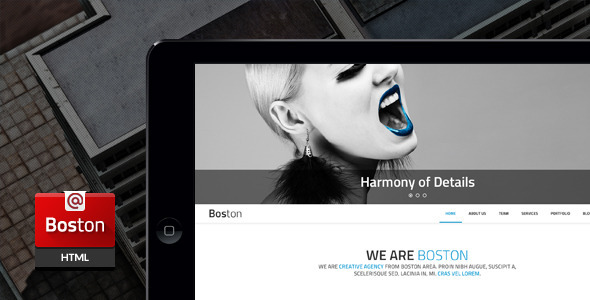
Boston is a corporate parallax HTML template sold on ThemeForest by the developer createit-pl. It provides a set of pre-built, responsive page layouts for company websites, with scroll-driven parallax imagery, multiple homepage and menu variants, and a bundled Revolution Slider licence. It suits freelancers and small agencies building a brochure-style corporate site on a modest budget, and it is a poor fit for anyone who needs a modern content management system or long-term framework updates.
The template has been purchased around 660 times at $16, which places it in the budget tier of the corporate template market. The last vendor update was in November 2016, and that date matters more than any individual feature when judging whether the product is still worth buying.
What the Boston corporate template actually gives a project
The headline number is nine homepage layouts. Each is a different arrangement of the same underlying components, so a business can pick a structure that matches its content rather than forcing content into a single fixed design. Five menu styles ship alongside them, covering the usual horizontal bar, sticky, and dropdown arrangements. In practice this means the first decision on a project is which combination to start from, and the rest of the build flows from there.
Parallax is the defining visual behaviour. Background images move at a different rate to the foreground as the page scrolls, which creates depth on hero sections and section dividers. A second effect, Ken Burns, applies a slow zoom and pan to slider images so static photography feels alive. Both effects are disabled on mobile devices, which is a sensible decision: parallax on a phone usually costs smoothness and battery life for very little visual gain.
Slider support comes from two sources. Revolution Slider is bundled and carries its own licence, which the vendor values at $12 against a $16 purchase price. FlexSlider is also included and accepts video and arbitrary HTML content, not just images. A lightbox handles image previews, and the portfolio section loads additional items through AJAX, meaning new work appears without a full page reload.
Under the surface, the template is built on Bootstrap 3 with a mobile-first approach, so the grid, typography and spacing scale from small screens upward. FontAwesome supplies more than 369 icons. Colours are unlimited, and from version 2.0 onward each colour lives in its own file, which makes swapping a palette considerably less error-prone than hunting through a single stylesheet. LESS source files are included for developers who prefer to compile styles rather than edit finished CSS.
Two dynamic features depend on server-side PHP. A working contact form and a newsletter signup are included, and the vendor notes the contact form can send through a Gmail account. A Twitter feed module pulls live tweets using the Twitter API, also requiring PHP. Eleven PSD files are bundled for designers who want to modify the original artwork. The vendor states that demo images are not included, so stock photography must be licensed separately.
Where a Boston corporate template fits, and where it does not
This product is aimed at static corporate brochure sites: professional services firms, consultancies, construction and engineering companies, agencies, and small businesses that need a polished multi-page presence without a database behind it. The nine homepages and five menus make it practical to build several distinct client sites from one purchase, which is where the value concentrates for a freelancer or a small studio.
It also works for a landing page that needs to look expensive on a small budget. The bundled Revolution Slider alone covers a meaningful share of the price, and the parallax and Ken Burns effects give a single-page site a level of motion that would otherwise require custom JavaScript.
The wrong choice is any project that needs a content management system. There is no WordPress version here, no admin panel, and no database. A client who expects to edit their own copy without touching HTML will not be served by this template, and neither will a site with hundreds of pages, user accounts, e-commerce, or content that changes weekly. Anyone building on a current front-end stack should also look elsewhere: Bootstrap 3 is several major versions behind what new projects typically start from, and the template has not been updated since 2016.
What setup involves in practice
Deployment is a file upload. The template is plain HTML, CSS and JavaScript, so it runs on any standard web host, including shared hosting. No build step is required to use the finished files, though a LESS compiler is needed if the source styles are edited directly.
PHP is the one real prerequisite. The contact form, newsletter form and Twitter feed will not function without it, and the Twitter module additionally depends on the platform’s API, which has changed substantially since the template was last updated. Buyers should treat those two dynamic features as the parts most likely to need rework.
For a straightforward build, replacing the demo content with real copy, swapping in licensed images, and adjusting colours takes roughly half a day to a full day for someone comfortable with HTML and CSS. Customising a layout beyond the supplied variants, or wiring the forms into a specific mail service, adds time. The eleven PSD files shorten the process for designers who prefer to work from the source artwork rather than edit live markup.
Strengths and limitations
Strengths
- Nine homepage layouts and five menu styles give genuine variety from a single $16 purchase.
- Revolution Slider is bundled with a licence the vendor values at $12, a large share of the total price.
- Parallax and Ken Burns effects are disabled on mobile, showing attention to how the template behaves on phones rather than only on a desktop demo.
- LESS files and eleven PSDs are included, so both developers and designers can work from source rather than patched output.
- Per-colour stylesheet files, introduced in version 2.0, make palette changes manageable across a large site.
- 660 sales indicate a reasonably tested product with a real user base.
Limitations
- The last update was November 2016. Bootstrap 3, the Twitter API integration and general browser compatibility have all moved on since then, and the vendor does not state whether further updates are planned.
- Dynamic features depend on PHP and, for the Twitter feed, on an API that has changed significantly. Expect to rebuild that module rather than switch it on.
- Demo images are explicitly not included, so photography must be sourced and licensed separately, adding cost that is not reflected in the $16 price.
- There is no CMS. Every content change is a code edit, which rules the template out for clients who want to manage their own site.
- Parallax and animation are switched off on mobile, so the signature visual effect is a desktop-only experience.
How Boston compares with other corporate templates
The corporate template category splits broadly into two groups: static HTML templates like this one, and CMS themes, usually for WordPress, that sell for a similar price. CMS themes win on editability and on the size of the ecosystem around them. Static HTML templates win on control, load behaviour and the absence of plugin conflicts, and they are often faster out of the box because there is no database query behind each page.
Within the static group, the differentiators are layout count, bundled assets and maintenance. Boston’s nine homepages and bundled Revolution Slider sit at the generous end for the price. Its weakness is maintenance: a template last touched in 2016 competes against newer releases built on current Bootstrap versions and tested against current browsers. For a project delivered in the next few months and then left largely alone, that gap is manageable. For anything expected to run and evolve for years, it is the deciding factor.
Frequently Asked Questions
Is Boston a WordPress theme?
No. Boston is a static HTML5 and CSS3 template built on Bootstrap 3, not a WordPress theme. It has no CMS, no admin dashboard and no database. Content is edited directly in the HTML files. That makes it fast and simple to host, but it means a client cannot update their own pages without developer involvement.
Does the Boston corporate template still work in current browsers?
It generally renders, but it was last updated in November 2016 and was never tested against later browser versions. Bootstrap 3 and the bundled jQuery plugins are dated. Expect to review and patch layout and script behaviour, particularly the Twitter feed and the form handling, before treating the template as production-ready.
What do I need to run the contact and newsletter forms?
PHP. Both forms are server-side scripts, and the vendor states the contact form can send through a Gmail account. Without PHP hosting they will not submit. The Twitter feed module also requires PHP and uses the Twitter API, which has changed since the template was released, so that feature should be treated as needing a rebuild.
Are the images in the demo included with the purchase?
No. The vendor states plainly that demo images are not included. The listing credits Shutterstock and Unsplash as sources for the preview photography, and those images remain subject to their own licences. Any images used on a live site must be licensed separately, which adds to the real cost of the project.
Verdict
Boston is worth buying for a freelancer or small studio that needs an attractive static corporate site delivered quickly and cheaply, and that values the bundled Revolution Slider and the range of homepage and menu options. The 660 sales and the depth of the feature set support that use case. It is not the right purchase for a client who wants to edit their own content, for a project built on a current front-end framework, or for anything expected to run for years without developer attention. The 2016 update date is the single fact that should decide the question: if the project can absorb that risk, the price is low enough to justify it, and if it cannot, a maintained CMS theme is the better spend.