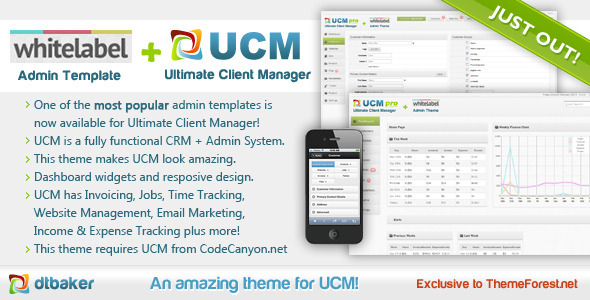
UCM Theme: White Label is a front-end skin for the Ultimate Client Manager (UCM), a self-hosted client and project management system sold separately. It replaces the default UCM interface with a cleaner admin layout and adds dashboard widgets for earnings, expenses, job deadlines and customer file uploads. It suits agencies and freelancers already running UCM who want a more presentable back office without rebuilding their workflow.
The product is a single theme file sold on ThemeForest for $20, developed by BakerWebDev and based on the White Label Admin Skin by revaxarts. It has been purchased 644 times. Anyone researching UCM Theme: White Label Cms Themes should understand one thing before buying: this is not a standalone application, and it does not add new management features of its own.
What the UCM Theme: White Label Actually Changes
The theme’s job is presentation plus a handful of dashboard additions. The most visible change is the dashboard itself. Where the stock UCM install shows a fairly plain landing screen, this theme adds widgets that summarise the state of the business: a graph of weekly earnings and expenses, notifications when a job is coming due, and alerts when a customer has uploaded a new file. For a small studio, that turns the login screen into a morning briefing rather than a menu of links.
The second change is the layout. The theme uses a fluid responsive design, so the interface reflows across screen sizes, and the navigation menu collapses out of the way on smaller devices. That matters for anyone who checks invoices or job status from a phone between meetings, since the default UCM layout was not built with narrow viewports as a priority.
Third, there are customisation options exposed in the interface. Common layout colours, font choices, text sizes and spacing can be adjusted without touching code. Users comfortable with CSS can go further and edit the stylesheet directly. This is a practical middle ground: enough control to match a brand palette, without requiring a developer for every tweak.
Critically, the theme inherits every existing UCM capability rather than replacing them. Customer management, invoicing and finances, website management, encrypted fields, customer notes, user permissions and file uploads all continue to work as before. The vendor describes the theme as working with both UCM Lite and UCM Pro, so the feature ceiling is set by whichever UCM licence is already installed, not by the theme.
One clarification the vendor makes explicitly is worth repeating: rebranding UCM with a company name and logo does not require this theme. That is handled inside the core UCM system. The theme is for a different look and the extra dashboard widgets, nothing more.
Who This Fits, and Where It Does Not
The clearest fit is an existing UCM user. If a business already runs Ultimate Client Manager and finds the default interface dated or awkward on mobile, this is a low-cost cosmetic and usability upgrade. Design studios that hand clients a login to check project files or invoices will get the most from it, because the dashboard widgets surface exactly the information clients and account managers ask about most often.
Freelancers running UCM Lite also fit, provided they accept that the theme cannot unlock features their UCM licence does not include. The theme is a layer on top of the system, so it inherits the same limits.
It is the wrong choice for anyone who has not bought UCM. The vendor states plainly that the latest version of Ultimate Client Manager, Lite or Pro, must be purchased and installed first. Buying this theme alone produces nothing usable. It is equally wrong for someone who wants a standalone CRM or admin template to build a custom application on. This is not a general-purpose admin theme; it is bound to one specific platform, and the tags describing it as an admin template or CRM theme can mislead on that point.
A third mismatch is anyone expecting ongoing feature development. The vendor’s last update to this listing is dated February 2013. Buyers should treat it as a finished, stable product rather than one receiving regular new functionality.
Installing the Theme: What It Involves
Setup is genuinely short, and the vendor has designed it to avoid file uploads or manual code edits. The sequence is: install Ultimate Client Manager on the site first and confirm it is working; purchase the theme; locate the licence code for the theme; open Settings then Upgrade inside UCM; click the plus button to add the additional licence code; paste the code and click upgrade. That step installs the theme and registers it for automatic updates going forward. The final action is switching it on under Settings then Theme.
The prerequisites are a working UCM installation, a licence code for the theme, and access to the UCM settings area, which normally means an administrator account. Realistically the whole process takes ten to fifteen minutes, most of which is finding the licence code. The vendor also runs a dedicated email support channel for the theme and the UCM system, and notes that the UCM email system is itself powered by UCM.
Strengths and Limitations
Strengths
- Installation runs entirely through the UCM interface, with no FTP uploads or template file editing.
- Automatic updates are tied to the licence code, so the theme stays current without manual reinstallation.
- Dashboard widgets add real operational value: weekly earnings and expense graphs, job due notifications and customer upload alerts.
- Responsive layout with a collapsing menu makes the system usable on phones and tablets.
- Colour, font, size and spacing options are exposed in the interface, with CSS access for deeper changes.
- Works with both UCM Lite and UCM Pro, and preserves all existing UCM functionality.
- At $20 with 644 sales, the cost is trivial relative to the time saved on interface work.
Limitations
- It is useless without a separate UCM licence, which is the real cost of entry.
- The vendor’s last update was in February 2013, so the theme reflects the interface conventions of that period and buyers should not expect new features.
- Customisation beyond the built-in options requires editing CSS directly, which is not realistic for non-technical owners.
- The theme does not add management features. Everything it displays comes from UCM itself.
- Rebranding with a logo or company name is already possible in core UCM, so part of what buyers might expect from a “white label” product is not exclusive to this theme.
- The vendor does not state compatibility with UCM versions released after the last update, so buyers on a very recent UCM build should confirm before purchasing.
How It Compares to Other Admin Themes and CRM Skins
Against general-purpose admin templates sold on the same marketplace, this product is far narrower. A generic admin theme gives a blank framework for building any application, with dozens of page types, form elements and chart libraries. That flexibility comes with the work of wiring everything up. UCM Theme: White Label does none of that. It slots into an existing system and changes how that system looks, which means near-zero integration effort but no reuse elsewhere.
Against other skins for hosted or self-hosted client management platforms, the comparison comes down to platform lock-in. Most CRM and client portal products either ship a fixed interface or offer limited theming through settings. This theme sits in a middle category: a paid visual layer for a system that already handles the data. The trade-off is that the buyer’s options are constrained by UCM’s own roadmap and release cadence, not by the theme developer.
For anyone already committed to UCM, that constraint is irrelevant and the comparison is simply whether the default interface is good enough. For anyone still choosing a platform, this theme should not influence that decision at all.
Frequently Asked Questions
Do I need to buy Ultimate Client Manager as well as this theme?
Yes. The vendor states that the latest version of Ultimate Client Manager, either Lite or Pro, must be purchased and installed before this theme can be used. The theme is an add-on layer for UCM, not a standalone product, so the two purchases are separate and both are required.
Can this theme rebrand UCM with my own logo and company name?
No, and it does not need to. The vendor notes that rebranding UCM is handled inside the core UCM system, so a separate theme purchase is not required for that. This theme changes the visual design and adds dashboard widgets rather than handling branding.
Does the theme work with UCM Lite, or only UCM Pro?
It works with both. The vendor confirms compatibility with UCM Lite and UCM Pro, so buyers can choose either licence. The difference in available features comes from the UCM licence itself, not from the theme, since the theme inherits whatever the installed UCM version supports.
How is the theme installed and kept up to date?
Installation happens inside UCM under Settings then Upgrade, where the theme’s licence code is added using the plus button and confirmed with the upgrade button. That process installs the theme and registers it for automatic updates. The theme is then activated under Settings then Theme.
Verdict
Buy this if a business already runs Ultimate Client Manager and wants a cleaner, mobile-friendly interface with useful dashboard summaries of earnings, deadlines and customer uploads. At $20 the risk is minimal, and installation takes minutes rather than hours. Do not buy it if UCM is not installed, if a standalone admin template is needed for a custom build, or if ongoing feature development is expected from a product last updated in 2013. It is a finishing touch for an existing UCM setup, and it should be evaluated as exactly that.