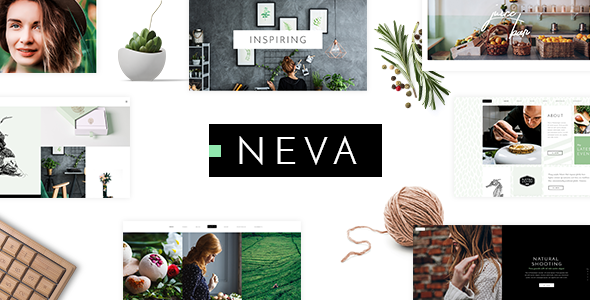
Neva is a multipurpose creative WordPress theme sold on ThemeForest by Mikado-Themes for $39. It bundles a page builder, a slider plugin, 15 prebuilt homepage layouts and a wide set of portfolio and blog templates, aimed at designers, agencies and small businesses that want a visually rich site without writing code. It has been purchased 378 times and carries a strong rating from buyers.
The theme sits in a crowded category, so the useful question is not whether it looks good in the demo but whether its particular mix of layout tools, portfolio options and bundled plugins matches a real project. The list of what ships in the box is unusually long for the price, and that length is both the main argument for buying it and the main thing to think carefully about.
What Neva creative actually gives a site owner
The headline feature is volume of choice. Fifteen homepage examples ship with the theme, covering business, portfolio, blog and shop-style openings. For a freelancer quoting a fixed price, that breadth shortens the discovery phase considerably: instead of describing a layout in words, it is possible to show a client three or four near-final options and let them react.
Layout control runs deeper than the homepages. The theme includes multiple header types — standard, centred, divided, minimal and vertical — each with its own behaviour settings, plus separate logo files for light and dark header skins and a distinct logo for the mobile header. There is a header top bar and dedicated widget areas above and below the header. In practice this means a site can keep a clean desktop header while still presenting a phone number or announcement strip, without a plugin.
Portfolio handling is the strongest part of the package. List views include masonry, justified gallery and slider layouts. Single project pages can be masonry, gallery, slider, full width, or built around small and big image combinations, and custom single layouts are supported. For photographers, illustrators, architects and design studios, that range covers most of the ways a body of work needs to be presented, and it removes the need for a separate portfolio plugin.
Two commercial plugins are bundled and licensed through the theme: WPBakery Page Builder, listed at $46, and Slider Revolution, listed at $26. Together they represent more value than the theme’s own price, and both are maintained by their own developers. The trade-off is that the theme’s update cycle is partly tied to theirs, which is worth understanding before committing.
Content blocks are handled by a large shortcode collection rather than a purely block-based approach. The set includes pricing tables, team carousels, client carousels, process steps, banners, item showcases, vertical split sliders, infographics, a restaurant menu list, a reservation form, working hours, a product list and video buttons. There are also parallax and video background sections, anchor links for one-page sites, and a boxed layout option. For a restaurant, juice bar or furniture store — the verticals the vendor names — several of these remove the need to commission custom development.
Blogging is not an afterthought. Multiple blog list layouts are included, along with a split column layout, a blog list shortcode, and custom post formats for standard, gallery, link, quote, video and audio entries. Social sharing is optional and can be switched off. Typography options cover more than 800 Google Fonts, with a setting to disable Google Fonts entirely — useful for privacy-conscious sites and for regions where Google font delivery is unreliable.
Commerce and compatibility round things out. The theme is WooCommerce compatible, includes a dropdown cart widget, works with Contact Form 7, is WPML compatible for multilingual sites, is translation ready, and ships with a child theme. Custom sidebars, a configurable footer of up to four columns with a separate bottom area, and a configurable grid size are all present.
Where Neva creative fits, and where it does not
The clearest fit is a creative studio, agency or freelancer building a portfolio-led site where visual presentation carries the pitch. The portfolio layout options and the homepage variety mean a distinctive site can be assembled quickly, and the bundled slider and builder keep the plugin budget at zero beyond the theme itself.
A second fit is a small hospitality or retail business — a juice bar, restaurant, furniture showroom or clothing store — that wants a polished site with menus, opening hours, reservations and a small shop. The restaurant menu, reservation form, working hours and product list shortcodes exist specifically for that pattern, and the WooCommerce integration covers a modest catalogue.
A third fit is a one-page marketing site. Anchor link support, parallax sections and the vertical split slider are built for single-scroll layouts, and the header behaviour options keep navigation usable as the page grows.
Where it is the wrong choice: projects that need a lightweight, block-first build on the native WordPress editor. Neva is built around a shortcode-driven page builder, so the editing experience is a builder canvas rather than the standard block editor. Teams standardised on full site editing, or on a strict performance budget where every extra script matters, will find the approach heavier than they want. Sites with very large catalogues or complex custom data structures are also better served by a purpose-built solution.
What setup involves in practice
Installation follows the standard WordPress route: upload the theme, install and activate the required plugins when prompted, then run the one-click demo import. The vendor states that no coding knowledge is required, and the demo import is the fastest path to a working site — it brings in pages, menus, widgets and sample content in one pass. Importing a full demo on shared hosting can take several minutes, and the imported stock images are presentational only; the vendor states plainly that image licences are not included and must be purchased separately if they are to be used on a live site.
From there, the work is replacement rather than construction: swap logos, set the typography and colours, replace demo content with real content, and adjust header and footer behaviour. A realistic timeline for a competent WordPress user is roughly a day for a clean five-page site and two to four days for a portfolio or small shop with real content loaded. Prerequisites are a WordPress install, an administrator account, and a hosting environment that meets current WordPress requirements — the theme’s changelog records PHP 8 and WordPress 6.2.2 compatibility. A child theme is included, which is the correct place for any custom CSS.
Strengths and limitations
Strengths
- Fifteen homepage layouts and a deep portfolio template set cover most creative briefs without extra plugins.
- WPBakery Page Builder and Slider Revolution are bundled and licensed, a combined listed value well above the theme price.
- Unusually granular header, footer, title area and sidebar controls for a theme at this price point.
- Vertical-specific shortcodes for restaurants, reservations, opening hours and product lists.
- WooCommerce, WPML and Contact Form 7 compatibility, plus a child theme and translation readiness.
- An option to disable Google Fonts, which many themes in this bracket still lack.
Limitations
- The editing model is shortcode and page-builder based, not native block editing, so content is less portable if the theme is later replaced.
- Bundled plugins are a double-edged benefit: the theme’s stability depends partly on third-party release cycles, and the changelog shows several rounds of compatibility fixes.
- Demo images are not licensed for use, so a real image budget sits on top of the $39.
- The changelog also records the removal of a Twitter plugin because of API changes, a reminder that social integrations in themes can break through no fault of the buyer.
- Feature breadth means a larger CSS and JavaScript footprint than a minimal theme; the vendor does not publish performance figures.
How it compares with the wider multipurpose theme market
Multipurpose creative themes compete on three axes: how many starting layouts they provide, how much control they expose without code, and how much they bundle. Neva creative is competitive on all three. Its homepage count and portfolio layout range are at the higher end, its header and footer controls are more detailed than most, and bundling two paid plugins at a $39 price is an aggressive position.
The trade-off is architectural. Themes built around the native block editor tend to produce lighter pages and content that survives a theme change intact. Themes built around a bundled page builder, as this one is, trade that portability for speed of assembly and a wider shortcode library. Neither approach is universally better; the deciding factor is whether the project values fast visual assembly or long-term content independence.
Against simpler single-purpose creative themes, Neva offers more surface area but also more to configure and more to keep updated. Against heavyweight corporate multipurpose themes, it is more focused on visual and portfolio work and less on enterprise-style page structures.
Frequently Asked Questions
Does Neva require any coding knowledge to set up?
No. The vendor states that no coding is required, and the theme ships with a one-click demo importer plus a visual page builder for layout changes. Styling tweaks beyond the built-in options are best placed in the included child theme, which does involve CSS, but a standard site can be built entirely through the admin interface.
Are the bundled plugins included permanently?
Yes, WPBakery Page Builder and Slider Revolution are bundled and licensed through the theme, with no separate purchase needed. They are updated as part of the theme’s own release cycle rather than through separate plugin licences, so their versions track the theme’s update schedule. The vendor lists both in the changelog with version numbers.
Can Neva be used for an online store?
Yes. The theme is WooCommerce compatible and includes a dropdown cart widget, with a product list shortcode for showcasing items outside the shop pages. It suits a small or mid-sized catalogue — a clothing store, furniture shop or similar. Very large catalogues with complex filtering needs are better served by a dedicated ecommerce theme.
Is the theme compatible with multilingual and translation plugins?
Yes. Neva is WPML compatible and translation ready, so it can be used for multilingual sites or localised single-language builds. The theme also supports Contact Form 7 for forms and works with the standard WordPress translation workflow. The vendor does not state support for other translation plugins by name, so those would need testing on a staging site.
Verdict
Neva creative is a sensible purchase for freelancers, small agencies and business owners who want a visually strong site assembled quickly and are comfortable working inside a page builder. The portfolio templates, header controls and bundled plugins give it more substance than most themes at $39, and 378 sales with a strong rating suggest buyers have generally been satisfied. It is a poor fit for teams committed to native block editing, for projects with strict performance budgets, or for anyone who expects content to move cleanly to a different theme later. Buyers should also budget for stock imagery, since the demo images are not licensed for live use. Treat it as a fast, feature-dense starting point rather than a long-term architectural commitment.

![FOX – WooCommerce Currency Switcher Professional – Multi Currency [WOOCS]](https://nulledwp.click/wp-content/uploads/2026/05/fox-woocommerce-currency-switcher-professional-multi-currency-woocs.jpg)