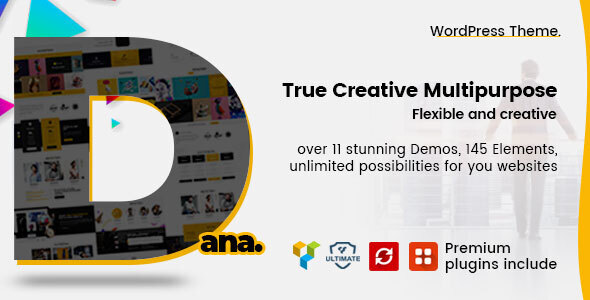
Dana is a multipurpose WordPress theme from developer Bearsthemes, sold on ThemeForest for $59, that ships more than twelve prebuilt home page layouts aimed at corporate sites, creative studios, portfolios, one-page launches and cryptocurrency or ICO landing pages. It suits small businesses, freelancers and agencies that want a finished, restrained-looking site without paying for custom design work. The Dana business package bundles the Visual Composer page builder, a Bootstrap-based HTML5 and CSS3 framework and a responsive layout system in a single licence. The item was last updated in June 2025.
What the Dana Business Template Package Actually Includes
The headline figure is the twelve-plus home pages, and it is the most useful thing about the product. A buyer starts from a layout that already looks close to the finished result instead of a blank canvas: a corporate front page with service blocks and a hero banner, a portfolio grid, a photographer gallery, a fashion or shop landing page, and a dark, chart-heavy crypto layout. These are alternative home pages inside one theme rather than a family of separate child themes, so changing direction mid-project means importing different demo content and rebuilding, not switching products.
Layout work happens in Visual Composer, the drag-and-drop editor now sold separately as WPBakery Page Builder. Rows, columns, buttons, tabs and image blocks are placed visually, which removes most day-to-day code editing for a non-technical site owner. The trade-off is standard for this generation of builders: page content is stored as shortcodes, so text and markup become tangled together and migrating away from the builder later requires cleanup.
The theme is built on Bootstrap with HTML5 and CSS3, which means a consistent grid underpins every demo and breakpoints behave predictably on tablets and phones. A dedicated one-page layout stacks sections into a single scrolling document with anchor navigation, and a separate cryptocurrency demo targets token sales and blockchain projects. The visual approach across the set is minimal — generous whitespace, light typography and restrained colour — so the design depends on good photography and disciplined copy rather than decorative effects.
Beyond the home page variations, the package is organised around the usual corporate site building blocks: services, team members, testimonials, pricing tables, blog posts and contact sections. That matters because most buyers are not only choosing a front page; they are choosing a set of compatible page patterns that will carry the rest of the site. The demos can be imported and edited, so the practical workflow is to choose the closest layout, replace the sample content, then adjust colours and typography to match the brand. Buyers should expect to spend time trimming demo material rather than designing every section from scratch.
Where the Dana Business Theme Fits, and Where It Does Not
The strongest fit is a small or mid-sized company site that needs to be live quickly: a professional services firm, a marketing agency, a design studio, a consultancy or a solo freelancer’s portfolio. The one-page layout works well for a single-service business or an event, and the crypto demo is a sensible shortcut for a blockchain project that needs a credible landing page ahead of a token sale. Photographers and other visual creatives get a gallery-driven option without hiring a designer.
It is a poor fit for content-heavy operations. A news publisher, a membership site with gated content, a learning platform or a store with hundreds of SKUs and complex shipping rules needs structures a marketing theme does not provide out of the box. Teams committed to the block editor and full site editing should also look elsewhere: the vendor states Visual Composer as the builder, and the listing makes no claim about block-based template support, so a Gutenberg-native theme will feel more natural to that workflow.
It also helps to think about the theme as a starting point rather than a complete business system. Dana provides the presentation layer and a set of page layouts, but it does not replace the need for a content plan, a clear service structure or a conversion strategy. A business that already knows what its pages should say will get the most value from the demos; a business still deciding its positioning may find that the polished layouts simply expose gaps in the copy and information architecture. The theme reduces design decisions, not strategic ones.
What Setup Involves, From Purchase to a Live Site
The prerequisites are a self-hosted WordPress installation, hosting with PHP and MySQL, administrator access and the ability to install plugins. The vendor does not publish specific PHP or WordPress version requirements in the supplied documentation shown on the listing, so it is worth confirming current compatibility with your host before purchase.
In practice, setup follows a familiar sequence: install WordPress, install and activate the theme, install the required or recommended plugins, import the demo content that matches the intended layout, then replace logos, colours, images and text. The demo import is the step that saves the most time, but it is also the step that can leave unused pages, sample posts and placeholder media behind if the site is not tidied afterwards. A careful launch checklist should include removing unused demo assets, checking mobile breakpoints, testing contact forms and reviewing page speed after the imported content has been adjusted.
Because the theme relies on a page builder, the editing experience is visual rather than code-based, but it is still worth planning the site structure before importing too much content. Menus, footer links and reusable sections are easier to manage when the page hierarchy is clear from the beginning. Buyers who need multilingual content, complex ecommerce rules or membership functionality should also budget for additional plugins and testing, since those requirements sit outside the core promise of a multi-purpose marketing theme.
Frequently Asked Questions
Is Dana suitable for a first WordPress website?
It can be, provided the site owner is comfortable installing a theme, importing demo content and working inside a visual page builder. Dana is aimed at business users rather than developers, and the prebuilt layouts reduce the amount of design work needed. A complete beginner should still expect a learning curve around WordPress settings, plugins and content replacement, and may prefer to follow the theme documentation carefully before launching.
Do I need to know how to code to use the theme?
No coding is required for ordinary page building, because Visual Composer provides drag-and-drop rows, columns and content elements. Some customisation, such as deeper styling changes or troubleshooting plugin conflicts, may call for CSS or developer help. The theme is positioned for non-technical business owners, but it does not remove the need for basic WordPress administration skills.
Can I use Dana for an online store?
Dana includes shop-oriented demo layouts, so it can be used as a presentational starting point for a small store. However, a business with a large catalogue, complex shipping rules or advanced ecommerce requirements should check plugin compatibility and test the checkout flow carefully. The theme is a multi-purpose business theme first, not a dedicated ecommerce platform, so the store functionality will depend on the ecommerce plugin and extensions added to the site.
What happens if I want to switch away from Visual Composer later?
Because Visual Composer stores page content as shortcodes, moving away from the builder can require a content cleanup. Text and layout markup may need to be converted or rebuilt in the block editor or another builder. That does not make the theme unusable, but it is a reason to decide early whether the visual builder workflow fits the long-term maintenance plan for the site.