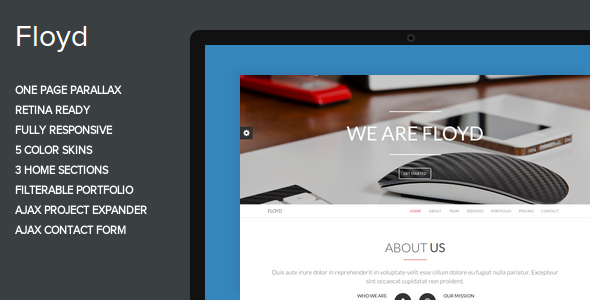
Floyd is a one-page parallax HTML theme sold on ThemeForest for $15, built by the developer ThemePitch for agencies, studios and small businesses that want a single scrolling page rather than a multi-page website. It ships as a static HTML5 and CSS3 template powered by Bootstrap 3.0, with three interchangeable home sections, a filterable portfolio, an Ajax contact form and five colour skins. It has been purchased 606 times, and it suits freelancers and small teams who are comfortable editing markup directly and want a finished visual design without paying for a custom build.
What the Floyd creative template actually delivers
The defining characteristic of this Floyd creative theme is that everything lives on one page. Navigation links scroll to anchored sections instead of loading new documents, which keeps the browsing experience continuous and removes the need to design and maintain a set of interior page layouts. For a studio or consultancy with a short story to tell, that structure is often enough.
Three distinct home section arrangements are included. In practice this means the same content can be presented in different orders and densities, so a business can lead with a portfolio grid or with a services block depending on what matters most. Switching between them is a matter of choosing a different markup block rather than rebuilding the page.
The portfolio uses MixItUp for filtering, so visitors can narrow a grid of work by category without a page reload. Each project opens through an Ajax expander, which loads the detail inline rather than sending the visitor to a separate URL. That keeps attention on the page, though it also means project detail is not independently linkable or indexable by search engines in the usual way.
Five colour skins are bundled, which covers the common palette needs without requiring a designer. Font Awesome supplies 369 icons, and Google Fonts handles typography, so the visual layer is largely configurable through CSS rather than image editing. A FlexSlider carousel and an Owl Carousel instance are both present in the asset list, giving two carousel implementations for different content types.
Media handling goes beyond static images. The theme includes a background stretch plugin for full-bleed imagery and an embedded YouTube player plugin, so a video can sit inside the page as a background or a feature block. Parallax scrolling ties these layers together, creating depth as the visitor moves down the page.
The contact form submits through Ajax, meaning the visitor stays on the page after sending a message rather than being redirected to a confirmation screen. Client-side validation is handled by a jQuery validation library, so obvious errors are caught before submission.
Where this one-page theme fits, and where it does not
The strongest fit is a creative agency, design studio or freelancer with a compact portfolio. These businesses typically need a landing page that establishes tone, shows a handful of projects and offers a way to get in touch. Floyd covers all three without requiring a CMS, a database or a hosting environment beyond plain static files.
Corporate and small business brochure sites are the second natural fit, particularly where the content genuinely fits on one page. A consultancy with three services, a team section and a contact block does not need a multi-page architecture, and a one-page layout avoids the awkwardness of thin interior pages.
Event or campaign microsites are another reasonable use. The video background support and the carousel give enough visual variety for a temporary promotional page, and the low price makes it disposable once the campaign ends.
It is the wrong choice for content-heavy projects. A blog, a documentation site, an e-commerce store or any business with dozens of service pages needs real routing, a content management system and per-page metadata. Forcing that content into a single scrolling document produces a page that is slow to load and difficult to navigate, and the Ajax project expander does not solve the underlying problem because those expanded panels are not separate addresses.
It is also a poor fit for anyone who wants to manage content without touching code. There is no WordPress version implied by the listing, and no admin interface of any kind. Every text change, image swap and new portfolio item is a manual edit to an HTML file.
Setting up Floyd in practice
Installation is straightforward because there is nothing to install. The download contains static HTML, CSS and JavaScript files along with the documentation. A developer uploads the folder to any web host, or opens the files locally, and the theme renders. No build step, package manager or server-side runtime is required, which keeps the barrier to entry low.
Customisation is where the time goes. Changing the colour scheme means editing CSS or swapping the skin stylesheet. Replacing placeholder images means preparing assets at the right dimensions and updating the markup. Adding or removing portfolio items means duplicating and editing blocks within the filterable grid, and each new item needs the correct category class to appear under the right filter.
The contact form needs a backend endpoint to actually deliver mail. The theme handles the client-side submission and validation, but the vendor listing does not state which mail script or service the form posts to, so that piece has to be wired up separately. This is the one part of the setup that requires server-side knowledge.
A realistic timeline for a developer familiar with Bootstrap is a few hours to get a working page with real content, and a day or two to polish typography, imagery and responsive behaviour across breakpoints. Someone editing HTML for the first time should expect considerably longer, and the documentation is the main resource available.
Strengths and limitations of the Floyd creative theme
Strengths
- Genuinely responsive layout built on Bootstrap 3.0, so the grid behaves predictably across screen sizes.
- Three home section layouts and five colour skins give meaningful variation without custom design work.
- Filterable portfolio with inline Ajax project expansion keeps visitors on the page.
- Video background and parallax support add visual depth that static templates lack.
- Ajax contact form with client-side validation reduces friction on the main conversion point.
- Static files mean hosting is cheap and simple, with no database to maintain.
- 606 sales indicate a reasonably established track record for a template at this price.
Limitations
- The vendor last updated the theme on 29 April 2014. That is a long gap, and it means the bundled jQuery plugins and Bootstrap 3.0 have not tracked the security and compatibility fixes released since.
- Bootstrap 3.0 is several major versions behind current Bootstrap, so any developer expecting modern utility classes or current grid conventions will need to work with older syntax.
- Because the portfolio detail loads through Ajax, individual projects have no distinct URL. That limits deep linking, sharing and search engine indexing of project pages.
- There is no content management system. Every content change is a code edit, which rules out non-technical editors.
- The contact form’s backend is not specified in the listing, so mail delivery has to be implemented separately.
- Demo images are replaced with placeholders in the download for licensing reasons, so the site will not look like the preview until real assets are sourced.
How Floyd compares with other one-page themes
The one-page parallax category is crowded, and the differentiator is usually not the visual concept but the underlying stack. Floyd sits at the static HTML end of that spectrum. It competes on price and simplicity rather than on extensibility.
Compared with WordPress one-page themes, Floyd gives up the admin interface, plugin ecosystem and automatic updates. What it gains is speed and a lack of hosting complexity. A static page has no database queries and no PHP to patch, which matters for a small brochure site that rarely changes.
Compared with modern static site generators, Floyd gives up build tooling, templating and version control workflows. It also gives up the maintenance that comes with a dependency tree. For a single page that will be edited a handful of times, hand-editing HTML is a defensible choice.
Compared with page builders and drag-and-drop editors, Floyd gives up visual editing entirely. The trade is that the output is lean markup rather than generated divs, which generally loads faster and is easier for a developer to reason about.
The honest positioning is that Floyd is a 2014-era static template. It remains functional and cheap, but anyone evaluating it in a current context should weigh the age of its dependencies against the effort of building the same page from scratch with a current framework.
Frequently Asked Questions
Is Floyd a WordPress theme?
No. Floyd is a static HTML5 and CSS3 template, not a WordPress theme. There is no PHP, no theme folder structure and no admin panel. Content is edited directly in the HTML files. Anyone needing a WordPress site should look at one-page WordPress themes instead, since converting this template would require rebuilding it as a theme from scratch.
Does the Floyd theme still work with current browsers?
It generally renders, but the vendor has not updated it since April 2014, so the bundled Bootstrap 3.0 and jQuery plugins predate several years of browser changes. Basic layout and parallax effects typically still function. Anyone deploying it should test thoroughly on current browsers and expect to patch or replace outdated JavaScript libraries.
Can the portfolio items be linked to directly?
Not by default. Project details open through an Ajax expander that loads content inline, so each project has no separate address. That means individual projects cannot be shared as links or indexed as distinct pages. A developer could restructure the markup to create separate project pages, but that is custom work beyond the template.
What is included in the $15 purchase?
The download contains the HTML, CSS and JavaScript files, the five colour skins, the Font Awesome icon set, Google Fonts integration, the documentation and the bundled jQuery plugins. Demo images are replaced with placeholders for licensing reasons, so real photography and graphics must be sourced separately before the site matches the preview.
Verdict on the Floyd creative theme
Floyd is worth buying for a developer or small studio that needs a single-scroll portfolio or brochure page and is comfortable working directly in HTML. At $15 with 606 sales behind it, the risk is low and the visual foundation is solid. It is not the right purchase for anyone who needs a CMS, a blog, an online store or content that changes without a developer. The 2014 last-update date is the main caveat, and buyers should budget time for testing and likely patching of the bundled libraries. For a static one-page site that will be built once and left largely alone, it remains a practical option.