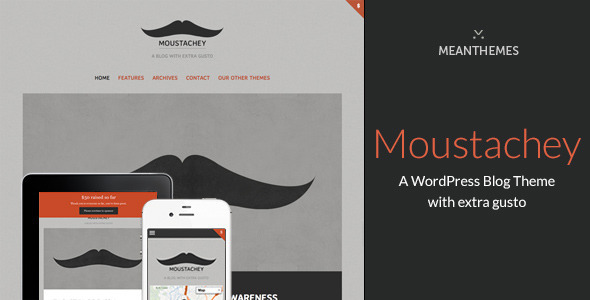
Moustachey: A Blog Theme With Extra Gusto blog-magazine is a WordPress theme sold on ThemeForest for $39, built by the developer meanthemes for personal blogs, photography journals and editorial sites. It ships with every WordPress post format, a full colour and font control panel, Google Maps integration and a configurable donate block, which makes it a reasonable fit for a solo publisher or a small charity site that wants a magazine-style layout without hiring a developer. It has been purchased 605 times and carries a strong buyer rating, though the vendor’s last update landed in April 2019.
What the Moustachey blog-magazine theme actually lets a site owner do
The headline capability is format coverage. Moustachey supports all ten standard WordPress post formats — aside, audio, video, gallery, image, status, chat, link, quote and standard — so a blog that mixes written articles with embedded video, photo sets and short status notes does not need separate plugins or workarounds to style each type differently. For a blog-magazine layout, that flexibility matters more than it sounds: most themes handle text posts well and treat everything else as an afterthought.
Design control is handled through a single options panel, which the vendor moved into the native WordPress Customizer in version 1.4.0. From there, colours and font sizes can be adjusted across the whole site, and typography can be pulled from Google Fonts, Typekit or Adobe Edge Web Fonts. A custom CSS block is included for anything the panel does not cover, which means a site owner can override styles without touching the theme’s own stylesheet and losing those changes on the next update. Layout can be switched between boxed and wide, the sidebar can sit on the left or right, or be removed entirely.
Several features point at a specific use case rather than general blogging. There is a configurable donate or message block that sits at the top of the page, Twitter integration with a settable number of tweets in the footer, and footer links for a range of social networks. A Google Map with an adjustable road colour and a custom map pin upload rounds out the set. Taken together, these suit a charity, a community group or a personal project with a campaign element, where the site needs to ask for something rather than just publish.
On the structural side, Moustachey includes five page templates covering blog layout, archives and full-width pages, plus an archive template that groups posts by month, year and category. There is a contact form, featured image support, dropdown menus, shortcodes and a widgetised sidebar and footer. A plain-text logo option and separate retina-only logo upload are available for anyone who wants a sharp mark on high-density screens.
Where this theme fits and where it does not
The strongest fit is a single-author blog that publishes in more than one medium. A photographer who writes accompanying text, a podcaster who posts show notes alongside audio embeds, or a writer who mixes long essays with link posts will get more out of the format support than someone publishing only standard articles. The gallery handling, built on the Flexslider script, and the option to hide post thumbnails on gallery posts specifically, suggest the theme was designed with visual publishers in mind.
Charity and fundraising sites are the second clear fit. The donate block, the social sharing controls and the footer social links are not decorative extras here — they are the parts of the page that do the work. A small organisation that needs a credible web presence with a donation prompt and a map of its location can get there without commissioning custom development.
It is the wrong choice for a multi-author news operation or a high-traffic publication with an editorial workflow. There is no mention of a page builder, no block library beyond what WordPress itself provides, and no indication of schema markup, advertising slots or membership tooling. Anyone running a content team with scheduled publishing, contributor roles and revenue requirements will find the feature set thin. It is also a poor fit for a storefront: the theme has no e-commerce integration of any kind.
Setting up the Moustachey theme in practice
Installation follows the standard WordPress route: upload the theme package through Appearance, activate it, then install and activate the MeanThemes Tools plugin when prompted. That plugin is not optional in any meaningful sense — as of version 1.4.0, post format settings and Google Analytics configuration were moved out of the theme and into it, so skipping the prompt leaves those controls missing.
From there, the setup work is configuration rather than development. Logos, favicon and Apple touch icon are uploaded through the Customizer. Colours, font families and font sizes are set site-wide from the same place, and the vendor provides inline help text alongside the controls. The donate block, footer content, Twitter feed and map settings each need their own pass. The Google Map requires an API key under the v3 integration, which is a step that trips up a lot of first-time users because the key has to be generated in a Google account and restricted correctly before the map displays.
A straightforward personal blog could be live in an afternoon. A charity site with a map, a donate block, a Twitter feed and a custom colour scheme is a fuller day’s work, most of it spent on content and images rather than the theme itself. The vendor supplies documentation, and localisation files in .mo and .po format are included for anyone translating the interface.
Strengths and limitations of this blog-magazine theme
Strengths
- Complete post format support, which is unusual at this price point and genuinely useful for mixed-media publishing.
- Colour, font family and font size controls that apply across the whole site from one panel, with a custom CSS field for anything the panel misses.
- Purpose-built donation and message block, plus social sharing and footer network links, aimed at cause-driven sites.
- Five page templates, archive views by month, year and category, and a widgetised sidebar and footer.
- Retina-ready logo handling and responsive output for phones and tablets.
- Documentation and a vendor support channel, with a public update history going back through several WordPress releases.
Limitations
- The most recent vendor update is dated April 2019. That is a long gap, and buyers should check the theme’s current compatibility with recent WordPress versions before committing, because the vendor listing does not state it.
- Key settings now live in a separate plugin. Sites that disable or remove MeanThemes Tools lose access to post format and analytics controls, and the theme depends on that plugin being maintained alongside it.
- There is no page builder and no block library beyond Gutenberg’s defaults, so building anything more complex than a blog or a simple landing page means writing markup or shortcodes by hand.
- No e-commerce, membership or advertising integration is described, which rules out monetisation beyond donations and social traffic.
- The Twitter feed feature depends on the platform’s API, and social integrations of that age are prone to breaking when the underlying service changes its rules.
How Moustachey compares with other blog and magazine themes
Blog-magazine themes generally split into two groups. One group is built around a page builder and a large block library, aimed at agencies assembling varied client sites quickly. The other is built around typography, post formats and editorial presentation, aimed at publishers who care about how writing and images read on the page. Moustachey sits firmly in the second group.
Against the builder-driven options, it gives up layout flexibility. There is no drag-and-drop homepage construction, and the templates are fixed in number. What it offers instead is a tighter set of controls over colour, type and post presentation, which is the part that actually determines whether a blog looks considered. For a publisher whose content is the design, that trade is reasonable. For an agency building five different site types from one licence, it is not.
Against free themes, the case rests on the format support, the donation block and the Customizer controls being present without plugin assembly. Against premium competitors at a similar price, the deciding factor is likely to be update recency rather than features, since the feature list here is broad for the money. Buyers comparing options should weigh how much they value a maintained codebase against a one-off $39 purchase.
Frequently Asked Questions
Is Moustachey compatible with the current version of WordPress?
The vendor does not state current compatibility. The last recorded update was version 1.4.0 in April 2019, which added Gutenberg support and updates for WordPress 5.1. Because several years have passed since then, buyers should confirm compatibility with the vendor directly or test on a staging site before using it on a live installation.
Does the Moustachey theme require any plugins to work properly?
Yes, the MeanThemes Tools plugin is required for full functionality. Version 1.4.0 moved post format settings and Google Analytics configuration out of the theme and into that plugin, and the theme prompts for installation after activation. Without it, those controls are unavailable, so it should be treated as a dependency rather than an optional extra.
Can Moustachey be used for a photography or portfolio site?
It can, with caveats. The theme supports gallery and image post formats, includes a Flexslider-powered blog gallery, and allows thumbnails to be hidden on gallery posts. That covers a photo blog well. It is not a dedicated portfolio theme, though, so there is no project grid, filtering or case study template beyond the standard blog and archive layouts.
Does this theme support multiple languages and translation?
Localisation files are included. The package ships with .mo and .po files, which are the standard WordPress formats for translating interface text into another language. There is also a general template text control that lets common strings be edited directly from the settings panel, which avoids editing the translation files for small wording changes.
Verdict on the Moustachey blog-magazine theme
Moustachey is a good buy for a solo blogger, photographer or small charity that wants a well-presented magazine-style site with donation and social features built in, and that is comfortable configuring a theme rather than assembling one from plugins. At $39 with 605 sales and a strong rating, the value proposition is clear for that audience. It is not the right choice for agencies needing flexible layouts, multi-author newsrooms, or anyone planning to sell products through the site. The main reservation is the age of the last update: the feature set still holds up, but a buyer should verify it runs cleanly on a current WordPress install before relying on it. Anyone who needs guaranteed ongoing development should look at themes with a more recent release history.