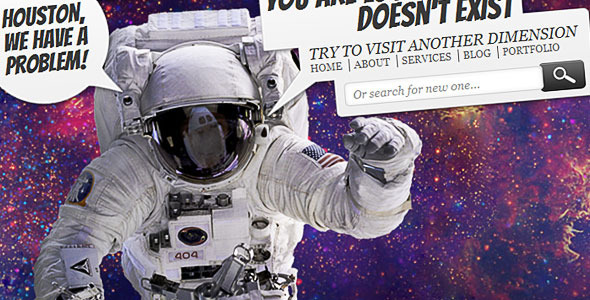
Lost in Space – Error 404 is a small HTML, CSS and JavaScript template that replaces the default server error page with an animated space scene. It is sold on ThemeForest by the developer adraft for $8, and it covers the standard HTTP error codes — 401, 403, 404, 500 and 503 — rather than only the familiar “page not found” case. It suits site owners who want a branded, self-contained error page without building one from scratch, and it is a poor fit for anyone who needs a modern framework component or ongoing updates.
What the Lost in Space 4 4 Pages template actually delivers
The package is deliberately narrow, and that is worth understanding before buying. It contains a set of HTML, CSS and JavaScript files that render the error page, two layered Photoshop files for editing the artwork, and a help document. There is no CMS plugin, no build step and no dependency on a framework.
The animated background is the centrepiece. Rather than a static illustration, the page uses JavaScript to move elements across a starfield, which gives the error screen a sense of depth that a flat image cannot match. Because the animation is driven by plain JavaScript and CSS rather than a heavy library, the page stays light — an important property when the page in question is often served precisely when something else has already gone wrong.
Two PSD files ship with the download, both described as fully editable and organised into layers. That matters more than it first appears. It means the astronaut imagery, the typography and the colour treatment can all be reworked in Photoshop before export, so the page can be adapted to a brand palette instead of being used as-is. A buyer who does not own Photoshop will find this part of the package useless, which is a real constraint rather than a minor one.
The template is built on valid HTML and CSS, and the vendor states it is ready for the full set of common HTTP status codes. In practice that means the same visual treatment can be reused for an authentication failure, a permissions problem, a missing page, a server fault or a maintenance window. Many error templates only address the 404 case, so covering 401, 403, 500 and 503 in one package is a genuine convenience for anyone maintaining a site that returns several of these.
Assets are documented in the help file. The astronaut photograph is a public domain NASA image credited to Michael Gernhardt on the robot arm, taken for the Johnson Space Center. The galaxy background is also public domain, credited to NASA, the Space Telescope Science Institute and the European Space Agency’s Hubble information centre. The display typeface is Bangers, a free Google web font, paired with Georgia for body text. Because the imagery is public domain, there is no stock licensing to worry about — a meaningful advantage over templates that bundle images under restrictive licences.
Where an animated error page like this fits, and where it does not
The strongest use case is a portfolio, agency site or small business site where the owner controls the server and can point error documents at a custom file. A photographer, a design studio or a personal brand can drop the template in, recolour it to match the site, and end up with an error page that feels intentional rather than broken.
It also works well for staging environments, intranet tools and internal dashboards where a 500 or 503 page is likely to be seen by colleagues rather than the public. A maintenance page that looks deliberate reduces the number of support messages during an outage.
The template is a poor choice for a WordPress, Shopify or similar CMS-driven site if the owner expects a plugin-style install. There is no module, no shortcode and no admin screen. The files have to be uploaded and wired into the server configuration manually, and on some hosts that is not possible without support intervention. It is equally unsuitable for a project that needs accessibility compliance signed off, since an animated background and a decorative display font are not the ingredients of a WCAG-conformant error page without substantial rework.
Setting the template up in practice
Installation is a file operation, not a software install. The buyer downloads the archive, unzips it, and uploads the HTML, CSS and JavaScript files to the server. The error page then has to be registered — typically through an .htaccess rule on Apache, an error_page directive on Nginx, or the equivalent control panel setting. Anyone comfortable with a text editor and a hosting file manager can finish the job in fifteen to thirty minutes.
Customisation is the longer part. Changing colours and copy is straightforward, since the CSS is described as well organised. Swapping the astronaut or the galaxy image requires the PSD files and a working copy of Photoshop, plus an export step. Matching the page to an existing brand identity — correct typeface, correct palette, correct logo placement — is realistically an hour or two of work for someone with design experience.
Two prerequisites are worth stating plainly. First, the buyer needs the ability to edit server configuration or ask a host to do it. Second, they need a way to open PSD files if they intend to change the artwork. Neither is unusual, but both rule out some buyers.
Strengths and limitations of Lost in Space 4 4 Pages
Strengths
- Covers 401, 403, 404, 500 and 503 in a single package, so one template serves several failure states.
- Public domain NASA imagery removes stock licensing concerns entirely.
- Two layered PSD files allow genuine visual customisation rather than colour tweaks alone.
- Lightweight JavaScript and CSS animation keeps the page fast, which matters on a page served during an incident.
- Valid HTML and CSS, with organised files, makes hand-editing predictable.
- At $8 it is inexpensive relative to commissioning a bespoke error page.
Limitations
- The last vendor update was 31 October 2012. The template has not been refreshed in over a decade, so buyers should assume no further maintenance.
- There is no CMS integration of any kind. WordPress, Joomla and similar users must handle the wiring themselves.
- Editing the artwork requires Photoshop. The PSD files are of no use without it.
- The design depends on a decorative Google font and a moving background, which conflicts with strict accessibility requirements.
- There is no documented support commitment or update policy in the listing.
- The animated background may be distracting on a page where the visitor is already trying to recover from an error.
How this compares with other error page templates
Error page templates broadly fall into three groups: static HTML pages, CMS plugins that generate the page from within the admin, and framework components for React, Vue or similar. Lost in Space – Error 404 sits firmly in the first group.
Against static templates generally, its advantages are the multi-code coverage and the inclusion of editable PSD source files. Many competing static templates ship a single 404 page and no source artwork, which limits how far the design can be adapted. Against CMS plugins, it loses on convenience: a plugin installs in a minute and updates through the dashboard, whereas this template requires file uploads and server configuration. Against framework components, it is simply a different tool for a different stack.
The honest positioning is that this is a design asset, not a piece of software. Buyers comparing it with a plugin should weigh the extra setup effort against the fact that they own the files outright and can modify them without depending on a third party’s roadmap.
Frequently Asked Questions
What is Lost in Space – Error 404 used for?
It is a template for building custom HTTP error pages on a website. The package covers 401, 403, 404, 500 and 503 responses, so the same animated space design can be used for missing pages, permission errors, authentication failures, server faults and maintenance windows.
Does Lost in Space – Error 404 work with WordPress?
Not as a plugin. There is no WordPress integration in the package, so a WordPress site would need the HTML, CSS and JavaScript files uploaded manually and the error page registered through server configuration or a hosting control panel. It is possible, but it requires more technical work than installing a plugin.
Can the astronaut image and colours be changed?
Yes, provided Photoshop is available. Two layered PSD files are included specifically so the artwork, typography and colour treatment can be edited before export. Colours and text can also be changed directly in the CSS and HTML without touching the PSD files at all.
Is the template still updated?
No. The vendor’s most recent update is dated 31 October 2012, so the template has not been maintained for well over a decade. It still functions as static HTML, CSS and JavaScript, but buyers should not expect new features, browser fixes or a documented support commitment going forward.
Verdict
Lost in Space – Error 404 is worth buying for anyone who wants a distinctive, lightweight error page and is comfortable uploading files and editing server configuration. The multi-code coverage, public domain NASA imagery and editable PSD source make it more useful than a single-purpose 404 template, and the 587 sales recorded on ThemeForest suggest a reasonable number of buyers have taken the same view. It is not the right purchase for WordPress users who want a one-click plugin, for anyone without Photoshop who intends to change the artwork, or for projects with strict accessibility requirements. The decade-old update history is the main caveat: treat this as a finished design asset rather than a maintained product, and it will do its job well.