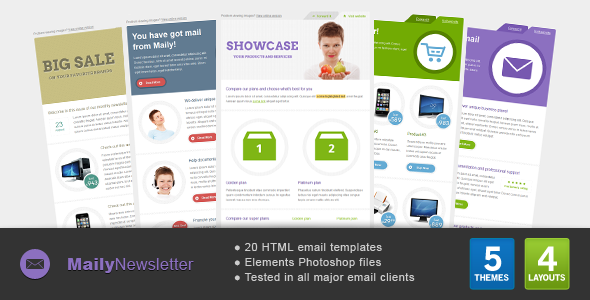
Maily Newsletter is a set of 20 HTML email templates sold on ThemeForest for $17, built around five colour themes with four layout variations in each. It is aimed at small businesses, freelancers and marketers who need a ready-made, table-based newsletter design they can drop into an email service such as Mailchimp or edit by hand. The package also includes layered PSD files and documentation, which makes it a reasonable starting point for anyone who wants to customise the visuals rather than send the design untouched.
The item was released by an author trading as Gifky and has sold 282 copies since launch. One detail matters more than any other before going further: the vendor last updated it in June 2012. That single fact shapes almost everything below, so it is worth stating plainly at the top rather than burying it.
What the Maily Newsletter Email Templates actually include
The core of the package is 20 finished HTML emails. Rather than 20 distinct designs, these are five colour palettes crossed with four layout structures, which means the visual variety comes mostly from colour while the underlying grids repeat. For a business sending a regular promotion newsletter, that is usually enough: a seasonal colour swap is a cheap way to keep a recurring send from looking identical every month.
The layouts are built from tables, the long-standing technique for email because most inbox software ignores modern CSS layout rules. Each content block is a self-contained table, and the documentation confirms blocks can be copied from one layout into another, duplicated, or deleted entirely. In practice this turns the templates into a modular kit: a header from one file, a two-column product row from another, and a footer can be assembled into something that fits a particular campaign without touching the underlying code structure.
Alongside the HTML, the download contains layered PSD files. These are the editable Photoshop source documents, so a designer can recolour a button, swap a background, or rebuild a banner graphic and then export it for use in the email. Without layered files, changing a design usually means rebuilding it; with them, the work is closer to editing an existing document.
Compatibility is stated broadly. The vendor says the templates render across major email clients and browsers, with specific mentions of iPhone, iPad, Hotmail, Yahoo and Outlook 2007 through 2010, and claims support reaching back to Internet Explorer 5.5 and forward to Thunderbird 12. Those version numbers are a useful signal about the era the code was written for, and they are also the reason the next section matters.
Where these email templates fit, and where they do not
The strongest fit is a small business or solo operator running a straightforward promotional newsletter who wants a decent-looking design today rather than a bespoke build. A café announcing weekly specials, a consultant sending a monthly update, a local service business running a seasonal offer: these are the situations where a $17 template earns its money in the first send.
It also suits freelancers and small agencies who need a cheap starting point for a client project and are comfortable editing HTML. The table-based structure is predictable, and the ability to move blocks between layouts means a bespoke-feeling result is achievable without writing a template from scratch.
The wrong choice is anyone sending to a modern audience where mobile display is the priority. Email clients have changed substantially since 2012. Gmail’s mobile apps, Apple Mail on current iOS versions, and Outlook’s web interface all handle CSS differently from the clients this template was tested against, and responsive behaviour — layouts that reflow to a single column on a phone screen — is not something the vendor claims. A template built before responsive email became standard will typically render as a fixed-width desktop layout that requires pinching and zooming on a phone. For an audience that is majority mobile, that is a serious problem, and paying a designer to modernise the code may cost more than buying a newer template outright.
It is also a poor fit for anyone who needs accessibility features such as semantic headings, sufficient colour contrast controls, or screen-reader-friendly structure. Nothing in the listing suggests those were considered, and 2012-era email code rarely included them.
Setting up the Maily Newsletter Email Templates in practice
Setup splits into two paths depending on whether the design needs changing.
If the colour scheme and layout work as-is, the process is quick. The HTML files are described as valid and well commented, so identifying which file corresponds to which colour and layout is straightforward. The file is then imported into an email platform that accepts custom HTML — Mailchimp is named explicitly, and the vendor notes the templates work with any service or desktop program that supports importing or editing HTML. Text and images are swapped for real content, and a test send goes out. Realistically this is an hour or two of work for someone comfortable with basic HTML.
If the design needs altering, the PSD files come into play and the timeline stretches. Editing layered artwork requires Photoshop or an equivalent editor, and the documentation covers both PSD and HTML editing, sending the newsletter, Mailchimp usage and general tips. The vendor does not state how long the documentation runs or how detailed it is, so treat it as a starting reference rather than a full course.
Two prerequisites are worth flagging. First, an email platform or desktop client that accepts pasted or imported HTML. Second, a working knowledge of HTML tables if structural changes are wanted — the block-copying approach reduces the need for this, but it does not eliminate it. The vendor also advises against sending from Outlook 2007–2010 even though the templates render correctly there, which is a sensible warning: Outlook’s rendering engine is not a reliable sending environment for HTML campaigns.
Strengths and limitations
Strengths
- Twenty finished HTML emails at $17 works out at under a dollar per file, which is inexpensive even if only a handful are used.
- Five colour themes across four layouts give enough variation to keep a recurring newsletter from looking repetitive.
- Layered PSD files mean visual changes are edits to existing artwork rather than rebuilds from nothing.
- The block-based table structure is genuinely modular: content blocks can be copied between layouts, duplicated or removed.
- Documentation covers the practical steps — PSD editing, HTML editing, sending, and Mailchimp — rather than just describing the files.
- 282 sales indicate a reasonable number of buyers have taken a chance on it, which is modest but not negligible social proof for a low-cost item.
Limitations
- The last vendor update was June 2012. More than a decade of changes to Gmail, Apple Mail and Outlook means the tested-client list no longer reflects where most email is read.
- No responsive or mobile-optimised layout is claimed. On phones, a fixed-width table design typically forces horizontal scrolling or shrinks text to an uncomfortable size.
- Compatibility claims reference Internet Explorer 5.5 and Thunderbird 12, which signals how old the codebase is and offers little reassurance about current clients.
- No accessibility provisions are mentioned — no semantic structure, no contrast guidance, no screen-reader considerations.
- Outlook is explicitly not recommended as a sending tool, so Windows users relying on desktop Outlook need a separate sending platform.
- The vendor does not state documentation length, file sizes, or whether any support or updates are offered after purchase.
How this compares with the wider email template category
Commercial email templates generally sit in three tiers. At the low end, single-design templates sell for a few dollars and give one layout with limited editing. In the middle, multi-layout packs like this one offer several designs and source files for a modest price. At the high end, template subscriptions and custom builds include responsive code, tested client matrices, accessibility work and ongoing updates, at correspondingly higher cost.
Maily Newsletter sits firmly in the middle tier on price and file count, but its 2012 vintage pulls its effective capability toward the lower tier for anything mobile-first. The comparison that matters is not price against price but cost against total effort. A newer template costing two or three times as much may still be cheaper overall if it arrives responsive and tested against current clients, because it avoids the redesign work this one may require.
Where this package still competes is on the PSD files and the modular block system. Plenty of modern templates ship HTML only, leaving design changes to code edits. Having layered source artwork is a real advantage for anyone with Photoshop skills, and it is the main reason a buyer might choose this over a newer, leaner alternative.
Frequently Asked Questions
Is Maily Newsletter compatible with Mailchimp?
Yes. The vendor states the templates work with Mailchimp and any other service that supports importing or editing HTML, and the documentation includes a section on Mailchimp usage. The HTML is imported as a custom template, then text and images are replaced with real content. The same approach works with most other major email platforms.
Are these email templates responsive on mobile devices?
No responsive behaviour is claimed anywhere in the listing. The templates were tested against iPhone and iPad rendering as it existed in 2012, which is not the same as a layout that reflows to a single column on a modern phone. Buyers whose audience reads email primarily on mobile should expect to modernise the code or choose a newer template.
Can the Maily Newsletter Email Templates be edited without coding?
Partly. Text and image swaps are straightforward in any HTML editor or email platform. Structural changes are harder: the layouts are built from HTML tables, so moving or resizing sections means working with table markup. The block system lets entire content blocks be copied, duplicated or deleted, which reduces but does not remove the need for HTML familiarity.
Why was this template last updated in 2012?
The vendor does not explain the gap, and no reason is given in the listing. What is clear is that the tested client list — Outlook 2007–2010, Thunderbird 12, Internet Explorer 5.5 — reflects that period. Buyers should treat the compatibility claims as historical rather than a statement about current Gmail, Apple Mail or Outlook behaviour.
Verdict
Maily Newsletter Email Templates suit a buyer who needs an inexpensive, editable newsletter design and is either sending to a desktop-heavy audience or willing to spend time modernising the code. The 20 files, layered PSD sources and modular block structure deliver fair value at $17, and 282 sales suggest others have found it workable. It is not the right purchase for anyone whose subscribers read email on phones, for teams that need accessibility compliance, or for projects where a broken layout in a current client would be costly. The June 2012 update date is the deciding factor: treat this as a starting point that will likely need work, not a finished modern template.