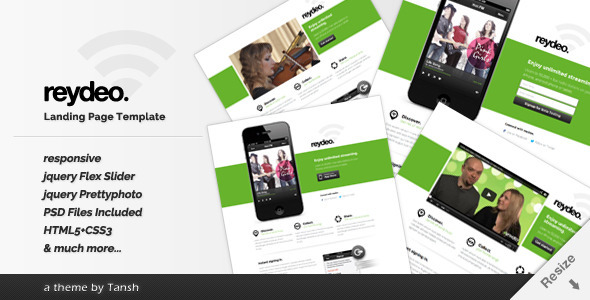
Reydeo Responsive HTML Landing Page Template is a static front-end template sold on ThemeForest for $15. It packages four pre-built landing page layouts, a set of custom shortcodes and the layered Photoshop source files, so a site owner or freelancer can assemble a single-page marketing site without designing from a blank canvas. It suits small businesses, app publishers and agencies producing straightforward campaign pages on a tight budget.
The product comes from the developer trading as tansh and has accumulated 313 sales since release, which places it in the modest-but-established tier of ThemeForest landing page items rather than the bestseller bracket. The last vendor update is dated June 2015, and that date shapes almost everything worth knowing about the template.
What the Reydeo Responsive HTML Landing Page Template actually includes
The core of the package is four layout variations built on the same underlying structure. Three are conventional single-page designs, and the differences between them are mostly in the hero area and the order of the content blocks. The fourth swaps the standard hero for a full-width slider and drops the iPhone mockup that appears in the background of the earlier variations. That slider is driven by FlexSlider, a jQuery plugin that cycles images or content panels automatically.
Video is handled through prettyPhoto, a lightbox script that opens media in an overlay rather than navigating away from the page. One of the four variations is built specifically around a video hero, which is the practical option for anyone promoting a product demo or an explainer clip above the fold.
A working subscription form is included. In a static HTML template this means the markup, styling and validation states are present, but the form still needs to be pointed at a mailing list provider or a server-side handler before it collects anything. That is standard for the category and worth stating plainly, because “working subscription form” in vendor copy can be read as more than it delivers.
Reydeo Shortcodes is a separate stylesheet and markup set bundled with the theme. It provides pre-styled buttons, columns, headings, alert boxes and similar interface elements, which reduces the amount of CSS a buyer has to write when the four stock layouts do not quite fit the content. For anyone comfortable editing HTML directly, this is the most reusable part of the package.
The template is built on Twitter Bootstrap, so the grid, typography scale and responsive breakpoints follow a framework that a large number of developers already know. The vendor states the markup is W3C valid, which means it passes the standard validation checks for correct HTML structure. Layered PSD files ship alongside the HTML, so a designer can recut the graphics or match the layout to an existing brand without rebuilding the visual assets from scratch.
Where this template fits and where it does not
The obvious fit is a single-purpose campaign page: an app launch, a webinar registration, a lead capture form for a service business, or a coming-soon page with an email signup. The four variations cover the common shapes these pages take, and the Bootstrap foundation means the result behaves sensibly on phones and tablets without extra work.
Freelancers will find it useful as a starting point when a client needs something live quickly and the budget does not stretch to custom design. The included PSDs make it easier to justify a small amount of visual customisation, since the source files are already there.
Agencies handling several small clients can reuse the same base across projects and differentiate through colour, imagery and content order. The shortcode library supports that approach.
It is the wrong choice for anything that needs a content management system. Reydeo is static HTML, so every text change means editing a file and re-uploading it. A business that wants staff to update copy, publish blog posts or manage multiple pages through an admin panel should be looking at a WordPress theme instead. It is equally unsuitable for large multi-page sites, e-commerce, or projects with accessibility requirements that go beyond what a 2015 Bootstrap build typically provides.
Setting up the template in practice
No build tools, package managers or server software are required. The buyer downloads a ZIP archive, extracts it, and opens the HTML files in an editor. Deployment means uploading the folder to any web host through FTP or a control panel file manager, which takes minutes.
Customisation is where the time goes. Changing colours and fonts means editing the stylesheet, and swapping the placeholder images means replacing files and adjusting the paths. The vendor’s own imagery comes from stock photography sources credited in the documentation, so those files cannot be reused commercially as-is; replacements need to be sourced separately. The same applies to the icon set, which is credited to a third-party icon library.
A realistic timeline for a technically comfortable buyer is two to four hours to go from download to a published page with brand colours, real copy and a connected subscription form. Someone who has never edited HTML should budget a full day, or hand the files to a developer. The vendor notes that older buyers can follow the help document to update between versions, so upgrade instructions exist for anyone who purchased an earlier release.
Strengths and limitations
Strengths
- Four distinct layouts in one $15 purchase, covering standard, video and slider hero treatments.
- Built on Bootstrap, so the responsive behaviour and grid follow a widely understood system.
- Layered PSD files included, which is unusual at this price point and makes rebranding realistic.
- A bundled shortcode library that shortens the work of extending the stock layouts.
- Static HTML output is fast to host and has no database or server dependencies.
Limitations
- The last update was June 2015. The template predates modern CSS layout features, contemporary accessibility expectations and current browser behaviour, and the vendor has not refreshed it since.
- Internet Explorer 8 does not support media queries, so the vendor confirms the template falls back to a non-responsive fixed layout in that browser and may render differently. That is a legacy concern, but it is documented rather than fixed.
- The subscription form requires an external service or server-side script to function; the template supplies the front end only.
- Placeholder images and icons are credited to third-party sources and are not licensed for commercial reuse, so every image has to be replaced.
- No CMS integration. Every content change is a manual file edit.
- The vendor does not state a support period or response commitment in the listing.
How it compares with other landing page templates
The general category splits into three groups: static HTML templates like this one, WordPress themes with page builders, and hosted landing page services with drag-and-drop editors. Reydeo sits firmly in the first group, and the trade-off is consistent across it. Static templates are cheaper, faster to load and simpler to host, but they put all editing responsibility on whoever can read HTML.
Against other static templates, the differentiators here are the four variations, the shortcode library and the PSD files. Many competitors at a similar price ship a single layout and no design source files. Against WordPress-based alternatives, Reydeo loses on flexibility and long-term maintainability but wins on hosting simplicity and cost. Against hosted services, it wins on ownership, since the files live on the buyer’s own server with no monthly fee.
The age of the product is the deciding factor in most comparisons. A buyer weighing Reydeo against a template released in the last two years is effectively choosing between a lower price and a codebase that reflects current practice. For a throwaway campaign page that will run for a few months, that gap matters less than it would for a site intended to last.
Frequently Asked Questions
Do I need to know how to code to use the Reydeo template?
Yes, some HTML and CSS knowledge is required. The template ships as static files with no visual editor, so changing text, colours or images means opening the files in a code editor and editing them directly. A buyer with no coding experience would need to hire a developer or choose a WordPress-based alternative with a page builder instead.
Does the Reydeo template work with WordPress?
No. Reydeo is a standalone HTML template, not a WordPress theme, and it cannot be installed through the WordPress admin. It can be hosted on the same server as a WordPress site, but the two would run independently. Anyone needing WordPress integration should look at landing page themes built specifically for that platform.
Is the subscription form ready to collect email addresses?
Not on its own. The template provides the form markup, styling and validation states, but it has no backend. Email addresses need somewhere to go, so the form must be connected to a mailing list provider such as Mailchimp or to a server-side script. That connection is the buyer’s responsibility, not something included in the download.
Can the images in the template be used on a live site?
No. The placeholder photographs are credited to third-party stock sources and the icons to an external icon library, neither of which grants commercial reuse through this purchase. Every image and icon should be replaced with assets the buyer owns or has licensed before the page goes live. The included PSD files help with resizing and layout adjustments.
Verdict
Reydeo Responsive HTML Landing Page Template is a reasonable purchase for a developer, freelancer or agency that needs a single-page marketing site live quickly and is comfortable working in HTML and CSS. The four variations, the shortcode library and the included PSD files represent solid value at $15, and the 313 sales suggest a steady trickle of buyers have found it adequate for that purpose.
It is the wrong purchase for anyone who needs to update content without touching code, for businesses planning a long-lived site, or for projects with modern accessibility and browser support requirements. The 2015 update date is the single most important fact in the listing, and buyers should weigh it honestly rather than assume the template has kept pace with current front-end practice.
Treat it as a short-term campaign tool rather than a foundation for a permanent web presence, and the price-to-effort ratio holds up. Treat it as anything more, and the manual editing burden and dated codebase will surface quickly.