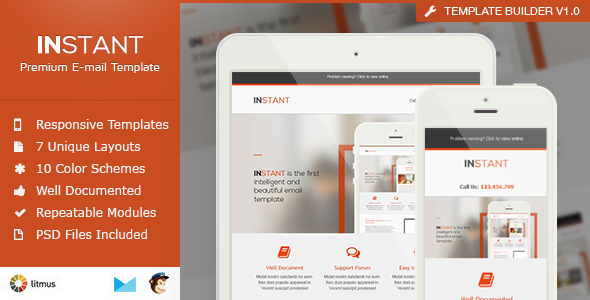
Instant is a responsive email template package sold on ThemeForest for $18, built by the developer Smythemes for businesses sending newsletters, promotions and transactional-style announcements. It ships as 50 finished HTML files covering seven layout structures in five colour schemes, plus MailChimp and Campaign Monitor versions, layered PSD source files and a drag-and-drop template builder. It suits marketers and small agencies who want a working HTML email without commissioning a bespoke design, and it has been purchased around 410 times.
What Instant Email Templates Actually Include
The core of the package is a set of 50 HTML files. Each one is a complete, standalone email with CSS written inline — meaning the styling sits inside the HTML tags themselves rather than in a separate stylesheet, which is how email clients require it. The seven layouts are duplicated across five colour variants, which is where the file count comes from. In practice that means a buyer gets a small library of related designs rather than a single template, useful when a campaign needs a different structure from the previous send without looking like it came from a different brand.
Responsiveness is handled at the layout level, so columns collapse on narrow screens instead of forcing horizontal scrolling. The vendor states the files were tested through Litmus, a paid service that renders an email across dozens of real clients and devices, and specifically calls out Outlook support. That matters because Outlook’s rendering engine is the usual reason a design that looks correct in a browser falls apart in a recipient’s inbox.
For people who do not write HTML, the package includes separate template files carrying the merge tags used by MailChimp (mc:edit and mc:repeatable) and Campaign Monitor (singleline, multiline, editable images and repeater modules). These tags are placeholders that let a non-technical editor swap text and images inside the platform’s own drag-and-drop editor. The repeatable module system is the most practical part of the offer: instead of editing one giant block of code, a sender can switch individual content sections on or off, reorder them, or duplicate them to build a layout that was not in the original seven. The vendor lists more than ten modules.
Two extras round out the download. The first is Template Builder V1.0, a tool introduced in version 2.0 that assembles a custom layout from the available modules without hand-coding. The second is a set of layered PSD files — Adobe Photoshop documents with elements kept on separate layers — plus a sliced version for designers who want to rebuild the graphics from scratch. A one-page customer comment quoted in the listing notes that importing into MailChimp was straightforward and that all layout sections arrive in a single import rather than needing six separate ones.
Where Instant Email Templates Fit, and Where They Do Not
The strongest fit is a small business or solo marketer running a regular newsletter who wants a professional-looking send without hiring a developer. The MailChimp and Campaign Monitor files mean the whole workflow can stay inside those platforms. A freelancer building emails for several clients also gets value from the colour variants and the PSDs, since one purchase can be re-skinned into distinct brand looks.
Agencies handling a high volume of campaign work will find the module system speeds up assembly of one-off promotional emails — product launches, event invitations, seasonal offers — where the structure changes each time but the visual language should not.
The wrong choice is a project that needs a genuinely bespoke design or interactive elements. This is a fixed set of layouts with a builder that recombines them; it is not a design system that will produce something no one else has. Anyone needing complex conditional content, AMP for Email, or heavy personalisation logic tied to a CRM should look at a custom build or a platform-native template instead. Buyers who need a template that reflects a specific brand guideline — exact typography, a distinctive grid — will spend as much time overriding the supplied design as they would starting fresh.
Setting Up Instant Email Templates
There is no installation in the software sense. The buyer downloads a ZIP archive and unzips it into folders already sorted by colour. From there the path depends on the tool being used.
- MailChimp or Campaign Monitor users: import the relevant tagged HTML file as a custom template, then edit content through the platform’s drag-and-drop editor. No code is touched.
- Hand-coding users: open the plain HTML file, replace the placeholder copy and image paths, and paste the result into whatever sending system is in use.
- Designers: open the layered PSD, adjust colours, type and imagery, then export the graphics and swap them into the HTML.
The prerequisites are modest: an account with an email service provider, and Photoshop only if the PSD route is taken. The vendor supplies written documentation covering HTML, PSD, MailChimp and Campaign Monitor, with step-by-step guides for the two platforms. Realistically, a first send can be assembled in under an hour by someone comfortable in MailChimp; a full brand re-skin through the PSDs is a half-day job. Support runs through a vendor forum and a Twitter account, with the listing claiming responses within one to two days.
Strengths and Limitations of This Email Template Package
Strengths
- Fifty ready-made HTML files covering seven layouts in five colourways, so a campaign series can vary without a redesign.
- Dedicated MailChimp and Campaign Monitor versions with working merge tags, which removes the coding barrier entirely for those two platforms.
- Repeatable modules let a sender build layouts beyond the seven supplied by switching sections on and off.
- Layered and sliced PSD files are included, which is unusual at this price and makes deeper customisation practical.
- Testing was carried out through Litmus, and Outlook compatibility is addressed explicitly — the most common failure point for HTML email.
- Documentation covers both the technical and the platform-specific workflows.
Limitations
- The last vendor update was in September 2013. Email client behaviour, particularly around responsive images and Outlook rendering, has moved on considerably since then, and no later maintenance is recorded.
- Support is forum- and Twitter-based rather than a ticketing system, so response times depend on the vendor’s availability.
- The design language is of its era — flat colour blocks and generous white space — and may read as dated against current brand standards.
- Only MailChimp and Campaign Monitor have pre-tagged files. Users of other platforms must work with the raw HTML.
- Photographs shown in the previews are licensed from a stock library and are not included, so buyers must supply their own imagery.
- There is no stated accessibility work — no mention of semantic headings or contrast checks — which matters for regulated senders.
How Instant Email Templates Compare With the Wider Category
Responsive email templates on marketplaces generally fall into three tiers. At the low end, a single-layout HTML file sells for a few dollars and does one thing. At the high end, subscription services provide a constantly updated library with a visual editor and ongoing client-compatibility testing, priced monthly. Instant sits in the middle: a one-off purchase that delivers breadth — multiple layouts, multiple colours, two platform integrations, PSDs and a builder — rather than ongoing maintenance.
Against a single-template purchase, the value is clear. A buyer gets enough variety to run a year of campaigns without repeating a layout, and the module system stretches that further. Against a subscription library, the trade-off is currency. A subscription keeps pace with client changes and typically includes accessibility features and newer formats; a static download does not. The decision hinges on whether the project needs a design that works today and will be maintained by someone else later, or a fixed asset that will be edited in-house.
For teams already inside MailChimp or Campaign Monitor who want a low-cost starting point, this package competes well on price and completeness. For anyone whose deliverability or brand consistency depends on current rendering standards, the age of the last update is the deciding factor.
Frequently Asked Questions
Do I need to know HTML to use Instant Email Templates?
No, provided the sending platform is MailChimp or Campaign Monitor. Both have dedicated template files in the download that carry the correct merge tags, so content and images are edited through the platform’s drag-and-drop interface. Anyone using a different email service provider will need to work with the plain HTML files and edit the code directly.
Is this template still updated?
No. The vendor’s most recent recorded update is version 2.0 from September 2013, which added the template builder and fixed Outlook font styling. No later releases are listed. Buyers should treat it as a finished, static product and expect to handle any client-specific rendering fixes themselves.
Can Instant Email Templates be used with Mailchimp?
Yes, and it is one of the package’s main selling points. A separate MailChimp HTML file is included with mc:edit and mc:repeatable tags already in place, so the layout imports as a custom template and every content block becomes editable. The vendor also provides a step-by-step MailChimp guide in the documentation.
Are the photos in the preview included?
No. The listing states that all images come from a stock photography library and directs buyers to a list of the photos used if they wish to license them separately. The download contains the layout, code and PSD files, but placeholder imagery must be replaced with the buyer’s own assets before sending.
Verdict on Instant Email Templates
Instant is a solid one-off purchase for a small business, freelancer or in-house marketer who needs a professional HTML newsletter and works inside MailChimp or Campaign Monitor. The combination of 50 files, five colourways, repeatable modules, PSD sources and a builder is generous for $18, and the Litmus testing and Outlook attention address the practical worries that come with email design. The 410 sales and the positive customer comment quoted in the listing suggest it has done its job for previous buyers.
The case against it is straightforward: the product has not been updated since 2013, and email rendering has changed since then. Anyone needing current client compatibility guarantees, accessibility compliance or a design that does not look like a 2013 template should look elsewhere. Buyers who accept it as a fixed asset and are willing to make small fixes themselves will find it good value.