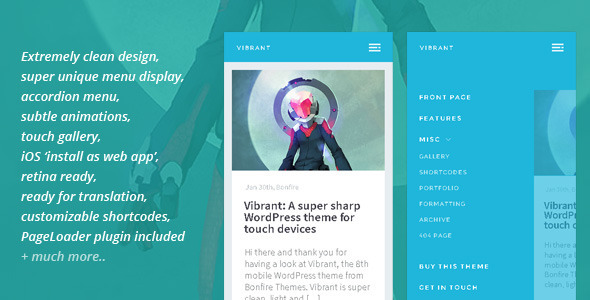
Vibrant: A Super Sharp WordPress Mobile Theme is a WordPress theme built by BonfireThemes specifically for phones and tablets, with a touch-first layout, an accordion navigation menu and a bundled gallery that responds to finger gestures. It sells on ThemeForest for $30 and has been purchased 425 times. It suits site owners who want a dedicated mobile presence, either as the only theme on a WordPress install or as a secondary theme that serves handheld visitors while a desktop theme handles everyone else.
What Vibrant: A Super Sharp WordPress Mobile Theme Actually Does
The design philosophy behind Vibrant is subtraction. The layout is deliberately sparse, with generous whitespace and a light footprint, so pages load quickly on cellular connections and remain legible on a small screen. Two interface elements carry most of the personality.
The first is the navigation. Instead of a hamburger icon that opens a flat list, Vibrant uses a two-level accordion menu that expands in place, showing sub-items underneath their parent. On a phone, that pattern keeps the visitor oriented because the menu structure stays visible as it unfolds. The vendor notes that touch responsiveness on this menu was improved in version 1.1, which suggests earlier builds were sluggish on real devices.
The second is colour. Each post and page can be assigned its own header colour from a palette of nine options. That single setting gives a site a sense of place: a visitor moving between articles sees the header shift, which makes the theme feel less like a generic template and more like a designed product. It is a small feature, but it is the one most likely to be noticed.
Beyond those two, the feature set covers the practical ground a mobile site needs:
- Touch gallery. A customised build of PhotoSwipe, an open-source image viewer, handles swipe gestures and full-screen viewing for photo-heavy posts and portfolios.
- Install as a web app. On iOS, visitors can add the site to their home screen so it launches without browser chrome, which makes a WordPress site behave more like a native app.
- PageLoader. A bundled plugin that shows a loading screen while assets download, with a close button appearing after seven seconds so a slow third-party embed cannot trap a visitor.
- Shortcodes. Alerts, progress bars, buttons, dividers, highlighted text and boxes, plus column layouts for text, images and video, and embeds for YouTube, Vimeo, USTREAM, DailyMotion and Blip.tv.
- Contact form with validation, so a business site can collect enquiries without a separate form plugin.
- Translation files. The theme ships with .po and .pot files, the standard WordPress format for translating interface strings into another language.
- Child theme included, which gives developers a safe place to make changes without losing them on the next update.
- Retina-ready assets, meaning graphics are supplied at double resolution for high-density screens.
- Widgetised front page footer for adding extra content blocks to the home screen.
The vendor states the theme was tested across Chrome, Firefox, Internet Explorer, Safari and Opera on desktop, plus iOS and Android devices. That is a broad claim, and it is worth checking the demo on a current phone before committing, because the last update shipped in August 2020.
Where a Mobile-Only WordPress Theme Fits, and Where It Does Not
The clearest use case is a business that wants a fast, app-like presence on phones without rebuilding its desktop site. WordPress allows a separate theme to be activated for mobile visitors through a detection plugin, so Vibrant can run alongside an existing desktop theme. The desktop design stays untouched, and phone traffic gets a layout built for thumbs.
It also works as the sole theme on a fresh install for projects that are mobile by nature: a restaurant menu, a venue schedule, a photographer’s portfolio, a personal blog read mostly on commutes. The touch gallery and per-post header colours suit image-led content particularly well.
A third scenario is prototyping. Because the theme is light and the shortcode library is broad, it can stand in for a native app during client presentations, especially with the iOS home-screen install option.
There are situations where it is the wrong pick. Vibrant is not a general-purpose responsive theme, and treating it as one creates problems. A site with a complex desktop layout, multiple sidebars or heavy plugin dependencies will not translate cleanly into a stripped-back single-column mobile view. Anyone wanting one theme that adapts across all screen sizes should look at a responsive multipurpose theme instead, because maintaining two themes doubles the work every time content or branding changes. Similarly, a store running WooCommerce should check compatibility carefully; the vendor does not list e-commerce support, and the theme predates several major WordPress releases.
Setting Up Vibrant: What the Process Involves
Installation follows the standard WordPress route: upload the theme package through the admin panel, activate it, then activate the bundled PageLoader plugin and import any demo content if a starting point is wanted. The child theme is included for anyone planning code changes, and it should be activated before customisation begins rather than after.
Prerequisites are modest. A working WordPress installation is required, along with the ability to upload files if the theme is being installed manually rather than through the dashboard. For the mobile-only setup, a separate plugin that detects handheld devices is needed, since WordPress does not switch themes by device type on its own. The iOS web app feature requires a small amount of configuration, typically an icon and a splash screen, which the documentation covers.
Realistic time to a working site is a few hours for someone comfortable with WordPress: an hour for installation and settings, then the rest spent on content, menu structure and colour assignments. A developer building a custom child theme should budget a day or more. The vendor describes the documentation as extensive, and the update history shows a steady stream of fixes through version 1.5, which indicates the theme was actively maintained during its development window.
Strengths and Limitations of Vibrant
Strengths
- The two-level accordion menu is genuinely distinctive and keeps navigation legible on small screens.
- Per-post header colours give content a designed feel without requiring custom CSS.
- Bundled PageLoader plugin, touch gallery and contact form reduce the number of third-party plugins needed.
- Child theme and translation files are included, which matters for anyone localising a site or handing it to a client.
- 425 sales at $30 suggests a settled, understood product rather than an experiment.
- Broad shortcode library covers most content needs, including video embeds from five platforms.
Limitations
- The last vendor update was in August 2020. WordPress has moved substantially since then, and buyers should verify compatibility with their current WordPress version and PHP release before purchase.
- It is a mobile-only theme by design. Running it as a desktop site is possible but produces a narrow, app-like layout that most desktop visitors will find odd.
- No e-commerce integration is listed. A shop would need to test WooCommerce or another cart plugin independently.
- The nine-colour header palette is fixed. Sites needing brand-specific colours will require CSS edits in the child theme.
- Maintaining a separate mobile theme means two sets of templates to update whenever the site changes.
How Vibrant Compares With Other Mobile WordPress Themes
The mobile theme category splits roughly three ways. At one end are responsive multipurpose themes, which adapt a single design across screen sizes. They are easier to maintain but rarely feel purpose-built on a phone. At the other end are app-style themes that mimic native interfaces, often at the cost of flexibility.
Vibrant sits in the middle. It is more opinionated than a responsive theme, with its accordion menu and colour-coded headers, but less rigid than a pure app template because it still uses standard WordPress posts, pages and widgets. Against free mobile themes, the difference is mostly in polish: the customised gallery, the loading screen and the shortcode set are the kind of details free options rarely include. Against premium alternatives, the deciding factor is usually the menu pattern and whether the buyer values the web app install feature. The main competitive weakness is age. A theme last updated in 2020 competes against options that have tracked newer WordPress features, so the practical comparison is between Vibrant’s distinctive interface and a newer theme’s compatibility guarantees.
Frequently Asked Questions
Can Vibrant be used as a mobile-only theme alongside an existing desktop theme?
Yes. The vendor explicitly supports running Vibrant as a secondary theme that serves mobile visitors while a different theme handles desktop traffic. This requires a device-detection plugin, because WordPress does not switch themes based on screen size by default. The desktop site remains unchanged, and only handheld visitors see the mobile layout.
Is Vibrant compatible with the current version of WordPress?
The vendor does not state compatibility with recent WordPress releases. The last update was August 2020, so buyers should test on a staging site before deploying. Core WordPress changes since then may affect theme behaviour, particularly around block editor styles and PHP version support. Checking the theme’s support forum for recent compatibility reports is a sensible first step.
Does Vibrant work with WooCommerce or other e-commerce plugins?
No e-commerce integration is listed in the product details. The theme is positioned for blogs, business sites and portfolios rather than shops. Running WooCommerce on top is technically possible, but the mobile-only single-column layout may not suit product grids or checkout flows, and no compatibility testing is documented by the vendor.
What is included in the $30 purchase?
The theme package includes the main theme, a ready-to-edit child theme, the PageLoader plugin, translation files in .po and .pot format, and documentation. Support is provided by the developer, BonfireThemes, who has released eight mobile themes on ThemeForest. The purchase covers the theme files and updates available through the marketplace.
Verdict
Vibrant: A Super Sharp WordPress Mobile Theme is a well-considered option for anyone who wants a fast, distinctive mobile presence without rebuilding a desktop site. The accordion menu, per-post header colours and bundled gallery give it a character that generic responsive themes lack, and the included child theme and translation files make it practical for client work. The 425 sales and steady update history through 2020 support that.
The caution is age. A theme last updated in 2020 needs verification against current WordPress and PHP versions before it goes anywhere near a live site, and the lack of e-commerce support rules it out for shops. Buyers who want a mobile-only theme with a strong visual identity and are willing to test compatibility will find it worthwhile. Those who need one theme to serve every screen size, or who require guaranteed support for the latest WordPress release, should look elsewhere.