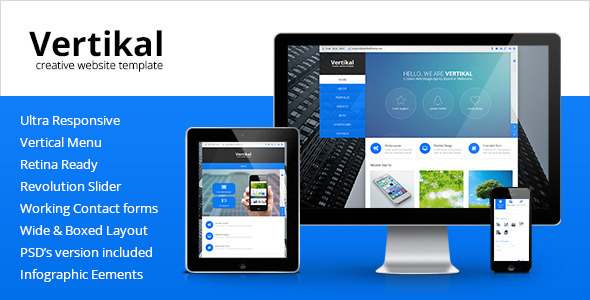
Vertikal is a multipurpose HTML5 template sold on ThemeForest for $99, built around a vertical navigation menu rather than the horizontal top bar most business themes use. It ships with four homepage layouts, Bootstrap 3 underneath, a bundled slider plugin and page types for blogs, portfolios, shops and contact forms. It suits agencies and freelancers building a corporate or portfolio site that wants a distinctive side-menu layout, and it is a poor fit for anyone who needs ongoing framework updates or modern build tooling.
The template has been purchased 527 times and carries the PremiumLayers author name, which gives it a modest but real track record. That sales figure matters less than the last update date, which the vendor lists as May 2017 — a detail worth weighing carefully before purchase.
What the Vertikal business template actually delivers
The defining feature is the vertical menu. Instead of a horizontal header, navigation sits down one side of the page, which changes how a site reads. Visitors scan a persistent column of links while content scrolls beside it. For sites with many top-level sections — a corporate site with services, team, case studies and news — this keeps every destination visible without a dropdown, and it gives the layout an app-like feel that matches the iOS-inspired flat styling the vendor describes.
Four homepage layouts are included, so the same template can be pointed at a marketing landing page, a portfolio grid, a photography showcase or a news-style feed without rebuilding structure. Two portfolio layouts and four blog layouts extend that flexibility further, and the portfolio can be filtered by category, which is the standard expectation for creative work.
Bootstrap 3 provides the grid and responsive behaviour. That means the layout scales from desktop to tablet to phone, and Retina-ready assets keep images sharp on high-density screens. The vendor bundles Revolution Slider, which is normally a paid plugin, alongside Flex Slider for lighter carousels. Pricing tables, testimonials sliders, infographic elements, Google Maps and multiple working contact forms round out the component set. Font Awesome and Google Web Fonts handle iconography and typography.
CSS3 animations and effects are used throughout for hover states and transitions. A sticky header keeps navigation anchored as content moves. The code is described as optimised and the template as easy to customise, though the practical reality of editing a 2017-era HTML template is covered below.
Where a Vertikal business site fits, and where it does not
The strongest use case is a small corporate or agency site that wants to look different from the standard top-bar template. A consultancy, a design studio, a photography business or a product marketing site can all use the vertical menu to create a memorable structure without custom development. Freelancers building a single client site on a fixed budget get a lot of pre-built page types for $99.
It also works for portfolio-driven sites. The filterable portfolio plus dedicated single-work pages means a studio can present case studies properly rather than dumping images into a grid. The included shop page suits a small product catalogue, though it is a page template rather than a full e-commerce system, so anyone expecting cart logic, payment processing or inventory should look elsewhere.
The wrong choice is any project that needs long-term maintenance. A template last updated in 2017 runs on Bootstrap 3, which is no longer the current major version, and the bundled plugins will not have received security or compatibility patches since then. A site being built today for a client who expects support for years is better served by a newer theme or a maintained framework. Similarly, anyone who needs a page builder, block editor integration or a WordPress-style admin will find a static HTML template limiting.
Setting up a Vertikal business website
There is no installation process in the software sense. The buyer downloads a folder of HTML, CSS, JavaScript and image assets, then edits the files directly. The practical prerequisites are a code editor, basic comfort with HTML and CSS, and somewhere to host static files. No build step, package manager or command line is required, which keeps the barrier low.
Customisation happens in two places: the markup for structure and content, and the stylesheet for colours, spacing and typography. Google Web Fonts and Font Awesome are linked in, so swapping a font or icon set is a matter of changing a reference. The four homepage layouts mean most of the structural decisions are already made — the work is replacing placeholder text, images and links with real content.
Realistically, a single-page marketing site can be adapted in an afternoon. A full multi-page corporate site with a populated portfolio, blog posts and contact form configuration is a few days of work for someone comfortable with front-end code, longer for anyone who is not. The vendor states the template is well documented, though the extent and currency of that documentation is not something the listing details.
Strengths and limitations of Vertikal
Strengths
- The vertical navigation is a genuine differentiator. It gives a business site a layout most competitors do not offer, which matters when standing out is the goal.
- Four homepage layouts, four blog layouts and two portfolio layouts provide real variety from a single purchase.
- Bootstrap 3 gives a familiar, well-understood grid that any front-end developer can work with immediately.
- Revolution Slider is bundled, which offsets part of the $99 price against a plugin that is normally sold separately.
- Retina-ready assets and responsive behaviour cover the two baseline expectations for any modern site.
- A 527-sale history with the PremiumLayers author name suggests the template has been used in production, not just listed.
Limitations
- The last vendor update is dated May 2017. That is the single biggest concern: Bootstrap 3 is superseded, and bundled plugins have not received patches in years.
- It is a static HTML template, not a content management system. Every content change means editing code, which rules it out for clients who want to update their own site.
- No page builder or visual editing layer is included, so layout changes require CSS knowledge.
- The included shop page is a template only. There is no cart, checkout or payment integration described.
- Support quality and documentation depth are claimed by the vendor but not verifiable from the listing.
- Browser testing against current versions is not stated, and a 2017 codebase may show issues on newer rendering engines.
How Vertikal compares with other multipurpose HTML templates
The multipurpose HTML template category is crowded, and most entries compete on the same ground: Bootstrap grid, a handful of homepage demos, a bundled slider and a component library. Vertikal matches that baseline but differentiates on navigation. Where a typical template offers a horizontal header with dropdown menus, Vertikal offers a persistent side column, which changes the entire feel of a site.
Against newer templates in the category, the trade-off is clear. Newer options tend to ship on Bootstrap 4 or 5, include modern build tooling, and receive updates. Vertikal offers a distinctive layout and a lower learning curve in exchange for an ageing foundation. Buyers comparing on capability should ask which matters more: a layout that stands out, or a codebase that will still be supported in three years.
Against WordPress themes, the comparison is about workflow rather than design. A theme gives non-technical clients an admin panel and plugin ecosystem. Vertikal gives full control over markup and no database dependency, which suits developers who prefer working in code and want a fast, static result.
Frequently Asked Questions
Is Vertikal a WordPress theme?
No. Vertikal is a static HTML5 template, not a WordPress theme. It consists of HTML, CSS and JavaScript files that are edited directly and uploaded to any web host. There is no admin dashboard, no database and no plugin system, so content updates require code changes rather than a login screen.
Does Vertikal still receive updates?
The vendor lists the most recent update as May 2017, so no recent updates are recorded. Buyers should assume the template is effectively frozen. That means no security patches for bundled plugins and no compatibility work for newer browsers or Bootstrap versions, which is a material risk for any long-term project.
What is the vertical menu in Vertikal and why does it matter?
The vertical menu places site navigation down one side of the page instead of across the top. It keeps every main section visible at once, avoids crowded dropdowns, and gives the site an app-like appearance. For businesses with several top-level pages, it improves navigation clarity and makes the layout visually distinct.
Can Vertikal be used for an online shop?
Only partially. A shop page template is included, so product listings can be displayed in the Vertikal business style. However, no cart, checkout, payment gateway or inventory functionality is described. Anyone needing a functioning store should pair the design with a separate e-commerce platform or choose a dedicated shopping solution.
Verdict on the Vertikal business template
Vertikal is worth buying for developers and agencies who want a distinctive vertical-menu layout and are comfortable working directly in HTML and CSS. The four homepage layouts, bundled slider and portfolio system give solid value at $99, and the 527 sales confirm it has been used in real projects. It is not the right choice for anyone building a site a client will maintain themselves, or for projects expected to run for years without a rebuild. The 2017 last-update date is the deciding factor: treat Vertikal as a design starting point to be maintained in-house, not as a supported product. Buyers who accept that trade-off get a genuinely unusual layout; those who need ongoing updates should look at newer templates.